Peter Antevy walks through the Littman Core Echo digital stethoscope and its app. The device has 40x amplification, noise cancellation, and a tunable diaphragm. It charges via USB for about 8 hours and records 15-second clips that sync to the HIPAA-compliant app.
Questions this video answers
40 times amplification.
Approximately eight hours of constant use.
The device enters sleep mode and must be turned off and back on to wake it up.
White blinking: on but not connected; solid white: connected; yellow blinking: low battery; solid yellow: charging; solid green: fully charged.
Wipe with alcohol wipes; do not submerge in other cleaners or disinfectants.
Chapters
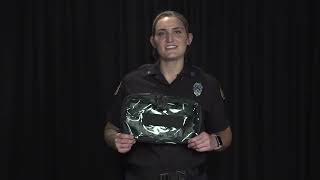
Today we're going to talk about a new piece of equipment that's coming to the rescues as well as the EMS captain vehicles. This is the Littman Core Echo Stethoscope. It's a digital stethoscope that has 40 times amplification for the noise as well as noise cancellation capabilities. To charge the stethoscope, you'll use a USB cable that will come with the device. On a full charge you will get approximately eight hours of constant use. If you turn the stethoscope off after each use, you'll be able to extend that life. After 5 minutes of non use, it will enter a sleep mode and need to be turned off and back on in order to wake it up. To turn the device on, you will hit the toggle switch and see a light blinking. If it's white and blinking like this, it means the device is on but not connected to a phone or app. It will still work as a stethoscope but just won't have the recording capabilities. Once it's connected to the app, it will be a solid white light when it turns to yellow blinking light. That means the device has a low battery and will need to be charged soon. When you plug it in, it will show a solid yellow light to show that it's charging and will be a solid green light when it is fully charged. Right here you have the charging port to charge the device. On the other sides you have a plus and minus sign to control the volume when using the device as well as a circle in the middle. The circle in the middle is used to take recordings on the app and we'll go over that in the next video. On the chest piece of this device you have an adult and a pediatric side. In order to coordinate which side you will be listening from, you just simply turn the chest piece of the device. This stethoscope also has a tunable diaphragm. This means that dependent on what pressure you use from the chest piece to the patient will allow you to hear different pitch sounds better. After each patient use decon this device with alcohol wipes. Do not submerge it in any other cleaners or disinfectants. With with your stethoscope you'll receive a Vuepak Pro module. This is to be able to store the device and still be able to see it through the clear front. To clean this Vuepak Pro module, you can use any of the disinfectants at the station. This module can be attached to the stretcher or wherever you and your crew see fit. It has three different Velcro attachment points. We're going to attach photos of different options of how to attach it.
This pack is to protect the stethoscope. Please do not overstuff it with other pieces of equipment.
Now we're going to go over how to use the Echo app. Refer to the reference sheet for the login information. When you log into the app, this is the screen you will see. Hit the menu button at the bottom and then turn on your stethoscope. When you hit the Connect button, it will scan for the device. Once it pops up, hit that and then it should connect right to your stethoscope. Here you'll be able to see the battery percentage and if there's ever any updates that need to happen. The next function will mainly be used for training purposes. If you have a PPM or a medic student and want to go over patient lung sounds back at the station, you're able to take 15 second recordings either from the app or from the circle button on the stethoscope itself. You can hit the button and start the recording. Once the recording is saved, you can go in and either put your unit number or call number to be able to go back and find the recording back at the station. The app is HIPAA compliant and will be able to keep all information secure.