Use of Formula in Conditional Formatting (Part-2) | MS Excel | Ira Edu-Tech | #shorts
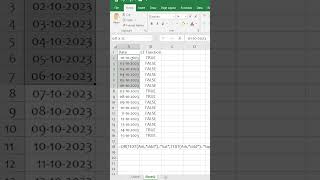
In this Hindi-language short, the presenter demonstrates how to highlight weekend dates (Saturday or Sunday) in an Excel column using a conditional‑formatting formula. The steps shown are: create a formula that returns TRUE for dates that fall on Saturday or Sunday, copy that formula, select the target cell range, open the Conditional Formatting dialog, choose a formatting style (yellow fill), and apply it. As a result, all weekend dates in the selected range are highlighted in yellow while other dates remain unformatted.
Chapters
More from Deven

Our bodies are at work, but our souls are already on the garba floor💃✨️ #iraskills #navratrispecial


One Formula. 🔥Unique Brands #ExcelTips #ExcelTricks #DataAnalysis #iraskills #explore

Comment "Google" to get all these Free Al Tools by Google.🔥#iraskills #google #explorepage #upskill