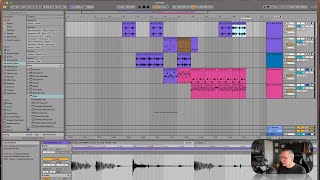
In this instructional segment, J. Anthony Allen walks through arranging a beat in Ableton Live. He starts by cleaning up the session—deleting unused clips and shifting existing material to form a continuous, evolving rhythm. He then creates several variations by copying, moving, and doubling clips, ultimately selecting a favorite loop he dubs "the jam." Allen marks this section, explains that he will provide the Ableton session file to viewers, and encourages them to chop, remix, and add synth layers to further develop the track. The tone is conversational and enthusiastic, aimed at empowering viewers to experiment with the provided material.
Chapters
Okay, so now that we've made a few things, let's try to organize this into something. We're not going to get a full track out of this, but I want to make, like, a few beats that you can use. And then I want to give you this session because maybe it's interesting to you. Okay, so there's nothing on this or this. So I'm going to delete those. Let's see. Something there, Something there. I think this we wanted there. Let's take all this and just, like, scooch it over. This was nothing. So I'm just kind of moving stuff around so we can. Have sort of one long and frantically evolving beat. Now I'm going to make a few more variations on it. Let's take this. No, let's take this and put it here. And let's double it with this first crazy one we made. That one, I think, is going to be my favorite. And then maybe we'll do our very original beat. Okay, turn off loop. Let's just hear all these variations that we ended up with. Here we go. Oops. Still soloed. Okay, here we go, Sam. All right. Pretty cool. This. This one right here, though, that's the jam. I could listen to that all day. Cool. I'm just going to leave a little locator there and write. This one is the jam. Okay, now. Now I'll give you this. This little track. Maybe this is useful to you. You're welcome to chop this up and do whatever you want to it and play around. But let's take this beat, especially this beat. But maybe a few of the variations and keep developing it by adding some synth layers to it. So I'll give you this, and then we'll keep going and build on it even more.