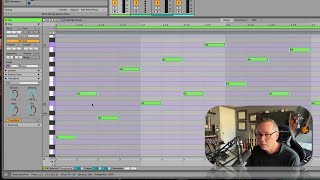
J. Anthony Allen shows how to use Ableton Live 12's Connect transform to insert notes between existing ones and create richer chord progressions. He walks through each control: Density fills gaps, Spread determines placement, Rate sets note length, and Tile controls stacking. Applied to a 1-6-2-5 minor progression with strings, Connect turns simple melodies into complex, symphonic textures.
Chapters
Okay, let's talk about Connect. This is actually a really fun one. And if you've watched any of my music theory content, then this might be familiar to you because I talk about doing this kind of thing all the time where we might make a chord progression. We want it to sound more natural and symphonic. In order to do that, we're going to, like, connect the dots a little bit. Right? That's exactly what this is doing. So let me give you a simple tutorial here, and then I'll try that. So transform, select, connect, and then we've got some options here. So I have this little. Almost just a scale here. Sounds like this. Creepy little scale and sort of F, not really. So connect right now isn't going to do anything because it doesn't have room. What it's going to do is it's going to try to add a note between the notes that I select. So I'm going to select all the notes and then I'm going to make them a little shorter. Okay, now I've got a space in between each note. So now I can say add a note. Put a note in between each note. And now I've got some controls to tell us where those go. So density, I'm going to say 100% because I want all of the gaps to be filled. Spread. I can kind of say how far away that note should be. That extra note that it's adding. Rate. What kind of note is it? I could make a shorter note, a longer Note. I have 16th notes here. So if I add a 16th note, it's just gonna automatically do it. And then I'm not exactly sure what tile does yet. I think if I make a short note, we'll be able to see it. Okay, so it's stacking the notes in different ways. But if I have this set to a 16th note, it has nothing to do. So here's what I made now. Okay, let me play with the spread a little bit. And the rate. Little swing in there. Super weird stuff. Okay, so it's pretty cool. Let's go and try my little string thing. We'll see if it works. Okay, let's give this a try. So what I've done in the magic of editing there is I made a fairly simple little chord progression, 1625 in minor, if that means anything to you. If it doesn't, doesn't matter. And then I loaded up kind of my favorite little string library at the moment, which is the Cinestrings solo. This is not a big orchestra sound. This is a small chamber orchestra sound, but. But it's really quite nice. Here's what it sounds like. Okay, cool. Now let's try connect. So here's what I'm going to do. Let's take the top two voices, I guess, just the top couple of notes, and let's make some rooms. So let's go like that. Okay, now let's say connect. Oh, interesting. Let's go down to just. A half note. Now that's interesting. It's adding a few notes, but let's see what it did.