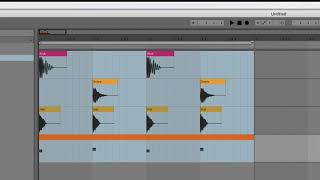
Learn what a bar is in a DAW and why it matters for drum programming. Most drum patterns run 1, 2, 4, or 8 bars long. The instructor shows how to read bar numbers in Ableton Live and Logic Pro, and how zooming changes what you see on screen.
Chapters
Okay, let's start off talking about the bar. So what is the bar in our case here? These numbers at the top. We're seeing one right now. We're seeing one point, 1.3, 1.21, 2.3, 1.3, etc. Till we get to a whole number two. Okay, so the bar is between one and two. So what I have looped here. Now, the bar is important because when we make beat patterns, we make drum patterns. We're typically working in groups of bars. I would say almost always you're working in a number of bars, and almost always they will be either one bar long, two bars long, four bars long, or eight bars long, sometimes 16 bars long, but that's pretty weird. So 1, 2, 4, or 8. Okay, why. Why is it that we don't typically have a beat pattern that's three bars long, for example? The answer is, I don't know. Actually, I don't know what the answer is. It's just hardly ever done. We just like these patterns that are four bars long or eight bars long or two bars long, or sometimes even one bar long. It's just the way things work. It's weird, but that's the way it is. So you can make a pattern that's three bars long. Don't let me stop you, but know that it's kind of weird. That's all. So we have one bar here. So if I wanted to make one that was two bars long, I would go all the way out to the number three. So this is now two bars long. Okay. If I wanted to make one that was four bars long, I need a little bit more space. And then I would take this all the way out to the number five. Now, note that we see the number five here, but that doesn't mean it's five bars long, because we're pushing right up to the start of the fifth bar. So that includes all of bar one, bar two, bar three, and bar four. You can kind of see the big blocks here. Each one of these is a bar. Okay? So on these numbers, when we see 1, 1 point something, and then 2, 3, 4, when you see just a single number, that's the bar you're on. Okay? Now if you see time up here, if you see, like minutes and seconds, you change that. You don't want to see that. And there's a way in all programs to change it. I can't remember where it is here, but. But in Ableton, we have time at the bottom down here, right? So this is one second. This is Two seconds. This is three seconds. But we don't want to work in time. We want to work in beats. So we want to work with 1 1, 2, 1 3, 1 4, 2. Right? So there's a way to change it if up here you're seeing time. Okay, let's jump over to logic and see what it looks like there. So in Logic, I see 1, 2, 3, 4. Right up here. If I zoom in a little bit farther, I can tell that those are full bars. So Now I see 3, 3, 2, 3, 3, 3, 4, 4. Okay, so from 3 to 4 is one bar. Okay, this much. That's one bar. And that's actually my third bar. So I can go back. We start at bar one one to two. That's a full bar. Okay, But I had to zoom in to see it, right? If I zoom back out Now I see 1, 5, 9. What am I seeing here? I'm seeing groups of four bars. Okay. Each one of these is four bars long because they're whole numbers. Right? So that means it's a big span of time. Up here, I'm at Bar125. It's a long time. I can zoom in farther. And the numbers get weirder. Right? There's. See here, I see 3, 1, 1, 229. We're going to talk about those numbers. And a minute. And Ableton does the same thing. If I scroll in even farther, I start to get 1.3.2. I'll get more if I zoom in farther. I think maybe I won't. Actually, I'm zoomed in too far already. So Ableton works a tiny bit different in that way. It's not going to give me new numbers if I go in crazy far. But don't worry, you're never going to go in that far. Okay, so that's the bar. Okay. Bar is very important. Okay, let's move on and let's talk about the beat. Like the. Well, I'll explain it in a minute.