In this segment of J. Anthony Allen's free Ableton Live 12 music production class, the instructor walks viewers through the process of locating, enabling, and managing audio plugins within Ableton Live. He explains the different plugin formats (Audio Units, VST2, VST3), shows how to activate them in Live's Preferences, discusses custom vs. system plugin folders, and demonstrates troubleshooting steps such as rescanning and restarting Live when plugins do not appear. Allen also touches on the abundance of free and paid plugins, warns about the financial temptation of building a large plugin library, and encourages users to explore the internet for new tools. The tone is instructional and conversational, with an enthusiastic yet cautionary sentiment toward plugin usage.
Chapters
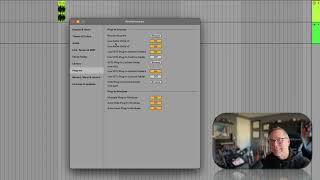
So they are really the only thing that pop open in a new window because they have their own little interfaces. Some of them are little and some of them are big. Some of these are cheap and some of these are expensive. You can comb the Internet for audio plugins or instruments. You can find a lot of free ones, expensive ones, cheap ones. There's things all over the place. Now, one thing that I want you to do is that if you click on plugins and you don't see any, then we might need to make a quick trip to our preferences. So let's do that. So I'm going to go up to the live menu and go to Settings. Now I'm going to go to plugins. Okay, now we need to turn some stuff on here. Okay, so use Audio Units. Audio Units is a kind of plugin. Use audio units version two. Turn that on. Use audio units version three. Turn that on. If you're on a PC, you might not see that that's okay. Use VST2 plugins in system folder. Turn that on. Use. Use VST2 is another kind of plugin. Use VST2 plugins in custom folder. You can leave that off. Unless you're doing something weird on your computer, you probably don't need that. But if you do turn that on, you need to hit this browse and tell it where your custom folder is. But don't worry about it. Use VST3+ plugins in your system folder. Turn that on. Custom folder. You can leave that off. And then these plugin windows, I like to have all three of these on. Okay. And then if you're still not seeing anything, show up in your plugins window. Hit this rescan button. And if you still don't see anything, I might restart live just to make sure that it gets everything. And if you don't see anything after that, you probably don't have anything. So search around the Internet for some cool plugins and you'll find some and install them. Okay, so that's what plugins are. They're really fun. They're really valuable. After you are producing music for a while, you will build up a library of plugins and it will be. And plugins will become a big strain on your bank account because it's kind of addictive to buy plugins. Okay, moving on.