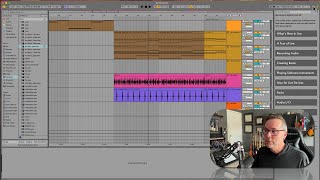
In this tutorial segment, J. Anthony Allen walks viewers through Ableton Live’s two primary workspaces—Session View and Arrangement View. He demonstrates how to switch between them using the Tab key or the on‑screen buttons, explains the visual cues of the Ableton logo, and describes the distinct clip launchers in Session View versus the timeline in Arrangement View. Allen emphasizes that while each view holds its own set of audio/MIDI clips, they share a single mixer, so volume and panning settings persist across both. He also shows the orange playback button that indicates which view is currently controlling playback and how to toggle it. The segment aims to prevent confusion about where clips are located, how mixer settings travel between views, and which view is active during playback.
Chapters
Okay, now let's go over to Session View, still looking big picture. Okay, so I'm going to press the tab key now, if you don't want to press the tab key, if you have some issue against the tab key, you can switch actually with this little thing over here, which I'll point out while we're here. If you look at the Ableton logo, you'll notice that it's three vertical lines and three horizontal lines, right? Just like we have here. Arrangement View, Session View, Arrangement View, Session View. So the Ableton logo is actually the Arrangement View and Session View buttons. That's how important this concept is to the program. Okay, so now we're in Session View, so no timeline here, but what we have is these little clip launchers. Okay? So we can put little nuggets of sound in there, otherwise known as clips, can put them all over the place. That's a cool one. And we can launch things as we want to, we can move around freely, we can click on things and get them in the Clip View. And we have access to the same kind of mixer here. Right? Here's the ins and outs. We saw that over here in Session View, but now it's down here and we have our volume in a bit more of a traditional looking mixer than we just saw a minute ago. However, like I said, we can pull up the mixer in both views now. So if I launch a clip here, We get just this clip, right? And you might think when I switch over, what happened to all this stuff? What happened to all my whole big track that was happening here? It's not here, right? It's gone, but it's not completely gone. The track names are the same. They come over into Session View and the mixer settings come over into Session View. So what you need to remember is that Session View and Arrangement View are two different canvases of material. They have separate clips, they have separate audio content and MIDI content. You can build things separately in them. However importantly, they share a mixer. Okay, if you keep that in your head, then this will, then you'll never get tripped up on what's happening. Okay, watch. If I click this, I can say, cool, let's make that super loud. I'm going to crank that up and move the panning all the way over to the left. Sure. Panning is like the left and right side. Now if I go over to Arrangement View and I look at the third track, go all the way up to the top. Here's the third track. Panning is all the way left. That's what 50L means. And the volume, which is this, is cranked all the way up, right? And it's called three New Disco four. Okay? That's what it's called. Go back here. Three New Disco four. And there's my stuff. But I have completely different clips on on it. But the mixer settings are the same. Now, another thing you might have noticed is that when I went over to Arrangement View, this is all grayed out, right? Let me turn that down. That's pretty nasty. If I hit play, what am I hearing? Right now, I'm just hearing Session View, okay? If I go over here, I'm hearing this clip, I'm hearing Session View. So what's happening is over here in Arrangement View, everything's grayed out and I have this little orange button. Now this orange button says, hey, you've got stuff happening in both Session View and Arrangement View. Which do you want me to use? So the orange button is saying, I'm going to use Session View, because I think that's what you want. If I'm wrong, click me. Okay, So I click you. And now I'm back to Arrangement View. Right? So Session View and Arrangement View, two different content areas, but they share a mixer, and you can only play one or the other at a time. Okay, cool.