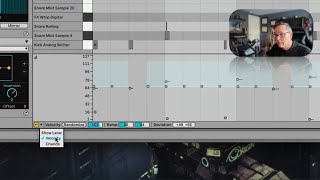
In this segment of the free Ableton Live 12 music production class, J. Anthony Allen walks viewers through creating a dynamic drum pattern using a loaded drum kit. He first slows the global tempo, then enables the MIDI grid and programs 16th‑note hi‑hat sequences. To make the hi‑hats sound more natural, he varies their velocity and introduces the "chance" lane, which controls the probability of each note playing. Allen demonstrates randomizing chance values, adjusting the probability percentage, and explains how the chance lane works similarly to velocity. He then shows how to group notes so a single chance or velocity control affects an entire bar, and how to ungroup for individual control, encouraging experimentation with these features to add variation and liveliness to repetitive rhythms.
Chapters
I think for this one, I'm gonna load us up a drum kit. Because the best kind of use case of this is in drums. And here's what we got. Okay, I'm gonna slow it down just a little bit. So my global tempo up here, just gonna slow everything down. Okay, cool. Now, when I loaded in that MIDI clip, it brought with it a drum kit. I can shift tab over to see that drum kit. It's over here. It's cool. On the MIDI grid, I have this hi hat. Okay, so for some reason, this clip has the grid off. So let's turn it back on. And I want to look at 16th notes. Going to add 16th notes all over the place in this hi hat. I'm just going to add a ton of them, not every 16th note, but I'm going to do some patterns here. Okay, cool. So now I have all these 16th notes, so let's add a few more. Okay, so here's what this drum beat sounds like now. Okay, cool. A little stumbly over there. Let's clean that up. Okay, so let's make these hi hats sound kind of natural. First, let's do a little bit of variation in our velocity with them. So we can go. Let's take them down a little bit and then vary our velocity like so. Okay, that's a nice start. Now I'm going to click this little arrow down here, this teeny, tiny little arrow, and I'm going to say show lane velocity. I'm already looking at that. Let's add chance. Okay, so now I've got this other lane here. I'm gonna make that nice and big. Chance means, like, probability. Like, what are the odds that each of these nodes are going to play at all? Okay, so I can go to chance and I can just say randomize if I want. Right. Or I can just say. Smash it up to the top and then bring it back down, say, 50%. Okay. So for any of these notes, there's a 50% chance that it's going to play at all. And when it does play, it's going to play at this velocity or in this range of velocity. But with something like hi hats. This is now going to give me kind of a cool flavor. It's going to randomly choose every time it plays through. So this is really almost never going to loop technically because the hi hats are going to always be changing. Let's listen. Okay, So it's just going to keep changing. If I want more, I can raise my chance probability. Right? So this chance and probability is really fun. It works kind of the same as velocity in terms of these controls we have for it, but it really can liven up a rhythmically repeating thing by just having it drop out every now and then. You can do some fun stuff like grouping things together. Like, let's say I wanted this whole bar of hi hats to either play or not play. So in that case, I could say play one and group them together. Now I have one velocity control for all four of those, or one chance control for all four of those. So they're either going to play or they're not going to play. In this case, I don't want that. So I can ungroup them, and now I get four chance controls for them. So experiment around with this chance thing and randomizing it. It's really.