In this tutorial segment, J. Anthony Allen walks viewers through Ableton's Packs ecosystem. He begins by navigating the Ableton website's Packs page, explaining that Packs can contain a variety of assets such as full Live sets, sample collections, instrument presets, and Max for Live tools. He highlights the diversity of packs—ranging from expressive choir libraries to Max for Live extensions—and notes that users can both create their own packs and download free ones from Ableton. Allen then demonstrates the download and installation process: selecting a free pack, downloading the .als file, and double‑clicking it to install the pack into Live. Finally, he showcases the installed "Orchestra Strings" pack, showing its sample library, the built‑in sampler device, and how to access individual samples, illustrating how a pack provides ready‑to‑use instruments within Ableton Live.
Chapters
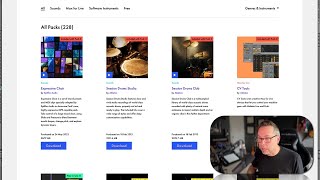
Okay, so in order to talk about packs, let's take a quick trip over to the Ableton website. So here I am on the ableton.com and I clicked on packs at the top. Look at that. Now you can see all kinds of stuff here. There's tons of them. Okay, let's look at this one. Expressive Choir made by Spitfire Audio. I think we actually already looked at a Spitfire Audio plugin. Now, the packs are not necessarily plugins. There's a lot of stuff that can be in a pack. A pack can have a whole session in it that live calls a set. Set is the word that live uses for its session. So a whole file of a track or something like that is called a live set. So a pack could have a whole set in it. It could have a set of samples. It could have a bunch of instrument presets. It could have some Max for Live tools. It could have all kinds of stuff. So if we look through here, we can see like, here's a Max for Live pack. Go down more. Here's a Sounds pack. Here's more Sound packs. More Max for Live packs. So there's a bunch of different kinds of packs. And you can make packs yourself and people do, or you can download them. Now if you go to the Live website, there's a whole bunch of free ones that you can have. And actually you can get access to all this. So basically you're going to go here, you can go to Live, click on a free one, download it, and after you download it, there's going to be something that looks like a live file. Double click on that, and it's going to install it for you here. Okay, these are what we have installed on our computer. Okay, so let's look at orchestra strings. Okay, that's a good one. So this is a pack that I installed that Ableton makes, and in it there's samples and sounds. So here is string ensemble. And I have a nice orchestra sound here. I can also. And then here I can get access to the individual samples if I want. But this is the Ableton device group of those samples. So this gives me access to a built sampler that I can play with and use.