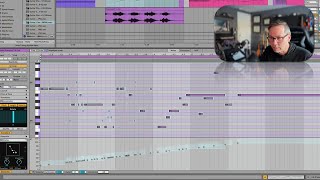
In this segment of J. Anthony Allen's Ableton Live 12 music production class, the instructor demonstrates several advanced velocity editing controls within Ableton's piano roll editor. He revisits a sample melody to illustrate how to (1) randomize velocity, (2) set an upper velocity limit, (3) apply a velocity ramp (start‑to‑end values) as a MIDI‑based volume fade, and (4) add deviation (small random variation) to humanize the performance. Allen explains the musical purpose of each tool—showing how ramping can shape dynamics, how deviation mimics the natural inconsistencies of a human player, and how these features together create a more natural, less robotic sound. He hints at a forthcoming video that will explore additional chance‑based features in the piano roll.
Chapters
Okay, we looked a minute ago at velocity editing, but there's a couple more controls related to velocity that I just wanted to show you here. So let's go back to our crazy invented melody here and let's see what it did with the velocity. That's cool. So if we look down here, we've got a couple more controls. We can randomize the velocity. I've already showed you that. And we can give it kind of some limits. So I believe this is setting an upper range so we can say, don't go above 101. We can also set a ramp. Now, this is a new thing we can do. So we can say ramp the velocity up. This kind of takes the place of like a volume fade, but just in the MIDI world. So we could say, you know, start at 1 and go up to 64. So if I did, like select all and then I said start at 17 and go up to 107, this is going to kind of ramp them up. This is a little easier than just drawing the velocity. And I can say deviation, like give it a little bit of randomization. Right? So that means that the velocity we get is going to be in this range somewhere. So adding this little bit of randomization can make it a little more human. Right. So if I did this, then we're gonna get a more natural sound. When a person plays this kind of a keyboard or any kind of instrument, you know, they don't play exactly the same velocity every time. That's unless they're a robot. So to make a more natural sound, add this deviation just so that it's nothing that you would really notice if listening to it. But unconsciously, it'll make it sound a little more natural and human. While they're playing inhumanly fast. But if it was, if they were playing something more natural and human, adding this would. Would give it a little more control over that. Now there's another thing built into the piano roll editor that gets us some cool opportunities for more of that kind of chance and randomness. So let's move on to a new video and talk about.