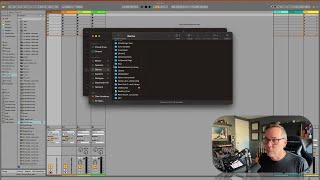
In this segment, J. Anthony Allen explains why mastering Ableton Live’s browser is essential for music producers. He begins by describing his personal file‑system setup: multiple external hard drives named after meaningful lakes (e.g., Lake Michigan, Lake Superior) each containing massive sample libraries that total millions of files. Because locating a specific sound—like a kick—can be overwhelming, he highlights how Ableton’s browser automatically indexes these drives, allowing fast searching, auditioning, and filtering of samples, presets, loops, effects, and plugins. He contrasts this built‑in solution with a now‑defunct third‑party “Sample Manager” from Audiophile Engineering, emphasizing that the browser now serves as the primary musical librarian. Allen also notes that the browser can be customized via the “Places” and “Collections” panels, which differ between users, and promises to cover those customizations later. Overall, the segment positions the Ableton browser as a time‑saving, all‑in‑one tool for navigating large sound libraries.
Chapters
Okay, so in this section we're going to deep dive into the browser. So this is going to be our first section that we're really going to go deep into. Now before we do, let's talk about why. Why do we care about this browser section? It is arguably the most boring part of life. Let me show you how. As a music producer, I organize all my files outside of Ableton. So first I have. I use the finder in Ableton. So here's all my hard drives. I have this tower of hard drives over here and I've foolishly. At some point I decided it was a good idea to name all of my hard drives based on lakes and bodies of water that have been significant in my life. So eight Point Lake is near where I grew up. Lake Michigan. Lake Superior Games Lake is a lake where I vacation sometimes. Lake Nokomis is just down the street. Anyway, you don't need to know that. But so in Michigan I have this folder called Sample Library and I have, you know, a couple million samples in here of just stuff. Then in the games, drive is just sample libraries. So this is just tons of sample libraries and hundreds of thousands of things. The reason I'm showing you all this is because how do I find anything? How do I, like, I want to find a cool kick sound. Where do I go? I don't know. I could go anywhere. I could spend hours digging around in my hard drives. So no, thank you. Instead, Live knows about those hard drives and it knows about that giant Sample Library folder. And it's categorized things quite nicely for me so that I don't have to deal with it for a little while. I used a separate program. There was a. There was a program that exists for a while by a company called Audiophile Engineering, Local to where I live, Minneapolis, and they had a program called Sample Manager that, that did all this really cool stuff. It was a librarian program and it also did some batch processing and it was really great. But that company is long gone and so is that program. So now the Ableton browser is our way to find samples quick. So now if I just go search here and I say kick, I can find a ton of kicks. So I can just audition them really fast. And I can just find the one I want. I can even be more specific. I can say hard kick, soft kick, different styles of kicks, all kinds of stuff. And this is my librarian. Okay, so. And it's not just for samples. This is also my librarian for presets, synths, loops, effects, plugins, all kinds of stuff. So this is your so don't think of this as just the place where our samples live. Think of this as your whole musical librarian, because that's really what it is. There's some things you can do to customize it. As you probably see, in this places area, you probably don't have the same things I have, and in collections you don't have the same things I have. Don't worry about that. We're going to go over all that soon. But that's why the browser is so important. It's going to save you so much time to really understand the browser and get good at navigating it. It is your musical librarian. Cool. Okay, so let's go in and talk about how to use this.