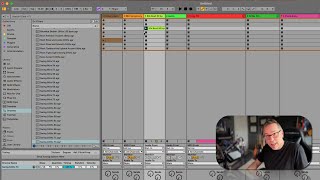
In this instructional segment, J. Anthony Allen explains Ableton Live's Groove feature, clarifying that grooves are pattern files—not clips, instruments, or sounds. He demonstrates how to preview and apply a swing groove to a simple straight‑eighth‑note beat, showing the rhythmic feel change. Allen describes the Groove Library, which contains .agr files representing various stylistic patterns such as swing, rock, conga, jazz, African house, hip‑hop, and funk, applicable to both audio and MIDI clips. He introduces the Groove Pool, the interface that appears when a groove is in use, and notes that users can also create custom .agr groove files. The segment serves as a quick practical guide to locating, previewing, and applying grooves in Ableton Live 12.
Chapters
Okay. Okay, let's move on to grooves. Okay, so this is a little bit of a weird concept. Okay. Grooves are not clips. Grooves are not instruments or sounds. They are, let's say, patterns. Here's how grooves work. Now, let's say I have a beat, for example, like this. Okay, so this is pretty straight. It's boom bop, boom bop. So if I wanted to apply a groove to it, I can make it do something like swing. So swing is a very common groove. If I click on one of these, you can hear a preview of the groove with just ticks. Right? You can feel that it's different than straight eighth notes. Let's go to. Okay, here's a kind of extreme one. So I'm going to apply this swing groove to that clip by taking this swing, this groove file, and dropping it right on top of that clip. Okay, let's hear it now. Okay, so it's got that kind of groove to it. So Groov files are swing, rock, Roomba. Here's percussion, conga, jazz, rock, jazz, African house, hip hop, funk. There are all these different kind of stylistic patterns that you can apply to a clip. They work on audio clips or MIDI clips. Okay, so this button here in our library is just a big archive of a bunch of different grooves. You can also make Groov files, which we'll talk about doing later, using this area down here that just popped up called the Groov pool. Okay, so this is the groove pool. It's a neat little area that comes up when you're using a Groov. So the files here in the library, these are AGR files. That's the only thing you're going to find in this setting. That's Ableton Groove. I don't know what the R is. Probably just groove. The R of groove. Ableton Groove, groove files, Cha Cha. You can add a Cha Cha. So those are a relatively new thing to live, and they're not new to 12, but I think they came out in 10. Maybe we'll deal a bunch more with using grooves and making grooves later. But this is where we find them, and that's the quick thing on how to use them, so let's move on.