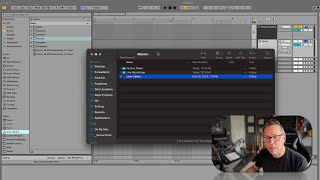
In this tutorial segment, J. Anthony Allen explains the purpose and proper handling of Ableton Live’s User Library. He emphasizes that the User Library is a single folder on the hard drive that stores templates, samples, presets, and other user assets, and advises against moving it to avoid complications. He demonstrates how to locate the folder via the browser’s ‘Show in Finder’ (or equivalent on PC) and shows its typical path (Music/Ableton User Library). If the folder has been moved, Allen walks through reconnecting it through Live’s Settings > Library > Relocate, which restores missing presets and templates. He also briefly mentions adding custom folders or bookmarks via the ‘Add folder’ button. The segment serves as a concise guide to prevent and resolve User Library issues.
Chapters
Okay, onto User Library. Now, this deserves its own video for one purpose and one purpose only. Your user library is a single folder somewhere on your hard drive. And the very important thing about it is to not move it. If you do move it, there's ways to deal with that. But if you want to keep your life simple, just don't move that folder. So your user library has kind of all of your live stuff. So this is where it's keeping track of a whole bunch of files, your templates, some samples, your presets, all that stuff. So if you have an issue where you load a bunch of things up and the presets are gone, there's no presets, then it might be that something has gone wrong with your user library. So if you want to know where it is, you can go to User Library here in the browser control. Click and say show in Finder. On a Mac, I think you'll find something very similar on a PC. And this is what it looks like. It's got its own kind of folder icon here. It shows you where it is. It's in Music. It's in. In my user folder. Music. Ableton User Library. Okay, so if I move this, then Ableton loses track of everything. I can go to my Live settings library and reconnect it this way. So if you have to move it, this is where you're going to go to tell Live where you've put it so that everything can kind of go back together. Otherwise you probably won't need to go into your user library here in the browser, really, at all. I don't think I've ever dealt with going into my user library here. So we don't need to see it in places, it's just there. But if we have a problem with missing a bunch of presets or templates or anything like that, it's probably because something's gone wrong with your user library. Go to that Settings tab and relocate. It will fix any problems that you have like that. Okay, that's it for places. So remember that if you want to add anything here, you just hit that extra folder, that Add folder button. And then you can just add things like bookmarks. All right, let's go up to Collections.