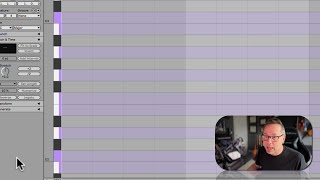
In this tutorial, J. Anthony Allen introduces Ableton Live 12’s new global tunings feature, explaining how it enables session‑wide retuning to microtonal scales. He starts by using the piano roll to illustrate the standard 12‑note octave (C2 to C3) and notes that many world music traditions employ different divisions of the octave, such as 13, 14, or more notes, which historically required complex detuning work. Allen then shows the Tunings panel, where presets are labeled by the number of notes per octave (e.g., 12, 16, 19, 22, 24, 31, 41, 55, 72). Selecting one applies the chosen microtonal system globally to the entire Live session, simplifying the creation of non‑Western tonal music.
Chapters
Okay. Onto tunings. This is a new thing in live 12 and it is probably the most mind blowing thing to live 12 is the ability to apply global tunings, which is what this is. So let me explain it this way. If you look at a piano, okay, Use the piano roll editor to demonstrate. I'm going to make this nice and big. Okay? You don't need to know how to play the piano for this. But here's what I will tell you. You can see here, this is C2. So the number here just tells us which octave we're in. So C2. Okay. Now this is D, E, F, G, A, B, C, C. Okay? So if we take all of those notes and the black notes in between, there are 12 notes in an octave. 1, 2, 3, 4, 5, 6, 7, 8, 9, 10, 11, 12. And then it starts over, we're on C again, right? So that's an octave. C2 to C3 is an octave and there are 12 notes in that octave. Cool. That's how music works. But that's not how music works all over the world for all cultures, and throughout all of history, it has changed. And there are some cultures that use a different system where they might have 13 or 14 notes per octave. That means every single note here is a little smaller. So if you want to make music that does that, your only way to do it historically was to do really complicated detuning things and figure it out. It's really hard to do. So a new feature that they added was you can retune this whole thing and it's going to apply to your whole session. So if we go into tunings, we can see all of these different settings. So look at this. These ones that start with 12, that means 12 notes per octave. But they're different, they're tuned different and strange. This one, 16 notes per octave. 19, 22, 24, 31, 41, 55 notes per octave. 72 notes per octave. Okay, I'm gonna load that one up.