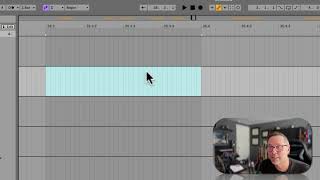
In this segment J. Anthony Allen walks viewers through Ableton Live’s timeline grid, explaining how the three‑digit display (e.g., 35 1 1) encodes bar, beat, and 16th‑note position. He demonstrates how zooming changes the visible subdivision—from quarter notes to 128th notes—and shows how to read the grid to locate specific rhythmic elements. Using this knowledge, he illustrates practical drum‑programming decisions: placing the kick on every downbeat and the snare on beats two and four. The tutorial emphasizes that recognizing bar‑beat‑subdivision positions lets producers keep musical time in mind rather than relying on elapsed seconds.
Chapters
Okay, what we're looking at here is we just see the bar. So 35, that means 35 means bar 35, beat 1, first 16th note. And this is bar 36, beat 1, first 16th Note. If you don't see something, it's dot 1, dot 1, like up here, 36. So that means that we're looking at a whole bar between these two points. So four beats are going to be our four quarter notes. Okay, so this is 35, first beat, 35, second beat, 35, third beat. 35, fourth beat. So our grid here is quarter notes, beats. Okay? So there's another way to know actually that we're looking at quarter notes and that is to look all the way down here. You see this flat floating quarter that says our grid is showing us quarter notes. Okay, let's zoom in a little farther. Okay, now we've got 35, measure 35, beat three. So we've got all these notes that happen before beat four. Okay? So that means we are looking at a very fine grid. There's a whole bunch of notes before the next beat. Okay? So we are way zoomed in. And in fact, if we look down here, we are looking at 128th notes. That's pretty fast. So let's zoom back out. 30 second notes. Let's go back to 16th notes. Okay, 16th notes, 35 to 36. So these are all our 16th notes between the two beats. So just remember that when we see three digits, it's bar, beat and 16th notes. Now, why do you need to know that? Because when you're working on something like a drum beat, you're going to remember that, well, the kick goes on. You might want the kick on all your downbeats. So that's going to be here, here, here, here, and here. You might want your snare on beats two and four. That's going to be here and here. And I can see that pretty quickly because I know how to read this. And see that? That's beat two, that's beat four. Okay? So just get used to seeing that to know where you are in a measure so that while you're putting music together, you can be keeping track of the beat. You can quickly see the beat, knowing where you are on the grid. Okay? Musically, it's more useful than the amount of time that has elapsed.