Free Ableton Live 12 Music Production Class! Delivered Daily.
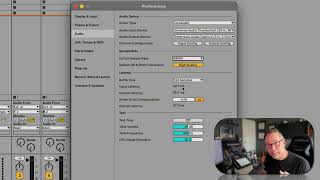
In this segment of the "Free Ableton Live 12 Music Production Class" tutorial, J. Anthony Allen walks viewers through essential audio configuration steps in Ableton Live. He first explains how to select the audio output device, noting that while his speakers are connected to a Universal Audio Thunderbolt interface, he switches to Telestream Audio Capture for recording the tutorial. Next, he details input and output channel configuration, showing how to enable stereo inputs on channels 1 and 2. Allen then advises on choosing an appropriate sampling rate, recommending 48 kHz or 44.1 kHz for most projects and warning against higher rates that create unnecessarily large files unless recording large ensembles. Finally, he introduces latency, describing how it arises from the signal path and offering guidance on adjusting settings to minimize the delay, with a promise of deeper latency discussion in a later class. The segment equips beginners with practical, actionable settings to ensure clean playback and recording in Ableton Live.










