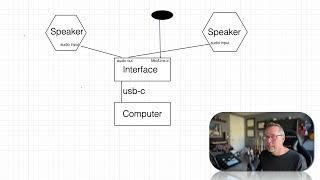
In this instructional segment, J. Anthony Allen walks viewers through the essential steps for setting up an audio interface for music production. He explains how to connect speakers to the interface's left and right audio outputs, emphasizing the principle that outputs connect to inputs. He differentiates between microphone (three‑prong) and line (guitar‑style) inputs, describing appropriate cable types and when a preamp might be beneficial—especially for guitars. Allen then advises configuring Ableton Live’s audio preferences to select the interface as both the input and output device, ensuring the system is ready for recording and playback.
Chapters
So you'll see two outputs named audio output, left and right. So we just need to connect our speakers to that. So the input on your speakers, so remember, whenever you're connecting cables, out goes to in and in goes to out. So this says out. This, This will need to say some sort of input. Okay, some sort of input and some sort of input. Okay, so now our speakers are connected. Now you will have. A mic or line in. A mic is going to be that three prong thing and a line is going to look like a guitar cable, like a single cable. If it's a mic, you can plug a microphone right into it. So let's say this is our mic, okay? So we can plug a mic right into that, right on the same box. If it's a line input, a guitar cable, you can also plug that right in. You might want to go through for both of these, you might want to go through a preamp or something first if you want a better sound. You don't have to, but you can. For my microphones, if I'm just talking like this, this microphone is going directly into my audio interface. My guitar goes through a preamp though. We can talk about preamps later. It's kind of like a extra thing that makes the sound just like a little bit better. Okay, so that's really all we need then in Ableton, we would just need to make sure that in our settings, our input and our output device is set to whatever our audio interface is, because here it is acting as both our input and our output. Okay, then you should be good to go. That's everything you need.