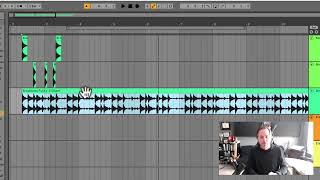
J. Anthony Allen shows how changing a DAW's time signature from 4/4 to 3/4 shifts the visual grid and where beats land, but the audio itself stays exactly the same. The drum loop sounds identical; only the grid relabels where the downbeat appears.
Chapters
Okay, let's go back to the horizontal element a little bit. And I want to point out one kind of weird thing about how these programs work when it comes to meter. Okay, so first, let's talk about what meter is. So all music is in a time signature. If you don't know what time signatures are, I guess I'm not going to go into a huge amount of detail about how different time signatures work here in this video. But let's just focus on the difference between a time signature like 4, 4, and a time signature like 3 4. Okay, so in 4, 4, we have four beats in a measure. And the beat is a quarter note. That's the bottom number. It's a four. So we're going to call it a quarter note. And there are four of those in a measure. Okay, so for example, this beat is in 4, 4. I'm going to solo it. So we only hear this beat. And let's count to four while we listen to it. You'll notice that it basically starts over every four beats. Two, three, four, one, two, three, four, one, Etcetera. Okay, so that's in 4, 4. Now, we could have a beat that's in 3, 4, and that would be the same thing, except it would line up every three beats. Okay, so it'd be like one, two, three, one, two, three. One, two, three, one, two, three. Got it. We can set the time signature of our session up here in the transport area. Okay. Right now it's set to four, four. What I want to point out here is if I Change this to 3, 4. Okay, now my session is in 3, 4. And now let's listen to this loop. It's still in 4, 4. Changing the session time signature doesn't really change our content. What it changes is the grid. Okay, so let's put this on. Let's put this on beat one. Okay, so our loop. Our drum loop is now on starts on beat one. So now you'll see that it goes 1.1.2. So bar one, beat two, bar one, beat three, two, bar two. So we're only showing on the grid three beats per bar, which is correct because I've changed it to 3 4. However, our drum loop hasn't changed. Like, the downbeat of the drum loop is still up here. This is beat four. Right. Beat four is now listed on our grid as beat one. So we have the wrong meter for our drum loop. Our drum loop is in 4, 4. Our session meter is in 3, 4. That's fine. You might choose to do that. But what it means is that our drum loop isn't going to line up on our grid very well. Right? Because our grid is in three and our drum loop is in four. So what I want you to get out of this video, if you're confused, is this changing the meter of our session does not change the content. In really only changes the grid and where things line up on the grid. See, this one is at bar two. Beat two is where this kick is. I'm going to change this back to four. Four. Now it just moved to bar two, right? Because it started counting at the beginning and shifted it over. Did it change the way it sounds? No, it changed how the grid is arranged, but it did not change how it sounds. Important thing to understand moving on.