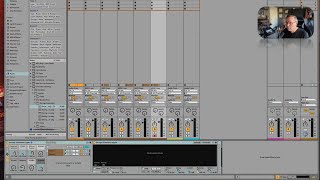
J. Anthony Allen explains Ableton's Session View, where each clip slot works like a spinning record you can drop the needle on to trigger at will. Session and Arrangement Views share the same mixer, so your track settings stay consistent across both.
Chapters
Okay, let's go over to Session View now and get a little bit more comfortable with producing music in Session View. Okay, so I'm going to hit the tab key, and now we're over in Session View. Now, remember what I told you before about one of the most important concepts with Session View, and that is that Session View and Arrangement View have different, like, content areas, but they share a mixer. Okay? So that means that all of these tracks have the instruments on them. Like, this one has the strings, right? And this one has this synthesizer. This one has the piano and the other synth. And the other synth, okay? They don't have any of the clips, but they have all of the settings that we had over in Arrangement View. Now, just because they don't have the clips in Session View doesn't mean that we can't get them, okay? There's an easy way to go get them. We'll do that in just a second. But I want to put this in your head first. As you're working in Session View, I want you to be thinking about each one of these little clips slots. Imagine these are each a little spinning record. So you've got all these little spinning records going all over the place. Now, you want to do two things with those. First is you want to craft what that spinning record is and making sure that it is exactly what you want. Then you're going to drop the needle on it whenever you're ready. So we're gonna have all these little spinning records and we're gonna, like, pull them in as we want them in. Okay? So let's do it.