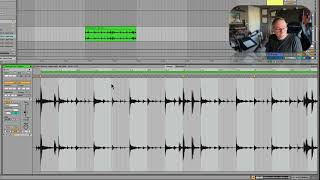
In this segment of the "Locking in Beats, Part 2" Ableton Live 12 tutorial, J. Anthony Allen demonstrates how to accurately locate the downbeat of the fifth bar in an audio clip and align it using warp markers. He explains the importance of using as few warp markers as possible, shows how to verify alignment with the metronome, and discusses fine‑tuning options such as zooming in and nudging individual markers. Finally, he checks the clip’s detected tempo (approximately 94.9 BPM), rounds it to 95 BPM, and confirms the clip is ready for further production. The lesson emphasizes practical, ear‑based decision‑making while maintaining technical precision.
Chapters
Yeah, it got a little strange here. So I think that we have to find the downbeat of the fifth bar, which I think is early, and that's why. So let's try it again. 1, 2, 3, 4. 1, 2, 3, four. 1, 2, 3, Four. One. Okay, I think this is the downbeat of the fifth bar. So I'm going to push that over to the fifth bar. Okay. Now let's listen to this with the metronome and see if we got it. Here's our metronome. Good. So now that is all correct. We used 1, 2, 3. Technically 4, because that very first one. Warp markers. That's good. That's not bad. So we just did the downbeats. Now, if this didn't fix it, I would go in more. I would say, okay, let's try to find, you know, this one and. Or let's try to find beat two and three and four. You know, I've worked on tracks before where in order to get something to warp perfectly, I had to go down to the eighth note or even the 16th note and lock every single one of those in. You don't want to do that. You want to use as few as possible. So this is great. Now we could go in here and we could see that like this measure two, if I zoom way in, that's not on. I could double click nudge that over and get it on if I wanted to. But I don't need to do that. Like, it's close enough for my ear. And again, the fewer warp markers, the better. So I'm going to double click that one to get rid of it. Cool. So before we go, let's take a peek at what our clip tempo is according to live 94.9. Okay. We could safely round that up to 95 and say, like, you know, we're basically 95 here. If we go back to our name, it says 95. So we're basically. We're right in the ballpark. It's a little off, I think, probably from some of these very fine things, but those won't matter very much at all. So this clip is good to go.