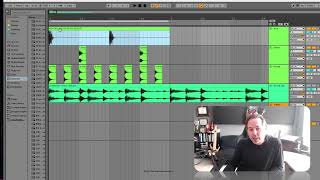
J. Anthony Allen shows how to turn short drum hits into full-bar loops in Ableton Live. Select the clip and empty space, use Consolidate (Cmd + J) to merge them into one bar, then duplicate endlessly with Cmd + D. The loops stay locked to the grid and can layer against each other.
Chapters
Okay. In order to make this a loopable beat, what I want to do is take each track and turn it into a one bar clip. Okay? Right. Now this clip is only a 16th note long. Okay? But what I want to do is have this clip be the whole bar. So what I'm going to do is I'm going to select both of these clips and I'm going to select the empty space after them because I need to select the whole bar, including the empty space. Okay? Now I'm going to do something called consolidate. Now, different programs might call this different things. They might call it merge, they might call it render in place, but in Ableton, we call it consolidate. And it's command J is the key command to do it. Like I said, I don't memorize all key commands, but this one happens to be my name, so I remember it. So I'm gonna press command J. It's gonna take a second to think, and then it's going to make our clip one long clip. Okay, now this is great because now what we can do is if I zoom out and I just hit command D to duplicate, I can just duplicate this all day long and it's going to stay right perfectly in time on our grid. Look at that. Let's go to the downbeat. Here's bar eight perfectly right there. Right? So having that one, that full one bar is a nice thing to do. Let's do that with our snare. And don't forget, we need this extra empty space to make it a full beat or a full bar long. So command J. There it is. Duplicate that out and it's going to be perfectly in time. Same thing with our hi hat. Not forgetting the empty space. Command J, duplicate that out. Cool. All right, let's hear our beat one more time. Let's start from random spot. Still perfectly in time. Here's our metronome. Lovely. Now, one thing that's really fun to do is take your beat and play it against another loop. And you've just kind of augmented this loop with your beat. Let's see what that sounds like. That's kind of cool. Might play around with that a little bit, but I think I'm more happy with just sticking to our beat. It's simple, but it's nice. Crank up the tempo a little bit. And we've made something great. We can start adding layers to it and playing around with our beat.