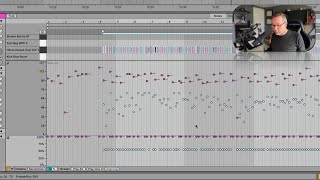
J. Anthony Allen shows how to use Ableton Live's Chance parameter to make drum notes play randomly. Set hi-hats to 50% chance so they drop in and out like a dice roll, or group multiple notes together to toggle whole drum sections on or off at once.
Chapters
Okay, let's look at the chance settings. And this is really fun. Okay, for this one, let's go over to that drum track I made. So I'm gonna go back over to Arrangement View, I'm gonna click my back to arrangement button. And let's go here to this one. Okay, so here's that beat I made, this very boring, uninteresting drum beat. Okay, let's start it up here. Okay, so I'm going to take just my hi hats. I'm going to highlight them all up here. And that's going to also highlight them down here. Okay. So we can see the velocity where I played them. They're kind of all over the place, which is fine because that's how I played them. But now let's go to chance. And let's take those ones that are from the hi hat, only the hi hat notes, and pull chance down to around 50%. There we go. Now what this means is that for those hi hat notes that are now down to 50%, you can see everything else is at 100% down in Chance. Okay, what that means this has nothing to do with velocity. This means that there's a 50% chance that those notes are going to play at all. Okay, so imagine that every time one of those hi hat notes comes up, okay. The computer is basically rolling a two sided dice and it either says play or don't play. Okay. And it's going to do that. It's going to be different every single time. Okay, let's hear what it did. Okay, that's cool. If I want a little bit more, let's raise the chance. Kind of like it more sparse. Okay. So there's holes in it. And that's kind of cool. So once you start programming more stuff and recording more stuff and building up whole tracks, you're gonna find this to be really useful. That you can create kind of a system almost where there's a clip that has some notes that happen sometimes, but not always. It's really fun to play around with. So explore that chance showing lane here. Of course, with chance, you can also randomize it. Just kind of set everything to a single value. If you want, you can group things together. Which would be the usefulness of that would let's say like for this bar or here's a. Let me give you a more useful one. Let's say. I'm going to zoom out and let's just say that all of these snare drums, okay, I want live to decide what. Whether or not to play that snare or not. But if it decides to not play the snare, I want it to not play any snares. I want to leave off the snare track. Okay, I could do that. What I do is I'm going to go into the chance lane. I'm going to highlight those snares. I'm going to say play all to group them together. Now I have one chance thing for all of the snares. And if I want to undo this, I can just hit ungroup. But now it's going to decide to play the snares or not. Okay, decided to that time. Let's try again. Okay. This time it decided not to play the snare. So that's how you can use grouped notes together. Okay, let's move on and talk briefly about mpe stuff.