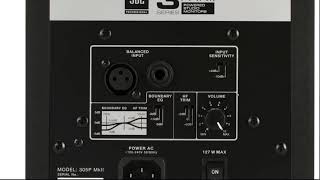
J. Anthony Allen shows how to set up studio monitors for accurate playback. Match the gain and volume on both speakers, set EQ trims to 0 dB for a neutral sound, and choose a listening level suited to your room size. Keep all controls flat and identical so the monitors don't color what you hear.
Chapters
Okay, let's talk quick about the monitor settings. So if you have active monitors and you look in the back, you've got a couple of settings here. So let's go over these really quick. Remember, what we want is something that is super flat, right? We don't want our speakers to be adding frequencies or taking away frequencies. We want it to be accurate to what the music is presenting. So most speakers will have something similar to this. Let me just zoom in here. Okay, so here's where your input goes. You can use whichever of these your audio card is putting out as your input. Input sensitivity is just going to give it a boost or a cut. It doesn't really matter which one of these you use. To me, it just kind of depends on what you think sounds better. But whether you need a little extra volume or not, you shouldn't need them. And I think there's a middle setting here that is nothing. But this will add a little volume. This will take away a little volume. Whatever you do. The most important thing with all of these settings is that both speakers match exactly. Do not set one speaker to do one thing and the other speaker to do the other thing. Need to make sure they match perfectly. Okay, so if there's an EQ built into the speaker, try to set it to be flat. In this case, we have this minus 3dB, we have 1.5dB and we have 0dB, which is doing nothing. Minus 3dB is going to pull the volume down a little bit. The low end 1.5 is going to pull it down slightly less on the low end. Basically what this is saying is at low frequencies, it's going to pull. It's going to make quieter the low frequencies. If we set it to zero, it's going to do nothing. So that's what we want. Okay, so set that to zero is what I would do. High frequency trim just going to be the opposite. It's going to boost high frequencies or take away high frequencies. So minus two is gonna make high frequencies louder, sorry, quieter. And plus two is gonna make high frequencies louder or zero is gonna do nothing. So set that one to zero. Also, volume depends on what you need for your room. It's just volume. So super important here that these are exactly the same on both speakers. Think mine are set to three. I have a relatively small room that I'm mixing in. And these speaker, at least the ones I have, they get super loud. So three is plenty of volume in my little studio here. So I have them set to exactly three. And I just like make sure that I'm exactly on that dot so that I can set them both to be exactly the same. And the stuff down here is just your power. Okay, so those are your monitor settings.