J. Anthony Allen explains mixing as the studio stage between writing and mastering, where you use EQ, compression, and level balancing to shape a song into a professional recording. The concepts work in any DAW, not just the Ableton Live he demonstrates.
Chapters
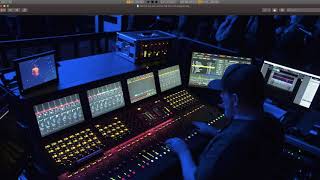
Okay, so when we talk about mixing in this class, we're primarily talking about making a finalized version of a track. Okay. So we're talking about the thing that happens after you've written the track and before mastering, and we'll talk about mastering in the next video. So we're talking about working primarily in software like this. Now, let's talk about software for a quick second. I'm going to be working in this class in Ableton Live. However, you don't have to be. You totally do not have to be working in Ableton Live. Everything that I'm going to walk you through how to do in this class, you can apply to any audio software you want. So if you're in Ableton Live, that's great. If you're in Pro Tools, that's also great. If you're in Logic, if you're in FL Studio, if you're in Cubase, if you're in, I don't know, any of the other ones, everything works the same, really. We're going to be talking about eqs and compressors and levels and all of these techniques you'll be able to do. Okay? So don't let Ableton Live bog you down. Okay. I like Ableton Live, so I'm going to be using that. But we're talking about concepts here, not specific software. Now, going back to what I just had up, the reason I had this up is this is live mixing. So this is what things look like when we're in a live setting. And that's not really what we're going to be doing in this class. This is a picture of the person mixing Red Hot Chili Peppers for a live show. They're working at a big board like this. And there's computers. There's computers involved. This is Pro Tools over here. I can see. But when we do studio mixing, which is what we're primarily going to focus on, we don't really usually have a big board like this anymore. We used to. And if you see older pictures of recording studios, you're going to see these big, huge, long mixing boards like this. You don't need those anymore. And I'm going to teach this class on the assumption that you don't have one. If you do have a big, huge mixing board, then that's great. That can be fun. But everything that we need to do in this class can be done right in the sequencer. We can look at it from a mixing standpoint like this. Let me make this a little bit bigger for us. There we go. So we can work with everything in software, and it's going to be a lot easier for us, and frankly, a lot cheaper than. Than buying one of those big boards. But if you're doing a live setting, you still have these big boards because you really need to get your hands on everything really fast. So. But we're not going to be focusing on live mixing. Maybe someday I'll make a class on live mixing, but we're focusing on studio mixing. Okay. So getting the track to sound great after the compositional elements more or less are done. So you've made the tune. Like, we have a tune here, but we need to make it sound really good. We need to make it sound like a professional song. You know, it might be the case that you're making music and you hear your music played back and you think, gosh, you know, like, I've got good chords, I've got good harmony, I've got good drums, I've got everything here. But it just doesn't sound as good as the stuff coming out of Mousetrap or whatever the reason is. Probably one of the reasons is the mix. We need to make that mix really pop. And that's what we're going to work on in this class. Let's move on and let's talk about mastering real quick and then we'll move on.