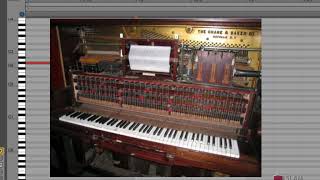
In this introductory lecture, J. Anthony Allen explains the piano roll editor used in Ableton Live as a visual representation of a piano keyboard turned on its side. He first outlines the keyboard layout, emphasizing the distinction between white and black keys while deliberately avoiding traditional note reading. He then describes how notes are placed on the roll, with vertical position indicating pitch (low notes at the bottom, high notes at the top) and horizontal position indicating time. Allen provides a brief historical sidebar, tracing the piano roll back to early 20th‑century player pianos (pianolas) that used paper rolls with punched holes to trigger notes mechanically. He connects this legacy to modern sequencers, noting that the same concept of spreading notes across a line to show rhythm persists. Finally, he introduces the temporal grid of bars and beats, showing a one‑bar, four‑beat pattern and explaining how the editor visualizes rhythmic structure. The lecture sets the foundation for using the piano roll editor as the primary interface for music theory in electronic production.
Chapters
All right, let's get started. So welcome to the Slam Academy online class. Music Theory for Electronic Musicians new reboot. So what we're going to do in this first chunk is talk about our first kind of main few things, which is the keyboard layout and finding octaves. So first we're going to talk about the keyboard layout. So you've seen this before, this thing we're looking at here on the screen. This is where we're going to live for the majority of this class. Now, I promised you, we're not going to focus on reading notes, and we're not going to focus on looking at the piano, which is traditionally how music theory is taught, is on the piano. We're not going to do that, but we are going to spend all our time here in this thing that we call the piano roll editor. So before we dive in, let's understand a little bit about where this thing comes from and what we're looking at here. So what we're looking at is basically a piano on its side, right? So we are kind of tied to a piano. But don't let that freak you out. Let me explain. So here is the piano keyboard, okay, Just roll with me for a second here. Here's the keyboard, right? So when we look at the keyboard, we can see alterations of white notes and black notes. So I'm just gonna, like, really simplify this, right? I don't care about what notes are what right now. So we see white notes and black notes, right? Now if we take that keyboard and we spin it on its side, and then we kind of crop the excess notes off, and then we extend all the notes out, then we end up with exactly the piano roll editor, which you can see here. I'm looking at it here in Ableton Live. So what we have is here's our white notes, and I have a line extending from that note, and then here's another note, and I have a line extending from that note. So anytime I put a note here, it's on that note. If I put it over here, it's still on that note, right? It's just on a different spot in time, right? And now this concept. So here's a bunch of notes just going up through the white notes and black notes of the piano keyboard. Now, we're going to talk about the difference between these white notes and these black notes very shortly. So just hold on to that for a minute. But this concept of the piano roll editor goes way, way, way back. This is actually one of the oldest kinds of sequencers we have so brief sidebar for a tiny history lesson. The piano roll editor. I can't even remember when it comes about, but sometime, probably around the 1900s, it predates the phonograph, your record player, by a little bit. I think. Actually it's like a crazy old piece of technology. And it's really interesting that a crazy modern piece of technology, like any professional sequencer, uses the same basic system. But what a piano roll editor was, was. It was a piano with this paper roll in it. And you moved the roll by pedaling the piano like a bike kind of, that had these pedals that would push air through the roll. And the roll looked just like this. And each of these was a hole in the piece of paper. So the pedals would also blow air into it. And whenever the air could get through one of these holes, it would trigger the note and that would make the piano basically play on its own. All you had to do was pedal it and put. So you would buy a piece of music in this piano roll, paper roll thing. That's like. You could buy music that way and you'd put it into your piano and then you'd pedal it and then you'd have. You'd see the keys moving on the piano like an old. Like. Like a ghost is playing it. They use these in horror movies all the time for that exact reason that was called a player piano. Or another fancy word for it would be a pianola. And that's where this general concept is taken from. That idea of all the notes kind of spread out in a line to show time and putting little dots or holes or lines to show rhythm just worked out really well for sequencing. So that's why we use it. But all we're really looking at here is a piano just laid on its side. And we don't care about the actual piano. It's just a really convenient way to show us where the notes are. So we have low notes down here and we have high notes up here. That's all we really care about. So that's what we're looking at when we see this up here we're looking at time. We can see bars and beats. So here we're on the first bar of this particular clip. Here we're on the first bar, beat two, beat three and beat four. So we're looking at a one bar pattern with four beats in. In it. Right. So that's what these four big chunks here are representing. Cool. So that's the basic concept of what we're looking at in the piano roll. Editor.