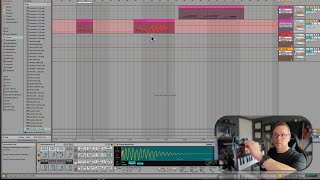
J. Anthony Allen shows how to record automation in Ableton Live 12 using a MIDI controller. Enable Automation Arm, switch to Automation View, select a parameter like drum bus amount, then record knob movements in real time. Most MIDI controllers have a 4x2 grid of eight knobs that auto-map to on-screen parameters.
Chapters
Okay, one last thing about MIDI recording before we move on. We can record automation with a MIDI device. Check it out. So what if I wanted to use one of these knobs to record automation? I can totally do that. So here's how I'm going to do it. Let's say this track here, this, this little drum thing right there. Let's get rid of this and just do that. So what I'm going to do is turn on this button. This is automation arm. So this basically means I'm about to record some automation. And if we're going to do it over top of a clip that already exists, we should turn on overdub as well. Okay, now I'm going to go into the automation mode so I can see what I'm doing. So I'm going to press the letter A or go to view automation so I can see all this automation stuff. Right. So now let's decide what we want to move around here. How about, how about just this drum bus amount? We're probably not going to hear anything, but that's okay. Okay, so with all of these things turned on, I'm going to hit record and watch what happens as I turn this knob. I am recording automation. Okay. And now I can play it back. And it's there. You can see that automation moving down here. Now you may wonder how did I get that knob on that keyboard to control this? What's happening here is that this group of eight knobs, you'll see this all over live. This like eight knobs in a little 4x2 grid. You'll see that everywhere. And you'll see on all kinds of devices a set of eight knobs. And what happens is when if you have eight knobs on your device and one of these eight knob things show up, most of the time they're going to automatically map, they call it auto map to the thing on the screen. So I can just turn these and they're automatically configured to control that set of eight knobs. So that's how I just grab something and it turned something and it worked for that instrument. Because that auto map feature, now you can change that mapping and we'll talk a lot about that later. So file that away for the moment. Okay, let's move on.