In this tutorial, J. Anthony Allen demonstrates how to record a live performance created in Ableton Live's Session View directly into the Arrangement View using the simple "Record to Arrange" workflow. He walks through the step‑by‑step process: positioning the cursor in Arrangement, hitting the global Record button in Session View, launching scenes, adjusting volumes, and then reviewing the automatically generated arrangement with automation data. Allen explains why this technique is popular among DJs who perform long sets in Session View, record them, tidy up the arrangement afterward, and quickly export the final track. He emphasizes that Session View should be treated as an instrument that requires practice, and he offers a starter session file for viewers to experiment with. The lesson is instructional, conversational, and enthusiastic, encouraging viewers to keep experimenting with Session View as a creative tool.
Chapters
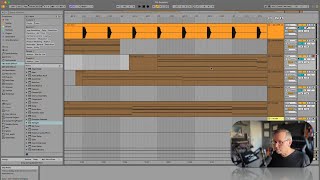
Okay, let's say I'm working on Session View. I've made something cool but now I want to like capture it, right? I want to capture my performance of it in a way because I'm going to go through, I'm going to launch some scenes, I'm going to do some stuff and I want everything I click to be recorded. So what you're going to do, what you're actually asking to do with that is can I record what I do into the arrangement? Right, and you super can. Let's do it. So I'm going to go over to the Arrangement View. I'm going to start way out here because I don't want to record over that. Okay. So I'm going to put my cursor right there. Now I'm going to go back over to Session View. I don't have to arm anything to record. I'm just going to hit record. Okay, now I'm going to start playing. Okay, well that's ramping in. Let's hear that. Okay, maybe let's launch our reverse scene. Oh, I have this track solo. Now. Maybe let's just launch this kick and this. Stop that, launch that. Let's adjust the volume for this a little bit. Okay, so let's just say I just recorded like a whole, you know, 20 minute jam. Now I can go over to Arrangement View and see I just recorded everything I did. I'm gonna hit back to Arrangement View. This is everything that launched and when it launched. We can even look at when I started messing around with the volume back then if I go to automation mode. There it is. That was me messing around with the volume. So everything recorded when I launched it, if I hit play on this, it's going to sound exactly like it's going to exactly like it did when I was just playing it in Session View. So this is called Record to Arrange. You don't have to do anything special. All you have to do is in Session View, hit your global Record button and then start going and it's going to record it to Arrangement View. This is actually really fashionable to do lately because what we see a lot happening is DJs like big name DJs going on stage playing like a two hour set using Session View and recording it to arrangement, right? And then they get off stage, they, they might go back to their hotel, they're going to tidy it up a little bit. Maybe they'll be like, oh whoops, I accidentally started something there before I was ready. You know, this is a little early. Let's stretch that out. Let's make sure this comes in right where I want it to. Maybe put a gap here, because it sounds cool. So just maybe fix it a little bit and then export this. Post it to SoundCloud, you know, literally an hour after their whole set. So that's how you do that. It's a pretty cool trick. Okay, that's enough session view for now. Keep playing with it. Session view is. Is like an instrument. It really requires practice. So keep it going. Keep working with it and practicing with it, if you're interested in working that way. Now, if you want just something to practice with, I'll give you this session. There's nothing particularly brilliant in it, but you can have it, and maybe it'll be a starting point for you to do something with.