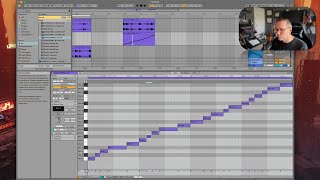
J. Anthony Allen shows how to use Ableton Live's Slice to New MIDI Track feature to break an audio loop into individual hits, each triggering from a MIDI note. He slices by transient to get 21 separate pieces, then rearranges them to remix the original loop.
Chapters
Okay, let's do this again using some MIDI magic. Okay, so I'm gonna actually leave this alone because I kind of like it, but I'm gonna take our original loop again. Okay, so I'm gonna take our original loop again and go out here. So here it is again. So what I'm going to do with this is a technique called slice to new MIDI track. Okay, so basically what we're going to do is we're going to ask Live to chop this up. And there's a few different ways it could do that. I'll show you that in a second. And then put it into a MIDI instrument and let us use it that way. Okay, so here we go. In order to chop it up, we're going to control click on that clip or right click, and we're going to go down to slice to new MIDI track. Okay, now it's going to say, how do you want to slice it by transient. That would be what we just did, automatic or manually. So if we say slice by transient, it's going to take every attack point and turn that into a new clip, just like what we did. And that might be best for this particular clip, but we have a few more options. We could say by warp marker, if we did a lot of warping to it, which we didn't. So that's not a good option here. Every bar that's just going to give us two samples. That's not very good. Or we could say every half note, quarter note, eighth note, 16th note, quarter note would be the best one here because that's where I see the beats lining up the most. But that's not great for this. So I'm going to go transient. And then there are these slicing presets. I always just use the built in. Okay. And this has the current clip region is eight beats long. This will result in 21 slices. Cool. Let's say. Okay. Okay, now here's what is going to happen. It made a new MIDI track. It's right here. We can open that up with this arrow. And now it looks like it's just playing through a bunch of notes. But let's examine what this is a little bit more. Let's double click on this and open up this MIDI clip. So here's what happened. So you can see here it says slice one, slice two, slice three, slice, slice four. So what this is doing, it looks like it's just going up and playing like a big weird scale or something, but it's actually playing through the whole beat. One slice at a time. And the slices are different lengths. So this shows kind of where they are. So we can see, we can line up, we can say, like, this one is probably that big hit right there, right? This one is that first kick sound. So if I solo this MIDI clip and play it, it's gonna sound more or less the same, Right? Okay. But this means more than that because there's a few different things I could do here. First, I could just very easily rearrange this by saying, okay, I want this here, this there, this there, this there, and just start playing around with moving things to different spots.