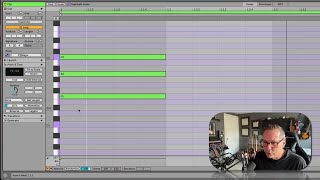
In this hands‑on tutorial, J. Anthony Allen demonstrates how to work with a fresh MIDI clip in Ableton Live 12, focusing on tools for stretching, transposing, and fitting notes to a global scale. He creates an F‑major chord, shows how to fit it to a C‑major scale, explains the (currently limited) inversion tool, and walks through dragging to transpose and duplicate chords. He then explores note‑stretching options, including multiplying lengths (x2, ½x) and using bracket‑style points to extend timing across a selected region. Throughout, he emphasizes that these adjustments stay within the chosen scale, ensuring musical coherence.
Chapters
Okay, so let's start with a fresh MIDI clip here. Now for stretch and transpose. These are all pretty easy, so I'm just gonna make, like, a nice little F major chord here. Sounds like this. Pretty. So I'm gonna go to this pitch and time window and open that up. Now, there's a few things we can do here. We can fit it to scale if it's already not. Now, my scale, you can see right here is C major, and that's getting it from the global scale up here. So I can fit it to scale if it's already in there, I can invert it if it's not, I can highlight some notes, and then I can actually just click and drag on this box, transpose it if I want. That's kind of neat. This inversion tool, I'm not really sure what this is doing. It's not doing anything at the moment. Typically, what an inversion tool would do would be to take, like, the lowest note and put it at the top like that. So I'm not really sure about that at the moment. Maybe that's still on its way. But if we want to do a little bit more mathematical transposition. Okay. So if I select this chord and then I just start dragging this up, you can see what it's adding. Right. It's adding a whole nother version of the chord on top of it. Okay. And then if I click out of it, we have it. Okay, I'm going to undo that. Cool. So we have new ways of adding more notes to it. And these are all going to fit within the scale if we want it to. And so they're probably all going to sound pretty good. Now, for stretching, we've got a couple new tools here. This just simply. We can just dial this up or down and make our notes really long. We can also x2, x half whatever we want. There's also this new feature, which we'll see in a second. But if I click and drag on the darker bar up here, this actually might not be new. I just never noticed it before. But what I can do is now I've got these two points that kind of look like loop points, but they're not. And I can click and drag on them and put them where I want them to go, and it's going to extend everything in that bracket. Okay, so some handy tools for just transposing and adjusting the timing of our MIDI notes.