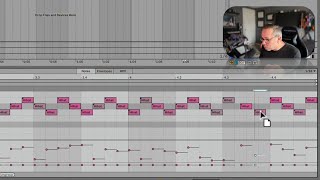
J. Anthony Allen shows how to use Ableton Live 12's triplet grid to add rhythmic variation to beats. Instead of standard 16th notes, triplets divide each beat into three notes for a different feel. Use Command-3 to switch modes and align hi-hats or other elements to the triplet grid.
Chapters
Okay, we're going to talk about doing something kind of strange to our grid here. And it's called a triplet. So if you know what triplets are. Hang on for just a second, I'm going to explain what triplets are. So what we have. Let's zoom in here. So what we have here is bar three and bar three, beat two. Okay. So in beat one, there are four 16th notes. Okay, four. All right. So that makes a sound like this. Duck, a duck, a duck, a duck, a duck, a duck, a duck, a duck, a duck, a duck, a duck, a duck. That's one, two, three, four. One, two, three, four. 1, 2, 3, 4. One, 2, 3, 4. Every beat has four 16th notes in it. That's most of the time what we want. But if you want to do something fast and rhythmic and a little bit different, you can switch that to having three notes per beat. Okay. That makes one, two, three, four. Or in other words, one, two, three. One, two, three. One, 2, 3. One, 2, 3. Now if you program a whole beat that way, you're going to end up in a waltz. One, two, three. One, two, three. 1, 2, 3. 1, 2, 3. And that's neat. If you're like in old timey Vienna and you want to right waltzes, that's great. But if you're doing something like this with hi hats or any kind of rhythmic thing, switching over to triplets can be really cool. A triplet is when we have three beats in the space of four. Okay, so there's normally four beats here. If we put three, it's rather nice. So let's do it. Let's find a spot where we think it'll work. Maybe here. Okay, so what I could do is get rid of one of these and take this and space it evenly over three beats. And I kind of just have to eyeball it. Okay, that's kind of looks right. But there's a better way. The better way is command three, three. Now we're looking at triplets. Okay. And you can see here I was a little off with that second one. I was pretty right on with that third one, though. Okay, now you're thinking, I see more than three there. That's right, because we're looking at 16th notes now, but so we have six. 1, 2, 3, 4, 5, 6. Okay, so this is still a triplet grid, and it's a triplet grid for everything. Right. So I'm going to adjust these to be triplets. Maybe I'll do it with the next bar too. Something a little different there okay. Now, if I get out of triplet mode, which I can do with Command 3 again, you'll see that it looks like these ones are off the grid. Right. Because they are. They are off the grid. They're on a triplet grid, not an 8th note grid or a 16th note grid, which is what we're looking at here. Okay. But they're gonna add some kind of fun and different variation. They'll probably throw off our delay a little bit. We might have to turn off our delay for this to work well, but let's try it. Yeah, let's turn off that delay, and we'll be able to hear him a little bit better. Okay, let's try now. Hear that? 2, 3, 4. And I'll increase the velocity of that first one. I like that.