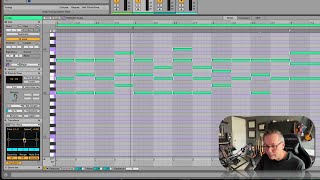
J. Anthony Allen shows how Ableton Live 12's Time Warp feature stretches MIDI note durations nonlinearly using control points on the grid. Move the endpoints to speed up or slow down one section, add a middle point for a third speed region, then re-enable Quantize to snap notes back into time. It changes rhythmic density without touching the overall tempo.
Chapters
Okay, two more Time Warp. So this one is kind of. Kind of wild. This is kind of a head scratcher. But the. The intent of this one is, you see how I have here, all notes are equal length. This is going to give us some flexibility to change that kind of wildly. So with this little grid here, think about, this is the beginning of this clip, and this is the end of this clip. Okay, so. And then higher is faster. So if I move this up, that means the durations of notes on this side are going to be faster than on this side. Okay. If I move this down, they're going to be faster over here and slower over there. But I can also add a third point. Now they're going to be faster in the middle or slower in the middle. Okay. So it's, like, really kind of wacky now. You might think, well, isn't this just throwing everything way off the grid? It is, but I could also just turn on, quantize, and then now everything kind of snaps to a grid. So it's still there. So let's take a listen to this. Now that. So I've made it basically start at the same speed and get faster rhythmically, not tempo. The rhythms are shorter, so it's different than just speeding up the tempo. And let's see what happens. Down. Okay. Weird. So this really lets you treat time like a rubber band with your MIDI notes. It's kind of wild.