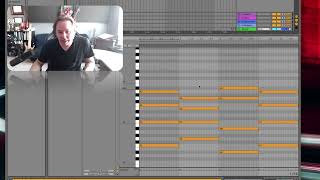
J. Anthony Allen explains how arpeggiators work, then builds a four-chord progression and applies the effect with different styles and speeds. He shows a workflow for duplicating the arpeggiated track, changing instruments and octaves on each copy to layer moving harmonies from a static chord progression.
Chapters
Okay, the first thing we're going to start with is probably the most popular MIDI effect and the most common to find, and that is an. An arpeggiator. So if you know the term arpeggio, then you know what this does. So in music, if I was to write a chord for piano, you would play it all the notes at the same time. But if I was to say I arpeggiate that chord, it means play that chord but one note at a time, like a harp. That's where the term comes from. So an arpeggiator is going to do that for us. So let's make some chords here. So let's see. I have an F. Let's just make this nice and. There. Big F major chord. Let's make it one bar long. Let's maybe add another chord. Oh, what's a good chord that goes with F? C would be easy. Okay, there's a c chord that didn't sound right. F, c, e, c, e, g. There we go. Then let's do something weird. Let's do like a, I don't know, E flat chord would be kind of fun. E, G B flat, B flat. Let's take this up to there. Sure. And then let's take this back. One more F chord. Okay, so going to get rid of that arpeggiator. And here is what our MIDI clip sounds like. Okay, lovely. Now let's put an arpeggiator on it. So an arpeggiator says play these one note at a time. So that means we have a lot of control over what we can do with the arpeggiator. We can tell it how fast to play, what direction to go, whether we want it to go up and then down or just up forever. So right out of the box, this is what it sounds like. Okay, cool. So we can say style. We can say up, down, up, then down, down, then up. Etc, we can say totally random, which is something I rather enjoy. So here's random. Okay, neat. Speed is this rate right here. You can see rate is at an eighth note right now. So that means that it's going to play our notes 1/8 note at a time. So I can speed this up to say 16th notes, for example. That's going to be twice as fast. But it's not going to play through the clip twice as fast. It's going to generate notes from the notes that we're giving it while still keeping the chord changes in the right spot. Okay, cool. Now if I want to get rid of Those repeated notes. I can say random up other. That means always play a different note than what you're currently playing. Okay. And then I've got some other options here that I can play with. But the main things you're always looking for in Arpeggiator is the style or direction and the speed. Now, one trick I like to do with Arpeggiators, which is actually really fun, is set it to some kind of random like this, and then duplicate it. So now I've got two, and they're both random. So what that means is that I'm most of the time gonna get a harmony, right, because we've got in most of these four possible notes. So two of them are going to happen every now and then. They'll hit the same one at the same time, but not very often. So it'll create this nice kind of moving harmony. Then if you really want to even reinforce it some more and duplicate it again. But on this one, I'm going to take it down to eighth notes and put a different sound on it. Let's go to instruments and let's do something. Some kind of pad or something. That's cool. Sure. Okay, so now I'll have this one moving much slower and add a kind of a big warm sound. And then these going really fast. Right? Really easy. One chord progression. Duplicated the track twice, added an Arpeggiator, played around with it. Super simple. I'm just gonna go nuts with it and add one more and get rid of the Arpeggiator altogether. Now this one is just gonna play the chords as they are, like that. Okay. Now let. Maybe if I want this, this one to stand out a little bit, could select all and shift it up an octave, two octaves. Now this one will be up really high. Neat. So Arpeggiators are great. If you've got a chord progression and you're just trying to add life to it, throw an Arpeggiator on it and it'll just create a lot of motion with it.