J. Anthony Allen breaks down Ableton Live's three warp modes: Beats preserves drum attacks, Tones keeps vocals and melodies smooth, and Texture handles pads and atmospheres. Each mode decides what gets protected when you stretch audio.
Chapters
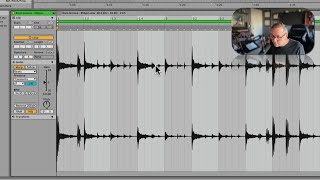
Okay, there's one other piece to the puzzle here. We've looked at warping these and how the more warping we do of a track, the more glitchy it can get, the more degraded the audio can get. There are some things you can do to help with that, and the biggest thing is called warp modes. So let's look at them. So if I click on this, I can go over here and I see warp is on. So now here it says Beats and there's a couple different options here. This list is our warp modes. The way to think about this list is what do we want to preserve? What is the most important thing about this clip? Now, in this case, Beats is set by default in almost, and I believe all of live Beats is going to be default. When you pull in a clip, it's going to say Beats. It's not going to try to figure out what it is. So Beats basically means that if it's going to glitch out on something, it's going to try really hard to preserve the transients, these attacks. Because that's the most important thing in a beat. Sustained tones, the area in between the attacks. It's going to let the, the degrading stuff happen there if it has to happen. Okay. So on any sustained sounds, that's where it might get kind of glitchy. Okay, so I'm going to try. Let's see, let's take this down to half time. Okay. If I listen to it at half time, we're really warping it a lot now. Okay, you can hear in these sections and like this one where it's not a transient, it's really kind of glitching a little bit. Right? It's like, it's like, ah, I'm trying to stretch things here, but that's cool because it's keeping our transients, the beat, it's keeping that going. Okay, so let's say we were working on something where we did want to preserve the, the ambient sections more than the rhythmic sections, the transients, right? So we're going to sacrifice the transients in order to keep some of the sustained content. That's going to be the tones. Warp mode. If I play this through this one, you're going to hear these might sound kind of okay, but the, the attacks here, the transients are going to get a little funky. Okay. It sounds a little funny in this example, but if this was like somebody singing or something like that, this would sound way better. Okay, let's go to the next one. Texture. This is for like if something is a pad or an atmosphere or something like that, it's going to do its best to preserve it. What you're really doing with these different warp modes is giving Live a clue and just saying, here's what this is. Try to help me out here.