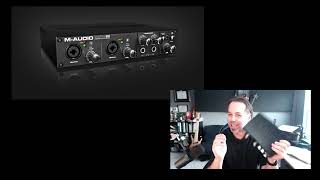
J. Anthony Allen explains what an audio interface does and how to pick one. Check that it uses USB 2 or 3 (not FireWire or USB 1), count how many inputs you need for simultaneous tracks, and plan for at least two outputs. Most home studios work fine with a basic two-in, two-out unit.
Chapters
Okay, There's a few things you're looking for when you're shopping for an audio interface. This one is by the company called M Audio. This is called a profire 610. There's a reason that I just had this one laying around. It's because I don't really like it. I had problems with the computer seeing it, and it's old and it just didn't sound all that great. M audio stuff is fairly inexpensive. So if you're on a budget, you might try some of the M Audio stuff. Although it's hit and miss. So what you're looking for in an audio interface is. The first thing is make sure it has the right connection. This one actually has old school because it's old FireWire 400 port. I can't even plug it into my current computer without a bunch of ugly adapters. So USB is fine, but it needs to be USB 2 or USB 3. And then any faster connection cable is fine too. Lightning or whatever you want. But USB 1 is generally going to be too slow. But USB 2 and 3 are fine. So make sure it has connections for what you have in your computer. The next thing you're going to look for is how many inputs it has. This has actually four inputs. It's got one here, one here, and then what's called a line input here and here. A line input is like an instrument, like a guitar. Can plug those in here. They're not XLR cables, but they're just instrument cables, quarter inch cables. So I can put four things into this. The number of things you can plug into your audio interface tell you how many things you can record at once. So in this case, if I'm using this box, I could record four things at once. I could plug in two microphones, a guitar and a bass. And I could set up four tracks and record those four things separately if I wanted to. But if I wanted to record a whole band, I can't do it with this because I can only record four things at once. So how many things do you want to record at once? You're always going to find these things in multiples of 2, 4 or 8. So you'll find a box, an audio interface that has 2 inputs, 4 inputs, 8 inputs, 12 inputs, then double from there, 24 inputs, 48 inputs. Not sure why that is, but it's always that way. The next thing you want to look for is how many outputs it has. You want at least two outputs because your outputs are going to be your speakers, right? We're going to connect our speakers to this thing. This one happens to have eight outputs. That's all of these. Now, having many outputs can be useful if you're trying to do submixes or you're trying to do like a surround sound thing or something like that. You could plug in eight speakers to this if you wanted, or you wanted to send a click track to someone while they were recording something. You could do that if you have multiple outputs. More on that later. If you're just getting started, it's unlikely that you're going to need more than two outputs. So if I was you, I would look for something relatively inexpensive. That means in the $300 range. I mean, these aren't super cheap, but you can get fancy ones that go up to $30,000 for the really high end audio converters. The one that I use here in my studio is an Apogee Quartet. I think it was around $1,500. It's a pretty nice one. It's only got two inputs. That's all I need here. And I think it's got four outputs. No, it's got four inputs and four outputs, I think. But I really only need two inputs and two outputs. Here in my home studio, in the recording studio that I work in, I use a different interface that has 48 inputs and a whole bunch of outputs. I don't remember how many. So these can be cheap or expensive. M audio stuff is okay. If you're looking in that price range, look at motu. MOTU is a company whose stuff. They have some stuff in the 500 range that is quite good also. Focusrite. Focusrite. Scarlet is a unit that a lot of people are using. It's really affordable. We use them all over the place at some of the schools that I teach at. And they're great. They're really reliable, they sound great and they're really affordable. So check those out. Cool. So that is an audio interface.