SaaStr AI Day: Elevating Business Communications Using AI Recaps with Dialpad's Group PM
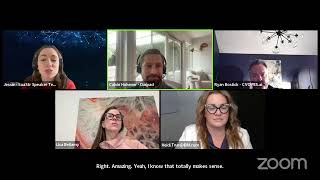
Calvin Hohner from Dialpad demonstrates AI Recap, which automatically generates meeting summaries, action items, and transcripts. A car dealership client saved 5-10 minutes per meeting and surfaced purchase-intent signals using the feature's customizable redaction and access controls.
Chapters
content. Thank you everyone who's joined so far. Super excited to have you all here. Hello everyone. I'm gonna give it a few more seconds to have a couple more people join, and then we will get started. Okay, thanks everyone who's joined so far, and welcome to SASR's inaugural AI Day. We're so excited to have everyone here, and we are especially thrilled to have Calvin Hohner with us this morning. He is a group product manager at Dialpad, and he's going to be discussing with us how to elevate business communications with AI recaps. So a quick note for everyone tuning in, we'd love to make this session as interactive as possible. So if you feel comfortable, you can turn on your cameras, you can drop in the chat where you are tuning in from, and then if you have any questions that you'd like Calvin to answer towards the end of the session, feel free to drop those in the chat as well. And Please welcome me— please join me in welcoming Calvin to AI Day.
Hey everybody. Cool. Thank you for the introduction, Jesse. My name is Calvin Hohner. I'm at Dialpad. Quick background on the company for those who aren't aware. We make a unified communications product similar to Zoom, similar to Microsoft Teams. AI has always been a big focus of the company though. We started working on AI-based features in early 2018. And so we've been at this for a while. We built our own LLM before it was cool. Anyway, so that's me. Very little time will be spent in this deck, mostly just kind of demoing how we do this, but I wanna focus on the best practice of recapping conversations for business communications. So we've always had a longstanding practice prior to even having the tools built internally at Dialpad of after a meeting, you share a recap of that meeting, right? That consists of the summary of what occurred, main action items for the takeaway, and, you know, it's important in internal contexts and external contexts as well. How that manifests really internally for us is I have a lot of standing meetings, and so those end up being sort of like adding to a running notes doc. But then for one-off meetings, particularly if they're with like external folks, customers that I'm discussing something with, the ability to like to get a recap of what was discussed in their hands is, is very crucial. So, um, we built Recaps, um, and then we spent a lot of time working with both our internal teams and our customers about thinking of how a recap actually becomes useful in your day-to-day. And so that's what I'm going to focus on demoing here. So the three kind of principles that really came to the fore when we were evaluating this is make a recap ubiquitous, available for every interaction that you have, make it customizable, and then make it instant and automatic and everywhere, really. So I'm going to kind of go through how we do that. Really quick case study, working with one of our customers, Van Horn. They operate a number of car dealerships across the Midwest. So yeah, this is just estimated, you know, 5 to 10 minutes saving using our tool in order to implement that best practice of making sure that your meeting attendees have a good recap of what occurred on that meeting. And so yeah, these are some of the features that I'm going to go through. Again, this is very sort of self-reflective in that I'm demoing our own product and how we utilize, you know, a recap that's created in Dialpad. And so that's just kind of the nature of it. But again, the best practice is making sure you're getting the right information in the hands of the folks who you just had a meeting with. So, um, I'll show you some stuff. So this is, um, what our post-meeting page looks like if you're the dial— if you're the host of it. So you can see that we present here a nice little recap of what that meeting was. This is just kind of a test meeting, action items, and then just like a quick summary of the guests. This was just with a test guest for myself. I just spun this up prior. But a couple things that you'll notice. So the summary will initially come in like a medium sort of paragraph-based format. I, for my running notes, will quickly do something like make it a bulleted paragraph and then just copy that and then throw it into a notes doc and then boom. Like my practice of making sure that all of our notes for our standups are, you know, captured and ordered chronologically in a doc. We do this in Confluence, not in Google Docs, but we just kind of demonstrating the ease of the point there. And then the ability to copy, you know, action items that may or may not be attached to the summary as well. I can grab the ones that are relevant and post them right in here, right? So, um, really, really simple to both see the information, access it, and then do something useful with it, right? That's obviously incredibly important. Um, again, a couple different options. If you want more detail in your summary, you can do things like that. Um, this is also editable too. Um, the customizable aspect of it, uh, was again something that our— both our internal teams and customers really wanted to focus on. So, you know, I could edit this, add some more stuff, and then I can save that, and then becomes the summary that then I can send to the various participants in the meeting, right? So that's kind of just briefly touching on the customizable aspects of it, but then sharing, getting it into the hands of the folks who need it is obviously sort of the next relevant point. And so the ability to get this information out there is something that we really focused on. So this occurs in a number of different surfaces in the app, and I'll show that, but the ability to share with both internal folks, so I could like, you know, search for engineering manager that I work with, add her. I could share with external users as well. So if I, you know, public typing, if I type in, you know, my external email address, then I can add that as well. And I'll show you, if there are other participants in a meeting, they auto-populate this as well. So it's literally just one click to get the information in your user's hands. There's additional like sort of granularity that became important to us. We don't wanna like necessarily share a transcript or a recording of a call in all scenarios, particularly if there's like PII involved and things like that. So we made it so you can also just shoot the AI summary and action items, which is what I was just showing there. So not the transcript, not any recording of the meeting. As well, you can send a message. Another common thing that I'll do for my recurring messages is I'll grab a link. I'll generally make it just internal for, for Dialpad employees if they're, you know, standups is something that I'm frequently in. So, and then again, you can customize the access that's available there too. So the summary or just a very limited access, but I'll frequently grab that link and then just pop this in the notes as well. So someone can go here that's on the team or, you know, anybody that I want to share this information with, what we've been working on, they can go here and see a quick summary and then just like have really quick access to that information as well. So I was just showing this information available to the host on the exit screen, but this is what it looks like for general access for folks that you share with, right? They can see the transcript excerpts, you know, various moments. I swore once on this call, it seems. Yeah, get that information into the folks who need it. The ability to, like, download the video recordings, audio recordings. Again, it's all just easy access to the information and making sure you can get it in the hands of the folks that need it. So that's kind of how we use it internally. There's various sort of like emails, you know, this is a meeting that I hosted. So very easy access points. Again, a big principle is making the information ubiquitous so everybody can see it in all the points that they have access to it. So I can access it there. And then in the Dialpad app too, right? So this is a running list of all of my meetings. I didn't go too into depth to this, but you can see that there's this request access capability for meetings that I didn't host. And so if the host wanted to share that with me, they get an email, they get a Dialbot notification in order to share that information with me. Let's find one where I was a host. Yeah, again, different surface but same information that you have. I can share directly from here. My meeting participants are automatically populated, so literally it could just be like one click, and those folks have that in their inbox. They'll also have it in the Dialpad app too. But again, you need not be a Dialpad customer to reap the benefits of this. If you're not, you get that recap that looks like this in your inbox. If you are, then you can see it in your Dialpad inbox, right, along with your other meetings. So, um, some additional things: the ability to schedule like follow-up conversations based on time, date, data that was said during the call. Really sort of basic, simple things, but the focus is again on making it actionable and useful. And then the ability to share and have that running record of that interaction, again, both internally and externally is incredibly important. So that's kind of the best practice. And again, this is self-reflexive in the way that like I'm demoing our own product, but you can think of, you know, ways to do that outside of Dialpad as well. You can feed a transcript into any LLM, ask for a recap and share it. Dialpad makes it easy, obviously, a lot of systems are trying to. But that was our focus. So I don't want this to be too much about the Dialpad product, but more about the best practice on how AI really sort of enables you to get that summary really quickly rather than combing through a transcript and typing something out and spending a lot of time on follow-up. So that's it. That's kind of the bulk of what I wanted to show you guys here. And I know that there might be some questions, conscious of leaving a few minutes for that at the end. So, What do you got for me?
Yes, thank you. Yeah, thank you, Calvin, for all of that. That was amazing. We do have a few questions from our livestream channels. So, oh, sweet. Yes. So one that stood out to me, what are you seeing your customers are demanding now as a result of AI?
That is a really good, like, customization continues to be a very big thing, particularly in the communication space. Like a lot of like the ability to to redact what will show in a transcript or redact what will show in a summary is really interesting and something that we're really pushing on. So we do things like PII redaction, for example, in a transcript, but the ability to get really granular with that and say something like, hey, I want to redact like all socials, but, um, you know, credit card numbers I can allow through because that's the nature of my business. So we're really kind of seeing like The sort of table stakes are out there, right? Like, you can get a transcript of an interaction, you can get a recap of an interaction relatively simple now. And so now it's really like what people want to do with those things and getting deeper, deeper signal from what, what transpires during an interaction. Um, another good example of that is like, uh, like purchase intent is something that we're exploring on in within our sales product, right? So We, you know, we have NLP and, you know, are running all these models in the background to try and sort of suss out based on what happened during a conversation and then based on the outcomes of a number of other sales conversations, what's said during a conversation and how that indicates, you know, the actual purchase intent of the prospect that you're talking to, for example, right? So getting deeper and more specific into like very granular use cases is generally where we're seeing our customers go now because the kind of— the table's been set, sort of the baseline is, is, is established now, right?
Amazing. Um, one other question from Pam in the chat: how do you keep all the text from getting overwhelming?
Yeah, so I, I do a lot of cutting down and editing when I do that copy-paste activity, to be very honest. Um, so I will frequently just do the bullets. Like, again, this is just me in, in my own practice, so I rarely will share, um, like a summary paragraph, for example. So like, this is really my workflow, like that bulleted paragraph, I'll make sure it makes sense, and then I'll just grab that and add that to a running doc. It's much easier to consume. We've seen that with our, like, our customers who are using this so far too, is that folks love the bulleted list, and we're finding that the, the paragraph summaries, um, are good for like a read-through to make sure you're capturing it, but we're not seeing a lot of like you know, making a short paragraph and then sharing that with somebody, right? It's, it's all about the bullets is, is, is what we've found.
Yeah. We need a bullet list. Amazing. Um, one other question from our livestream. Uh, in your opinion, what have you already seen that's changed in B2B SaaS with AI?
Uh, what have I seen change in B2B SaaS? So, I think two things immediately come to mind. The first is that customers have very quickly become super comfortable with this technology because of the prevalence of LLMs coming into the space. So prior to about a year ago, I would say there was still a lot of wariness about AI in general. How do we treat a transcript? Is it similar to a recording? All of the regulatory and compliance sort of like things around that, um, there was like this big sort of worry in people's minds. And then once, you know, the big LLM, you know, ChatGPT and etc., like started becoming more prevalent about a year ago, that was a real tipping point where folks are now super comfortable with this technology in a way less wary of it than they were in the past. And so, uh, the like embracing of it and the, the, the, the, um just the like familiarity with it and folks being comfortable with using AI has drastically shifted, I'd say, over the last year. And that's probably the biggest thing. And so now it's all about, okay, how do we like use that baseline understanding and that baseline awareness to really make people's lives better, right? Really make their workflows more efficient, more effective. Right.
Amazing. Yeah, I know that totally makes sense. One other question just from our chat quickly. Is there any feature that reduces topic duplication, or is there like a hierarchy of topics?
Uh, a hierarchy of topics, that would actually be a really good question for our LLM team that builds our models, um, and their PhDs in linguistics and stuff like that. Um, but there's a lot of that going on under the sea, uh, behind the scenes. Like, for example, with action items, there's a number of linguistic heuristics that like we apply in our model to make sure that we're trying to surface the most relevant action items to you. For example, um, like linguistically, we know that, um, action items that are mentioned towards the end of a conversation tend to be, uh, firmer and more set in stone and more accurate. Um, and so we favor those over ones that are caught earlier on in a conversation, for example, right? So that's just one of like the linguistic heuristics that we use to actually suss out and make these as accurate as possible. There's also self-reinforcement too, so I didn't show this, but you can like give positive and negative feedback for each of these various elements, and that feeds directly back into the model. Um, so it's constantly learning, and it's— and it's— we're using our own LLM too, so it's specific to all the business conversations that are happening on the Dialpad platform, not the general corpus of, you know, whatever's on the internet that you get with, uh, you know, ChatGPT or something else, right? So that level of specificity helps drive like our use cases more than using a more general model. Got it.
Amazing. Well, unfortunately we are at time, but we appreciate Calvin for all of this content and appreciate everyone who joined in. Just a reminder, this session was recorded so you can reference it in the future and also reference Calvin's slides. So thank you again, Calvin, and everyone who attended. We hope to see you in future AI Day sessions.
Thanks everyone.
More from Jason
Why Your Next Hire Should Report to an AI, Tragedy Apps, and Too Many AI SDRs? | The Agents #004
Our Agents Drove Our Salesforce Bill Up 80%, Marketo Hates Agents, and We Stealth-Churned Off Notion

Managing 20+ AI Agents: Lazy Agents, Our $500K AI Bill, Stealth Churn & the Death of 60% Solutions