SaaStr Annual 2024: Only 33 days to GO!
In this live sponsor‑prep session, Jason Lemkin (Speaker A) and Tricia walk SaaStr Annual exhibitors through every operational detail they need to finalize before the event. They explain how to submit booth graphics via the sponsor portal and a Box folder that feeds directly to Freeman, emphasizing the need to remove guide layers and use solid colors to avoid pixel‑perfect issues. They outline the review cycle, mock‑up revisions, and typical turnaround times. The team then covers activation permits, including food‑service, power, refrigeration, and material‑handling fees, and stresses that all activations require a completed intake form. Parking logistics are detailed, with instructions for sponsor load‑in on August 9, default parking locations (Delaware vs. Saratoga), hand‑carry limits, and how to request parking for multiple days or for vendors. The attendee portal’s map, shuttle schedule, and nearby hotel options are highlighted, along with tips for navigating the 40‑acre campus. They also promote exclusive sponsor‑only networking events such as Poker Night, CCO Summit, CMO Brunch, CFO Summit, and Meet‑a‑VC, explaining how to submit leadership for these gated sessions. Key upcoming deadlines are reiterated: internet order due tomorrow, booth graphics due next Friday, activation forms due soon, and a reminder to order swag. Contact information (events@saastrink.com) and the availability of recorded sessions on the SaaStr YouTube channel are provided for ongoing reference.
Chapters
Insider webinar. Tricia's joining too, just make her co-host. And we do like the latest and greatest of all the sponsor prep you need to know leading up to SASRA Annual. So I know we've got just a little bit over 30 days to go. I think it's 33 days till we start start and fewer days till we load in. So welcome. Thanks everyone for joining. We're going to cover quite a bit of the reminders. We'll go through kind of some of the upcoming deadlines. I know a lot of folks may have gotten Tricia's email this week, and maybe you didn't get the chance to read it quite yet. So we'll go over a bunch of those deadlines because I think they're very helpful on what's going on this week. So, yeah, so great. So let's start off with the timelines, and I'll get my screen share going. I'll go to this guy. It's the wrong slide. Let's go timelines. Okay. And then as always, I'm gonna put this into the chat again. We use the same deck week over week. So this one is updated for today, but I'll just drop this into the chat so that you guys have it. Let me drop that in there so you guys can follow along if you want. And then, yeah, we do keep that up to date in addition to everything that's in the sponsor portal. So, so yeah, okay. So first and foremost, let's go through the timelines because I know, again, like I said, there's, there's a few deadlines that are like this week actually, and then there's a few big ones coming up next week. So we will start with those. There are a few of you who might have gotten an email from Trish if you have not yet submitted your things in your tasks and your portal, like your logo, your description. We do really need those. These are things that we give off to like Freeman, some of our like, you know, production teams, you know, address. That's why we ask for your address. And so they are really needing that as well, right? We are getting close to the point where we start to actually build out the annual. It takes a little bit of time. And so that's why we need those ASAP. They are quite a bit overdue now if you haven't done it yet. So please do any of those tasks that are red if you haven't done those already. Next big upcoming deadline for this week is this is the last week to order any additional hardline internet that you might need. So I'll go through that process really quickly by— here's the form, but I'll just show you guys how to get there. It is in the sponsor portal, so I'll just load up my handy-dandy portal. Yeah, if you come to the resources and the FAQ, that's where this is linked in the FAQs. So my Zoom will move. It's in the FAQ. So that's how you get there. I'll put this into the chat if you're on the Zoom so that you can get there a little bit more easily. So I'll just, docs. I think that's the right, everything's a Google Doc. Okay. So you've got that now in the chat if you're, if you're watching this in lifetime. If not, you've got to get there from this. Sponsor portal or just open up, look for Tricia's email and it's in there too. It's all linked. But yeah, this is your last chance to order additional hardline internet. So just to give folks, because we had a few folks ask like, what's the internet situation just in the overall campus? I know we've got some new and returning sponsors. So the event center does have Wi-Fi like throughout the campus. There is a like sponsor network that we'll give you guys the password to that will just be for sponsors. And then some of you will already have a hardline already. So for the Diamond and Platinum Plus sponsors, you have 2 included hardline connections. If you're a Platinum or Super Gold, you do get 1 included hardline connection. And then if you're Gold, this one does not include a hardline connection by default. So good idea to order internet if you guys want to The chat is disabled. Ah, okay.
That we didn't maybe share it with everyone. It looks like those links came to just us.
Oh, I see that. Okay, hold on. You're right. You guys are right. Okay.
I'll drop them in there.
Okay. I was like, good call. Okay. Alright. Thanks for letting us know, Alexis. We'll, we'll read through those links real quick. Okay. So yeah, if you guys want to order Hardline Internet, that's the situation on like what's included by level. We've also had a few folks ask like, do we have to Do I need hardline internet? Is it something I'm gonna need? I would say depends on what you're trying to do in, you know, your booth. If you've got like really beefy demos that you wanna do on the hardline or some folks just like it to be faster, right? It is gonna be faster if you're hardwired in. That's just the nature of, you know, any hardline. If you hardline in versus being on the Wi-Fi, even at home, the hardline's gonna be faster. So if you do want it to be faster, the hardline is your better bet. Obviously it means it'd be faster for like anything you would need to do, right? In terms of, you know, if you're the person managing the lead capture backend or again running demos or just coordinating with other things like, yeah, then, then you may want one. I would say the Wi-Fi is fine for those needs. And then to the point of like my rough rule of thumb is always like, I don't know, back when I, it's been a while, but back when I was a sponsor assassin, when Trish was too, it's been a while. But when we were sponsors, I know I would always just preload everything onto my computer, hardline or not, right? I always just think it's a good idea to have everything preloaded. JIC, you know, you never know. So there is only one speed and type for the hardline. So I know a few folks were asking like, is there like a lower speed I can get for a different price? This is just, they just do one, one speed, one rate. It's $650 if you need an additional hardline. And then there's a reminder here, like if you have a MacBook like I do, you do, you do need one of those fancy dongles from the Apple Store to plug your Mac into the hardline. If you've got a PC, then you can just plug right in. Assuming, you know, most PCs have that built in. But yeah, that's the situation on internet there. So yeah, technically the deadline is tomorrow by 5 PM. We have a little bit of a tiny grace period. So if you're like, oh, I need a couple more days, do let us know though if you're thinking about ordering hardlines because we are gonna do an audit with the Wi-Fi provider. So yeah, that's what you need to know there. And then yeah, thanks Trish. She just redropped the links to the, both the deck and then the internet order form. If you're watching live and you do want to order additional internet. In terms of billing too, we've had a few folks ask this, you know, by default, like, Saster, the vendor that is doing it, will just bill you. It's just their preference. So we will bill you for your hardline. If we've seen too that you're ordering other things, we do at our— we do our very best to consolidate any of your additional charges. So these will be anything that's not Freeman related. Freeman will bill you directly for anything that's Freeman. So that's, you know, like furniture, stuff like that. That extra cabinet, whatever. But anything else, so, you know, this might be permit activation fees, this could be a hardline, electrical. We will try and put those all together. And then if you need us to, to— I know some people like, you know, you can't— it's harder to set up like 3 more vendors into your system, especially free event. And then we were probably already set up since you guys have paid for your sponsorship. So if that's easier to just let us know, because we can consolidate onto one invoice. So yeah, we do try and consolidate as much as we can just to try and make it easier. So yeah, that's the other big deadline for this week. That's the one that is technically this week. Um, the other one that's upcoming is going to be your booth graphics. So, um, I want to talk about that next and then just go through what you guys are going to be submitting, um, because I know a few folks have already started to submit. Um, so that is something where we want to go through that, and then I'll go through— so that some of the activation deadlines and then the other deadlines next. So, all right, so booth graphics, These are due, as you probably are all aware, next Friday by noon Pacific time. These are due Friday, August 16th. If it's late, it does have a late fee. So again, late fees are here listed. Please, I know you're going to probably try and avoid them, as are we. So definitely always a good idea to try and avoid the late fee if you can. So I'm just going to pull up a few things here and then just call out a couple of things. You're like, oh, shoot, I still have to design my booth this week. You have a week, right? So it, it can be done. So don't panic. Let me go to the resources tab of our sponsor portal. So I'm just in our handy dandy sponsor portal, which you guys all have access to. I'm gonna scroll down. There's a few things. Again, you should look at 3 things when you're designing the booth, not to be overwhelming, but it is handy to look at all 3. So I'm gonna click, they're all these, they're the first the bottom 3 basically. So these 3, sometimes these move because we add other things. So, um, they're the bottom 3 here. So I'm gonna download this one first. It will open it in a new tab too, just so you guys know. It's not gonna like download it, download it until you hit, you know, download. Um, but these are the guidelines for submitting graphics. So we've had a few folks, you know, ask about resolution, viewing distance, all that kind of stuff, you know, files. Obviously Creative Suite is preferred. So Photoshop or Adobe Illustrator. Is usually their preferred preference, or InDesign, right? So anything Creative Suite. I think they've gotten a few folks who just sent like PDFs that were exported from Creative Suite from your design team. That's fine. It's just usually easier if they have the whole thing. Makes it a little bit easier for them in case they need to do, you know, any sort of tweaks or whatever. Or like, you know, I had— we had one sponsor submit and they like forgot to turn the guides off, right? So we had to go back and ask them like, hey, turn your guides off, resubmit. Whereas like, you know, if we've got the whole file, then we can probably just turn that off for you. But anyways, rough rule of thumb, if you don't, if you don't know any of these design words, that's fine. Just send this to your design team and they'll know what to do with it. You know, Adobe Suite is pretty standard these days. The booth guidelines at a glance, these are again meant to just give you a good concept of what they look like in 3D because the specs are more of a flat image. So these are really good in terms of visual reference for 3D reference. You know, they tell you what's included in the booth at a glance. Glance too. But again, this is— I always like to use this for visual conception if I'm like thinking about what I'm gonna put in my booth, right? Because if I'm like, okay, I'm a Super Gold sponsor and I know I have an activation— some of you are using the table, some of you aren't though. So it's like, okay, I've got, you know, either this space for the activation, or I've got space because the activation is taking up my table. I've got the space, you know, to either stand, or if you order additional furniture, um, to have your team there if that is taking up your Activation. Again, some of you are doing it on the table. Some of you, they're bringing— you're ordering additional furniture to use this setup. So it's just a visual cue. It doesn't mean like your activation will physically be right there necessarily. And then there's, you know, super— I've never changed this, but the super cool booths that have no activation. Again, that is something where ideally you would tell us that you're submitting 2 of these front cabinets because you're not going to do an activation. It's not by default automatically if you're, if you're not doing an activation. So do let us know if that's what you're doing so we can keep an eye out for your two front welcome counter panels. So that's what the at-a-glance specs are for. Again, good visual to you of like how much will kind of fit in your booth. You know, keep in mind, you know, so we like to have the little 3D people. It's like if people are standing in front of it and then your team's in front of it, right, it might start to block some of the design. So it's really just good as a visual reference. It does have the same specs as on the Slicks at a glance, but the Slicks are really what you're gonna wanna use for that. So I'll pop over to that now. So that's the third resource here. We call these the slicks. I don't know, Froome calls them. So these are the slicks. This is all gold through the gold and the super golds. Those are our most popular. So gold, you know, you're submitting this back panel A and then G1. So that's the front welcome counter. We do get, I think our number one question right now is like, where is the TV? Like, how do I know where this TV is? If you go to the next page for any level, the first one is always going to be this. I know it's somewhat 3D. I call it flat. So somewhat flatter rendering of the booth that is the same as our rendering, right? Ours is just a little bit more impactful for size. So yeah, so that's, that's, it's always going to be the first page and then the second page is always going to be the like completely flat version. And this is the measurements, right? Of like, okay, this is how far across it is. This is how far, like, you know, to the middle, your TV is obviously centered. So a lot of your designers will be able to pop these measurements in. That's why they're specific into Adobe Illustrator, right? I've done it myself. You can pop this in, and then it'll spit it out for you of like, okay, you've got this playable area, and then you can use this as a guide of like, okay, that's where your front cabinet's gonna be. So it's gonna, you know, for a gold in this case, that's this cabinet, right? So it's gonna block anything that you put there. And then we've had a good question, I think this morning, as some of you have started to submit your graphics, is like, does the proof show where, you know, the cabinet and the monitor is? It will show the back wall ones. And so what that means is like, you know, for a Gold, it'll show you like the callout, it'll show you the cutout for the monitor. It's not going to be 3D, but it'll show you the cutout for the monitor and the cabinet. It's not going to show you this one because that placement changes, right? Most of you will have it by default, but in a Super Gold, for instance, right, it's in a slightly different place. So it's going to show you anything that's on the back wall that is immediately like in front of your graphic. It won't necessarily show, you know, stools that might be blocking. Again, it's not going to show people that are blocking. It's not going to show this front welcome counter, but it will show anything that's literally being like screwed into your wall. That's what it will show as a guide. I always like to leave though, you know, like a lot of bleed room, JIC, right? Because the thing about the TVs too, which I think is a good rule of thumb that sometimes people miss, is like, you know, there are— yeah, they do, you know, hide and tuck the cables away and like, you know, the HDMI will come through this cabinet so you can plug in. But then, you know, All right, like, if I'm a person standing here with my laptop, then I'm kind of blocking this entire side, right? So again, it's, it's, that's why we use the at-a-glance ones with the more 3D ones. And then this one, it's just if you visualize it, you know, just keep in mind, like, if you have, if you're very text-heavy or logo-heavy, you might be blocking it part of the time. Just because of the nature of standing in your booth and what you're doing in the booth. If you're not always at the front cabinet, right, then you may you may partially block the back wall. So keep that in mind. It is also why I think I've seen a lot of sponsors so far. It's generally a good rule of thumb on the G1 panel, which is the front welcome counter. A lot of folks will put their logo and their name, right? And some, some of you have done like a tagline of what you do. I've seen some folks do a QR code. So again, good rule of thumb there in case it's blocked, right? Because this is going to be the most front forward-facing thing that people are going to see. So good rule of thumb to think about if you haven't submitted your graphics yet. And then flipping to a Super Gold, very similar. This one does have two headers, right? But I'll show you what I mean in the difference of like their render versus ours. There's a little bit more of a flatter 3D, as I call it, because like here you can't really see that these panels pop out. But if you go back to ours, which is not open, but I'll reopen it. So if you go back to ours for a Super Gold, for instance, right, you can see that these panels a little bit more clearly pop out, right? So like they are, they are indeed 3D. They do come off the booth. It does call out here, if you're in a Super Gold, right, those header panels do come over your back wall. So they are gonna block the top 15 inches of your A graphic. They're pretty much, you know, just right above the monitor. So a lot of like this area is the safe space. So just keep that in mind. It doesn't mean you should leave it white at the top. You should do like some sort of color, right? Because it is gonna peek through. So like if you're on the side of your booth, like you are gonna see what's under there, because again, it's 3D. So most people just do like a color or whatever or continue their graphic, but don't put any words or logos there because it will get blocked. These two headers, I've seen, you know, folks go both ways so far. I've seen people do the same. There is a seam in the middle, so just bear that in mind. That's why there's two panels, right? So C1 and C2, there is a seam. And so yeah, I've seen folks do like, you know, tagline here, logo here. I've seen people do like, okay, even though there's a seam, I'm gonna do one design that goes like pretty much all the way across. I've seen people repeat. So I've seen folks do, you know, I'm just going to do one panel, do it twice because I want it just side by side. Dealer's choice there. I'm just giving you guys some rule of thumbs of what I've seen submitted so far. And then, yeah, then, you know, TVs here, tables here, and then, yeah, welcome counter here. So you've got some good playable space there in a Super Gold. And again, if you're trying to figure out where the monitor is, it's on the next page. So just go to the next page of, you know, once you get to your level, basically flip to the next page. And that will tell you where to go. Platinum's a little bit different, right? There's a lot of TVs in the Platinum. I think for any of our Platinum sponsors on today, I know a couple of you have asked, like, do I need to have two? You don't need to have two. You just tell us if you don't want to, right? And then you can ignore the guide, basically. You could say, I only want the left one, or I only want the right one. And then we'll take note of it. So yeah, any modifications like that, do let us know, right? Because otherwise we're gonna think it's wrong when you submit. Or if you submit something extra, like we'll reach out to you and say, hey, did you— are you ordering another cabinet if it's not something we're covering? So anyways, you don't have to think about all this until you submit. And just know that like it does go to myself and Trish for like first looks, if you will. We look at the graphics before Freeman will get it into layout, meaning like that's when they'll actually like work on your proof and then send it back to you. But we have actually caught a few things in, in these submissions already before it goes to layout. So it is a super helpful process. Keep it. So like, I think one of the questions that's probably gonna be on the, the— sorry, there's a question on Super Gold. It says, Super Gold says you get 5, but the image only has 4. That's a good question. So if you're, if you're ever confused on like how much is included, it's again, it's in this callout of bullet points of what your booth package consists of. So Super Gold, that's a good callout in question of like, you know, it says there are 5, bar stools, but there's only 4. So that just means like there are 5 bar stools, there's 4 pictured because by default how they will set it is they'll put 4 under the table and they'll put 1 by your welcome cabinet. Obviously once you get there you can move around your stools. Like you can have, I've seen people do like 2 or 3 here towards the front, do fewer here. I've seen people say, I don't want 5, like I only want 3. You can decide that when you get on site. That's fine. Like we'll take 'em back if you know now you're not gonna want that many. You can also just tell us now so that they don't drop you a bunch of stools. I know in a Super Gold sometimes 5 is actually too many. Like, I know, like, I don't know, if it were me, I'd be like, I just need 2. So I prefer to stand. So again, I think it's a little bit more welcoming, but totally again, up to you guys. It does come with 5 by default, but again, at any level, if you want to, you know, gut check what's included, this is a really good way to do it, right? On again, the first page, it'll tell you how many— what furniture is included, the size of the monitor. And then, um, what, where the electrical is, right? By, again, rough rule of thumb is it's at the, obviously the monitor's powered. Um, in a Super Gold, this is a powered table. So like you do get power to this table and then there's a little, you probably can't see it here that great. There's a little like peek hole that comes up with like an outlet so that you can plug into the table. It's actually quite handy. Um, it's a little bit easier cuz I think there was some feedback last year. So if you were a Super Gold last year too, this is a totally different table than last year. Last year was a waterfall. Um, this is a totally different table. It does have power, which I know a lot of you are like, I'm gonna steal the power for the activation. Like, totally good. You still might wanna order extra power in case you're like, oh, but when my activation comes, 'cause it's on all day, then I have no more power. Like, you're only gonna have power here. But yeah, as a rough rule of thumb, you've got power, you know, there and there for Super Gold. Again, it does call out here where the power is. I know another common question we've gotten is like, is, and then I'll answer the question that just got into the, into the chat cuz it's a good one too. A lot of folks have been asking us, and I know they've been asking Trish a lot, what's the situation on the monitor? Like how do I hook up into that? That is gonna be an HDMI cable for any monitor. So any monitor you see, it's an HDMI cable. Like I said, you know, they're gonna run the cable like to here to your table. So like whatever's nearest, right? So in a Super Gold case, that's this table. And in the case of a Gold, that's this cabinet, right? So it varies a little bit by level, but they're gonna run it to like whatever is basically directly below it. That's where they're running the HDMI cable to. It is strictly an HDMI cable setup. I know last year a lot of folks tried to do, and I tried to do, I tried to do like the Apple TV and like the AirPlay and like the Fire Sticks. Those don't work at our show. Like there's just too much interference with how things are set up. So wouldn't do that because it probably won't work. So you are going to want to use the HDMI that is included. Same idea with the hard line. Like if you're on a Mac, you know, you need the dongle. There is a handy dongle. I will say if you're planning to be like the person, there is a handy dongle. You can Amazon one too. Like there's a handy dongle that Apple sells. They're a little bit harder to find that does have all three. So if you look for it, it'll be like hardline power. There's like a power outlet and it'll be an HDMI. Try and get that one. Again, they're a bit harder to find because I think they don't make them anymore, but they used to. If not, then yeah, you're going to want the HDMI dongle and the hardline dongle if you're like the person plugged into the booth. Okay. And then there is a, there's a couple of good questions on here. So again, glad, I'm glad we're going through this more in depth today. We talked about the stools. All right, so there's a question on like, is, are the tables movable, right? Like, are they connected to the backdrop? They are not movable. They're definitely not movable on site. So like, if you are thinking of moving your table, if you're like, I want this to be, I don't know, an L shape over here, you would have to tell us literally right now, like email Trish, email events so we can tell Freeman. We may or may not be able to accommodate it depending on where you're trying to move the table. 'Cause by default you can't move these tables because they do have all your power and cables, right? So if you move the table, there's no power. Where to put your power or your hardline or your cables and all that stuff. I mean, I know it is carpeted and I know that sounds crazy, but like, we got to put them somewhere, right? There's only so much space in this cabinet and we do have to put those things somewhere. You do also, I would say, in a Super Gold, need somewhere to put your laptops. So I would say err on not moving anything that is a table. So in this case, you know, the table, In this case, in a gold back cabinet, not movable, right on the back wall. Anything on your back wall is pretty much not movable. Anything that's like forward-facing, if you're like, I don't want the welcome cabinet there, I want it to the left. Again, not something you can change on site. You'd have to tell us now so that, that one is movable, but you'd have to tell us now so that, you know, when they run your power, cuz they're gonna, your booths are turnkey. So like when you show, when you roll up to disaster, Your graphics are gonna be on it. Your cables are gonna be dropped. You know, the TV's gonna be on the booth. The stools will be there. Like it's gonna be set up for you. And then if they, if then if you're like, oh shoot, I did wanna move this. That's not only will Freeman charge you. So avoid that. They're gonna charge you because they have to move the power, right? So like the power's in there again, the power's in there. The hard line's back here. The other power's back here. That's labor, like to move it, right? So if you tell us now, it's probably something we can accommodate if it's It's the front counter and, you know, like, okay, like you want yours to line up with this table because I want this space. That's a little bit easier. If it's something that we don't know about and it's on site, just know like exhibitor services will probably do it for you, but they will probably charge you like, right? Because it's labor that they didn't know about. Um, if you tell them now, they may be able to accommodate it if it's one of the front-facing things. If it's a back-facing thing, it's pretty, I mean, my pretty much rule of thumb answer is they're, they're probably going to say no to you, right? Because there's, there's, there's infrastructure. Um, once you come up to a platinum, this is a waterfall table, so you definitely cannot move it cuz it's literally attached to the back wall. Um, so is the cabinet. So yeah, again, different use cases for different levels, but I would say by rough rule of thumb, don't, uh, err on the side of not being able to move anything that's connected to the back wall. Front cabinet, you could probably pick a position. Um, also I'll say this too, once you guys submit, like if you're like, I have this vision for my booth of how I want it to be, like it's a super gold, I'm not really changing anything, but But like, I'm gonna just move this cabinet over to line up with this table. Super duper duper handy if you send us a mock of your booth. Like if you send us basically back something that looks like this, it does not have to be this fancy. I know Matt makes these very fancy, but like it does not have to be this fancy. But if you're like, okay, I'm gonna give you guys actually a mock back that has my cabinet moved over and exactly how I want it to look, that is actually helpful. I will say not enough people do this. So especially if you're trying to change your booth, definitely good idea. Just ask your design team if they could do a quick mockup of it. It is actually extremely helpful. We've done this already for both Diamonds because they had a lot of changes. But like, if you're still on a Super Goal and you're like, I'm just moving my cabinet over, still really great to get us a mock. Then we know exactly what you want to do. Then there's like no questions, right? We're like, okay, we can see what you're trying to achieve. Makes it super duper helpful. Okay, so hopefully that answers a few questions there. And there's another question in the chat here is Is the power in the— is there power in the front cabinet for the Gold? So again, these slicks are on the sponsor portal. You should honestly read them or reread them on what's included in your booth. That will be all here. And then the electrical is called out here. So yes. So in a Gold, there's front power in this cabinet and then that cabinet. And then just as a rule of thumb for you guys, if you're like, I don't know what a welcome counter is, that's this guy. That's the G1 guy. They call this a welcome counter because it's brandable. And then they call this one a cabinet because it's not brandable. See, it's a cabinet that opens like this. So, so yeah, rough rule of thumb there. What else do I want to say on booth graphics? Yeah, I mean, they are due next Friday. Again, if you, if you want to include a mock at all with your graphics, that is super handy to have for us. Again, otherwise it'll just be a matter of you guys submit, we will do our first approvals, basically first looks, and then we'll come back to you if we, we already see edits. So again, A few of you got some emails from me last night. If you already submitted on, I was like, hey, you're missing this, or hey, this looks a little bit off. Like I do like a first, both Trish and myself do like a first pass of, um, any graphic submissions. 'Cause again, we can catch things before, um, we go to Freeman. Sorry. And then, sorry, there's a question in the chat on wifi. We did cover this already, Janine. So you might have to go back and watch the recording cuz we, we're already at the 30-minute Mark, so sorry, but there's a few other things we wanna go over, but we are live streaming to that point too. So if you go to the SaaStr YouTube channel, you can watch this right now and you can watch the replay backward. Wi-Fi was the first thing we covered. So just to keep going on these booths here and your guys' submission process, 'cause I know with the deadline being next Friday, a lot of you are now doing this. Once you submit, you are gonna submit to that Freeman box folder. So I'll just show everybody where that is. So if you go to your task and you scroll down—
while you're scrolling, I did want to call out one thing. We did see someone send over their booth design, and the designer actually put a big black square for where the TV would be, and they put a big black square for where the cabinet would be, and you don't need to do that.
Yep.
So just as a note, because I know a lot of you are submitting today and tomorrow, but your designer does not need to physically put a black square for what be. They just need to account for it in their design.
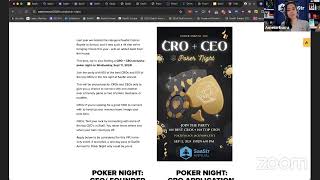
Yeah, exactly. Yeah. And in the— and in the— that's actually a great point because there's a few— there's a few points there is like, you know, whatever you guys submit to us, that is literally what they're going to print. So like if you send us where, you know, they left the guides on, because I get it, you know, you want to design around where the TV and where the tables are, like you got to have your designer though turn those layers off basically before you submit to Freeman, because otherwise Freeman will submit like guide. I've literally seen people put guide for TV. I've actually seen somebody where we caught it and we're like, hey, you probably want to turn that off. And they're like, no, we want that to print. And I was like, okay. And I will say it did not perfect— it was like not pixel perfect by like an inch. And so you could see kind of the guide. I don't recommend it. Um, again, you should just have color there, right? Or whatever your graphic is. I know a lot of you have like graphics and like a primary color, like just do graphic there. That is always the safest bet, um, in case something is not pixel perfect or something gets moved. Um, so Yeah, for submitting your guys' booth graphics, it is in the sponsor portal. There's a few ways to get there. So our portal actually cannot handle the big, big, big files that you guys have to submit to Freeman. So if you come to your task list, you'll see and you scroll down, it's like one of the last few things here. There's a link. It'll take you to the box folder. I'm probably— oh, I'm not logged in. Okay, good. I was like, I'm probably logged in. So this is the submission portal, you know, provider email, because that's basically going to do— that's going to, you know, that's going to attach you to your company because they've got a list of all of our exhibitors. So you put your— so try and put your company email. If you are like an agency or if you know your agency is going to be submitting on behalf of you, I would call out what the company is for. And if a lot of you already have it, I would call it your booth number too, just so they know exactly who this is for. Right. So if you've got like a GPJ or another sort of agency of the type that's submitting for you, make sure they say who it's for. I mean, we'll probably suss it out because it probably says your company name on your graphics, but still a good idea. To put your company name here if somebody else is submitting on your behalf and your— and their company name is not in the email. So you'll drop all your files there and then hit submit. Again, always good idea if you've got it all zipped into a folder. Again, that's the easiest way to submit into the box. So that's where you'll do that. Again, just because our portal won't— it's not big enough or our file size is a little limited. So you'll submit directly to Freeman. It's also just handy because then it goes directly to Freeman and then you're good and then just hit submit and then like you're done. Yay! Now my screen. Okay. And so that's the scoop on booth graphics. I've had a few— just last thing on booth graphics, because again, I know this is like the big deadline for next week and we are— we're going to talk about a little bit on next week's webinar, but we're going to use the rest of the time to talk about Brain Dates. There is a— so if you're submitting now, basically we do our first looks, we get back to you if there's any like if we see any spot changes off the bat. Um, and then, you know, it goes to Freeman. They do their mock-ups. Their mock-ups will include, again, kind of like those outlines for like the TV, anything that's on the back wall. Um, so you don't have to worry about that. And they'll give it back to you, and then you can either do one round of revisions— because I've had people ask this too— it's one round of revisions. Um, and then it'll go to like final, final approvals. Um, and then it is like how long it is again a little bit hard to say. And I say that only because right now if you submit it, it's not gonna take that long. Like it's only gonna take them a couple days to, couple business days to get your, you know, mocks back to you if everything looked good. If you don't hear from us and you submitted recently, that means like Tricia and I looked at it, we approved it, and now it's going to, you know, layout. If you heard from us, then you probably have some changes to make. And then once you change it, then it'll go to layout once we approve it. So if you did that again, you'll probably get yours early next week, I would say, because right now there's not a backlog. However, everyone's going to submit next week. So for everyone submitting like next Thursday or Friday at noon or Friday at 11:59, you know, it's going to take them a few days because literally we're going to get them all to review at once. They're going to get them all to put into layout at once. So in that case, it does take about, I would say, 5 days or so to get one back. And then from there, you know, they typically want, you know, 48 hours approvals, less so if you have any changes, you know, hopefully not. But if something is not as you thought it would be, then you do get, you know, one round of revisions. So that's kind of the next steps in the process for Booth Graphics. And then let's hit the next deadline, which is gonna be activation. So I'll go back to our deck for a second and just touch on activations. and the quick links that are in here. Again, this is in the chat now. Um, so again, if you need the, like, the internet form, because that's due tomorrow, that's there. Um, if you need to do the activation intake form, that's here too. That is also technically starting to be due only because we do have a deadline that we need to submit all of the permits on your behalf by. Um, and so in that case, we need this info from you so that we can fill out your permit on your behalf and then submit it to the county. So one thing I'll say on here briefly, because there's a few other like more funner things I want to get to, but just on this deadline in particular, if you are doing an activation, keep in mind, you know, it is a plus-plus thing. So, you know, it's whatever your actual activation costs cost. There is, you know, basically a combined cost here for your temporary food and health permit that is required by the county, right? They can technically at any time come and inspect us. And they typically do because we're a big event. So you are going to want to have this permit. Again, we file it on your behalf. That's why we just need you to fill in this intake form. It asks for certain information that we need for the permit, and that's why it's all on here. And then just keep in mind, like, some activations need additional power, so you would need power. And then some need storage. Some I've seen need refrigeration storage. That's like a different kind of fee than just a storage fee. So keep that in mind. And then material handling, right? So this applies both to activations and to like anything else you might be having delivered at the event center. If you're not shipping it directly to Freeman, then there is material handling of like, you know, getting it from basically the entry point of the gates to your actual booth. There is a material handling fee. It depends on how much it is, right? So their rough rule of thumb is like, if it fits into a cart, which I would say most things, you know, it's a hand cart, so it's like a I don't know how to explain. They're like the gray ones that you see at like Home Depot or whatever that you like roll through and it's like a handcart, you know? And so anyways, it fits like, I don't know, I've gotten like, depends on the size of the box, right? Like 6-ish boxes if they're heavy. Again, so that's like a cart fee so that they could do it all in one trip. But anyways, that's just something good to keep in mind on activations there. So I know not everyone's doing an activation though, so we'll we'll, we'll, we'll keep that one quick, but just keep that in mind there. I know Tricia is helping me answer some questions, which is great. Okay. We have a shuttle. Yep. We're gonna go over the attendee portal next, actually. So yeah, keep your guys' questions coming. We will either answer them live or Tricia is also in the chat just answering folks. So, so yeah, let me go through this and then I wanna hit on actually I wanna hit on a few things we added to the website cuz the sponsors, they are handy resources for you too. So one, if you haven't seen this yet, why haven't you? But no, it's okay. It's like our equivalent of a Disneyland map. It is your guide to the campus. It is 40 acres. So if you've never been or if you're a new sponsor, just, it is big. Okay. So like there's multiple entrances. Like I know sometimes people are like, how do I like kind of picture it in my mind? Like, one, if you go on Google Maps, it does have like a whole 3D satellite walkthrough thing. Like, they did the whole event center. I don't know why, but they did. So if you go on Google Maps, you can Google Earth like the event center. That'll give you a good, um, feeling for it. Um, funny enough, if you know where to look, technically if you fly into SFO on certain routes, you actually can see the— you can see the event center from your plane. I know because I've seen it. Um, and it's actually a little bit funny because you'll know, you'll know when Zastre's because all the tents are there. So anyways, yeah, it's big. So it's big, right? If you can see it from an airplane that's still coming into SFO. So yeah, it's a big space. Technically it's like 48 acres, I want to say. And we do use a lot of the acreage. So to that point, wear comfy shoes. Like I'm a big fan of trainers and sneakers. You know, it's just you got to get from point A to point B. So yeah, campus map, there's a lot of really good things on here. I'll call it, you know, all the sponsors are in this hangar west, as we call it. But a lot of attendees you'll see are gonna be going between Hangar West and Hangar East, and then the entirety of like the outside area. So Hangar West and Hangar East have, you know, all the stages in it, the sponsor hall, lunch, happy hours, the big par— the big party. I was like, oh, at night. Anyways. All right. The big party, all the stages. Yeah. Brain dates, right? All that kind of cool stuff is in both hangars. So yeah, a lot of people are gonna be going back and forth between the two hangars. It's like a rough rule of thumb. If you're like, I've never been and I'm a first-time sponsor and like, what do I need to do for arrival? So let's just say that's something you're starting to think about. I think a lot of people are gonna start thinking about this after they submit their booth graphics, but if it is something you started to think about of like, okay, am I gonna need parking? I'll go, I'll show you right now, like where to submit for parking. If you're like, okay, once I get there, where should I enter? The rough answer is it doesn't matter. Like you can answer, you can enter either way. There's tons of directional people we put out at the gates, 'cause obviously we know people are entering into one of the two main entrances. Basically, again, if you look at Google Earth or like a map, one street side is called Delaware. So we call that the Delaware registration and badge pickup. That's technically the west one. And then the east one is Saratoga. That is technically the bigger one. So that's kind of like the uber default one. but the other one is Saratoga, or if you're taking the shuttle, the shuttle drops off at Saratoga. So, good rule of thumb there. Trish just dropped it into a chat of where you can request parking. So I'll call out a couple things on this 'cause I think we've had a few questions. So one, if you haven't seen the attendee portal yet, it's in the chat. There's a lot of really great things on here that still pertain to you as a sponsor. 'Cause technically you're an attending sponsor. A lot of this we've already covered, so you've got like a leg up. Up on what's in the attendee portal. But a lot of this is still, again, really great information of like, you know, address. Just a reminder, it is indoor/outdoor, so, you know, dress appropriately and like layers. It's San Francisco. So the weather has been, knock on wood, very, very nice for the last 3 years we've done Zastre Annual. But, you know, it's something where you're like, I might need my sunglasses at some point in the day or a hat. or an extra jacket because it's like chilly in the morning and then it's, you know, calmer in the afternoon. So just, you know, accordingly of being indoor, outdoor. In terms of parking, so if you do want to park as a sponsor, and I'll go through some reasons like why you may or may not wanna park, there is this handy now parking request form. You would fill this out with your name, email, etc. For attendee type, you would pick sponsor if you're a sponsor, and then you just fill out here like what kind of parking you need. So if you're like, okay, I know I'm a sponsor, I need parking all 3 days, you're gonna click all 3 days. If you're like, I probably will only need my car maybe Wednesday, Thursday, you would just click these 2 boxes. I have seen people say, I need parking all 3 days, I'm gonna click all 3. That's okay. We'll, we'll understand that if you click all 3 days that it means 10th, 11th, 12th. I've had another question actually that was, if I'm coming for early loaded on Monday the 9th, because parking's not listed on here, how do I park? Parking's just open on the 9th, so you can come into either entrance. So either, either that Delaware one, if that's the first one that you come across, or the Saratoga one. Parking's just open on the 9th. So, um, again, it's only sponsor load-in, so you guys are not gonna fill up the massive lot that we have. So you can park basically anywhere. Um, those days they're about equidistant to the sponsor hall. So, um, again, it's, it's, you can park in either one. Um, if you're coming on the 9th, 9th. I know not all of you are coming on the 9th. If you're like, oh shoot, do I have to be there the 9th? What does she mean the 9th? You don't have to be there on the 9th. It's just we're doing early sponsor load-in. So if you're already in town, if you got somebody local and you want to load in your booth on the 9th, you can. I'll call out that those hours are on the sponsor portal as well. So if you come to the Home tab and scroll down, um, you'll see here, you know, again, early sponsor load-in. That's what I'm talking about on the 9th. It's from 2 to 6. So come hang out with me and Trish and load in your booth should you like. Or if you have anything custom, right, if you've got like booth modifications, custom orders, lots of those folks are coming on Monday. Um, but if not, you can just come on Tuesday starting at 9 and you have until 2:30 to get your booth show ready, as we call it. So you have plenty of time on Tuesday. Um, most folks just come that day, but if you wanna come hang on Monday, you can. We'll have coffee, we'll have food. You can come hang out with us. I'll probably play some music. I don't know. So you can come hang out with us should you want. But yeah, you don't need to request parking for that day if you're coming early on the 9th. Otherwise, request parking for however many days you need. We've also had a few people who said, you know, my exhibitor or vendor is gonna need parking for their activation. You can fill this out on their behalf, right? We also have our own running list of the vendors because they all made parking, but always a good idea to submit for them too if you know, again, I'm only doing Motivation Tuesday or I'm only doing it Wednesday. Good idea because we do reserve a certain amount of space for sponsors to park. So just coming back to that handy-dandy map, which is always— it's in the attendee portal too, but this one's easier. So as a rough rule of thumb, we do typically by default park the sponsors here. And that is because this is next to the Freeman Zone. So like if you come here, there's not like a dedicated Freeman receiving gate. So as the sponsor, just know by default, like this is again different for the 9th cuz we'll have people at both places, but from the 10th onwards, so the 10th, 11th, 12th, which are the main event days, um, we park all the sponsors in Delaware. If for some reason we need to overflow the sponsors cuz too many of you need to park in here, we will overflow you to Saratoga. You will need to call out for us though that like, you know, I'm gonna have a delivery that I need Freeman to handle. I'll, I'll arrive at XYZ time. So again, by default we park everybody who's a sponsor in Delaware cuz it's where the Freeman receiving is. And they can help you, you know, if you've got a bunch of stuff to get it over to your booth. So that's a good rule of thumb. I've also had this question a lot. And so we asked Freeman again yesterday, what's the rule on hand carrying? So, I know people ask us every year, like, okay, can I just park here if I have like a box? So really your rough rule of thumb is gonna be yes. Can you carry it? Can you carry it in your hand, in your hands reasonably? Okay. So I had a few people come last year where they were like, oh, I've got this dude on my sales team and like he can carry 3 large boxes like all at once. That's too much. That's a cart, right? It can't be more than a box. You have to be able to carry it in your hand and you can't be struggling with it. You can't be like, oh, I've, stuffed this box entirely full of like rocks. You know, it weighs 100 pounds and I can't actually carry it. Like you have to be able to reasonably carry it. And then it's okay. Again, it's just a union rule thing. It's also a safety rule thing. Like, you know, I've also seen people trying to overstuff their boxes and then the stuff falls out and then it all breaks and then you get really sad. So like if it's a box, my, my rule of thumb is always like, you know, if it's like a small or medium size like moving box and it's not too heavy, they're usually fine with it. Them. They're, you know, they're not there to be sticklers. It's just if they see you try and, you know, stack 3 boxes because you're like, I can carry 3 at once and they're super heavy, yeah, they're going to come talk to you. So that's a good rule of thumb. I know some people are like, you know, I bring like a— I bring some stuff in like a backpack. Okay. Like, again, you can't have like, you know, 5 luggage things that you're carting in. But again, if it looks reasonable, they are going to be reasonable too. But if it looks like you're struggling or it literally looks like it's too many, it's more than a box or a box worth, then they're gonna stop you for that. So just keep that in mind on parking. Hopefully that's helpful too. Other things in the attendee portal, because I know we're oddly coming up on time. There are overflow parking and shuttles. I know some of you have asked this. It is here of like where the shuttles run to. So much like previous years, we do run from the Crown Plaza back to the San Mateo County Event Center. We did add a stop stopped this year for the Hampton Inn. So this is a newer property that they opened. It is like on the way from the Crown Plaza to the event center. It's like 2 minutes from the event center. If you haven't booked, the last time I checked, you could still book there. I think they're sold out of the group rate, but I think you could still book. It depends on your dates, right? So like put in your specific dates. But yeah, I think the last time I checked, they still had, yeah, they still have some rooms here. Again, these are above kind of like the rates that we had, but they're still like the lowest rates. So there are still some rooms here if you want to grab the shuttle. That's typically a little bit handy. You know, people ask us like, you know, how often does the— somehow I lost my attendee portal. How often does the shuttle run? It's roughly every 15 minutes, right? There are times where they'll either be like behind or ahead of time and they'll hold the shuttle too. Like kind of like if you've been to Coachella, like they'll kind of hold it until it kind of fills up, right? If they know it's full immediately, they'll like, they'll send it right away and then come back. So they're good at managing this. There's more than one shuttle. So again, I've never had somebody wait more than like half an hour max to get on the shuttle. But if you're like, I'm a sponsor, I'm rushing to my booth, like grab an Uber. Like that is obviously gonna get you there a lot faster than the shuttle. 'Cause keep in mind too, if you're coming from Grand Plaza, like it's gonna make a stop, then it's gonna get to the event center. So yeah, I would factor in about half an hour of time. You're taking the shuttle, it is free, right? If you, if you're getting on it. So, um, there is that. So it will save you some Uber costs. It does say free here, but again, if you're rushing to your booth, maybe not something you wanna do. Um, in the mornings it's usually quieter cuz you know, sponsors do have early access in the mornings. It's usually nice and quiet on the shuttle in the mornings. It's like, it's like sponsors and like crew members. So. It's usually pretty nice and simple in the morning. I know sometimes, you know, if you guys are going other places, whatever, in the evenings on your way back, sometimes people don't always take the shuttle back. So it can be quite— it's, again, it's a quick trip. It's, you know, no more than 15 minutes from Crown Plaza to San Mateo. It's, it's really not that far. So it does constantly loop. And then if you are taking an Uber or rideshare, right, you can technically drop off in either location. You can also just put in, you know, San Mateo County Event Center and they they, they'll drop you kind of where they know. So that's the scoop there on that. A few other things I wanna cover on this in our last few minutes, and then we'll hit any questions if we missed any. Networking. So we talked about this a little bit, but we are gonna do, we're gonna use next Thursday's SAS Reinsider just to talk about boots 'cause they're due the next day and then Brain Dates. So the rest of it will be all about Brain Dates. We'll do a full walkthrough, we'll show you guys the platform, and then after that webinar you'll be able to log in. So that'll be super fun. Fun. So, um, we'll talk about this again. It does take some time, so we're going to use next Thursday's dedicated to talk about brain dates. Um, and we'll talk about— just, we'd be remiss if we didn't talk about booth graphics because they are due the 15th. So it will open, you'll see, to all attendees on the 19th. It is going to open for sponsors next Thursday. I know some of you are like, I can't even think about this till my booth graphics are due. That's fine. Like, we're going to be recording that session As we do all of these, you know, we'll send out the web, like the recording of it. You guys can watch it back. There's a lot of like, you know, good tips and tricks just about Brain Dates and to maximize networking. So we will do that there. So super handy there on Brain Dates. Other things you can participate in as a sponsor. So I've had, again, a few people ask me like, we'll go over bag policy next time. It's a little different for sponsors. Like, you know, I kind of heard there's like other events or like side events or I'm hosting a side event. So I'll kind of walk you through some of our official ones real quick. So if you are on saster.com or if you haven't been on it lately, or Saastr Annual, I should say,.com, there's this handy dandy networking tab now. So you can see a few different things we're doing that are invite, basically closed door like events within the event. So one is poker nights. If you guys haven't seen this yet, we are Some of you have, because I saw you submit your CROs or your CEO. Like, if you have not yet submitted for Poker Night and you know your CRO or CEO is coming, definitely either have them apply or apply on their behalf. There's two different ones here. So there's one for CEOs and founders and one for CROs. We are doing a Poker Night on Wednesday, September 11th at 4. It does roll into the big party. If you're a sponsor and like, you know, your CRO is already registered, cool. You know, we'll get them all the information they need to come to Poker Night. Same thing for your CEO. If they're not already registered and we see them apply, that's one of those things too where like we are starting to register like your CEO if we haven't seen them. Yeah. So you're like, okay, I, I don't know, let's just say I'm the CEO of Google Cloud and I haven't registered yet, but I submitted for Poker Night. Like we'll register you at the same time. So anyways, good thing to take advantage of here if your CRO or CEO is coming. This is one of our events within the event. So how these work for any of them is they are technically closed door sessions. Like we do gated access, we check the guest list. So there's gonna be somebody checking a guest list. So if you're like on site and you're like, oh, Trish and Amelia, I forgot to submit our CEO. Like it will depend on capacity cuz they are also capacity constrained. So good idea to do this now, submit for Poker Night if your CEO or CRO is coming. And then they'll get all the info of how to attend. Now I've had a few people oddly ask like, can I go with my CEO to Poker Night? No, not, I mean, unless you're the CRO, then you can go with your CEO to Poker Night. Other than that, all these micro events are, like I said, pretty much like events within the event. They are gated and access controlled. We will have a guest list that we will be monitoring. So yeah, one of those things where if you, if they are coming though, cool. Other one we're doing is the CCO meetup. You guys might have seen this. We've been talking about it a lot. We're doing a CCO meetup for the chief customer officers or whoever runs your customer success team. Some, some of you that might be your VP of sales. Some of you that might be your, yeah, maybe you have a director of customer success. Good idea to apply for the CCO Summit. It does have its own agenda, so keep that in mind. It does take a bit more of time than Poker Night, right? Like Poker Night's cool. It is also during happy hour. So if you're like, you know, I'm gonna lose my CEO and CRO to poker night during happy hour, you may wanna make sure you have like enough people in your booth at that time. 'Cause happy hour is a really busy time in the booths. But there's also CCO Summit. There's 2 more. So there's CMO brunch. So again, if you're like, my CMO's coming but not my CRO, have them apply for CMO brunch. That's on Thursday. So again, you can— these are all off the nav here now, so you can find them. And then the last-ish one is CFO summit. This one's on Wednesday. If you've got your finance person, or if you want a good reason for your finance person to go, this is a good reason to do it and bring your CFO to Snaster. And then kind of the last two ones are Brandeis, which we've talked about, and then Meet a VC, which technically as a sponsor you can apply for, or you can have your leadership team apply for. It's just meetavc.com. This is where they can apply to meet with investors during SaaStr Annual this year. Handy URL, just meetavc.com. All right, with that, I know we're at our time mark. I think we've gotten through all the questions. I'll stop sharing anything else, Trish, that that I missed, or that you wanna remind folks?
No, we did get a lot of questions just about the vendors needing parking for activations. So I'll follow up with each of you individually around what's still outstanding for your activations. So no worries there. If you are planning on doing an activation or even giving away any kind of food in your booth, reminder, you have to fill out that activation form, and we still have to get minutes, even if it's just packaged candy. So we've had a lot of—
yeah, good call out.
I'm sending candy. You cannot send candy without filling out the form. So if you are unsure, just send us a question.
But I think that's— yep, that's a good call out. Um, cool. If you guys have any, like, obviously specific question, just email events@saastrink.com. It goes both to myself and Trish, plus a few other folks now on the events production team. So that's the best way to get both of us Or I've seen people do all three. I've seen like Amelia's Asteroid plus Tricia's Asteroid plus Events' Asteroid. Totally cool. Either way works. It gets to us. Yeah, obviously if you guys have specific questions, let us know. Otherwise, you know, main takeaways from today will be making sure you order internet because that's due tomorrow and then starting to work on your graphics if you have not already, since those are due next Friday at noon Pacific. So Those are some of the immediate deadlines. Excited to talk to you guys about Brain Deez next week. I think that'll be good. And then, yeah, as always, these are recorded on our Saastr YouTube channel. So you just go to, you know, go to YouTube, type in Saastr, go to our page. It's under the live tab. If you're ever wondering, it's just there. I know Trish sends them out in her weekly emails too. Yeah, that is all for now. Thanks for all the good questions and for your attention and watching these. I know these are long, but, you know, hopefully super informative to get through your guys' questions. And as always, you guys know where to reach us. Happy August, you know, 33 days. So get excited. Again, Indoor/Outdoor Festival. If you haven't thought about your swag yet, probably order it now so you get it in time. And yeah, looking forward to seeing all of you there. And we will see you next Thursday. Thanks, everyone. Bye, everyone.
More from Jason
Why Your Next Hire Should Report to an AI, Tragedy Apps, and Too Many AI SDRs? | The Agents #004
Our Agents Drove Our Salesforce Bill Up 80%, Marketo Hates Agents, and We Stealth-Churned Off Notion

Managing 20+ AI Agents: Lazy Agents, Our $500K AI Bill, Stealth Churn & the Death of 60% Solutions