SaaStr Annual 2024: Unveiling the 2024 Campus Map & Much More
The video is a comprehensive sponsor briefing for SaaStr Annual 2024, delivered by Amelia. It walks sponsors through the sponsor portal, key deadlines, and logistical details for the 40‑acre campus. The main points include: (1) immediate sponsor portal tasks (logo, address, POC info) and the booth artwork deadline of August 16 noon, with late‑fee consequences; (2) booth selection timing by sponsor level (Diamond → Gold) and the 48‑hour window for each wave; (3) optional activation opportunities, the selection order, cost components (power, water, permits, insurance, vendor fees), and guidance on custom activations; (4) detailed campus layout, entrance options, shuttle/uber drop‑offs, coat‑check locations, tram service, and recommended meeting spots (Sasha Square, Midway Picnic, Camp Hexy Cool Zone); (5) customer‑pass program (eligibility, nomination process, spreadsheet workflow, usage rules, and how extra passes are allocated if not on contract); (6) lead‑capture setup using the CapTelo app, admin nomination, real‑time field configuration, and timeline for portal access; (7) shipping logistics for swag and booth materials, including Freeman warehouse cut‑off dates; (8) Wi‑Fi and AV ordering, hard‑line options for higher‑level sponsors; and (9) reminders about badge requirements, monitor placement, and upcoming weekly sponsor webinars. The briefing ends with encouragement and next‑step reminders.
Chapters
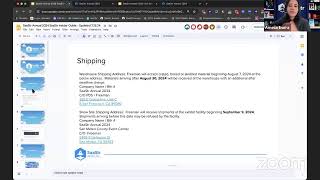
in the sponsor portal or in this kind of insider guide deck that we've been putting together that I'll drop into the chat as well. So without further ado, let me share my screen and we'll get into today's reminders. So let me share here. Okay, perfect. So, all right, just to go through the timeline, I like to start here every week just in case you're new here or just joined or just signed your sponsorship. Just to know what is the kind of latest and greatest. I'll be flipping back and forth between the portal and these slides just for folks to know. Again, all of this is in the portal. But right now, really, what's ASAP is there are a few deliverables in the portal. So if you have some red showing on your sponsor portal, it's because there were a few things that are already due, like logos, addresses, main POCs, things like that. We'll talk about this in a little bit, but the booth selection has started. So we'll go over the updated map and kind of what this means for sponsors. And then the next timeline being that on starting on August 1st, which is next Friday, I wanna say, we will start to collect your information for lead scanners, which we'll go over briefly. And then really the big, big deadline to keep track of is that on August 16th by 12 noon, this is a Friday, that your booth artwork is due. To Freeman. The link is in the sponsor portal to the Freeman Dropbox that you'll put it in, because the files are quite big. If you do not— we've had a few folks ask us, like, you know, what happens if I'm late? I understand there's these fees, you know, that apply. These are kind of the fees by the level that apply if your artwork is late. Kind of what happens then? So what happens then is you really buy yourself about a week of time if you are still late, you know. We do send these things to print. And actually, San Antonio has a fairly long load-in time. For those who don't know, it is a 40-acre campus. It takes about 2 weeks to load in, meaning, you know, we are on site already September 1st, which is why this deadline is the 16th. Because if you think about that being 2 weeks from, you know, when we're actually going to start building things, it does take about, you know, a week or so to get proofs back to you guys, get it all approved if you need to make any changes, and then send it to print so that it's ready to build when we show up on the 1st. So that's So that's why that is that date, just for those who are curious. It's 'cause we do have a longer load-in time, you know, again, massive 40-acre campus. And it does, you know, really buy you about a week of time to still send in your graphics, but they are still gonna need them, right? Fairly soon after that fact. So that's a big deadline to be aware of 'cause that one does have a late fee attached to it. Other than that, on August 23rd, lead scanner access will be available for all the admins. So that's what we'll start to collect the admin information on August 1st upcoming. And then by September 2nd, I know a A lot of people have been asking like, what's the deadline to register your staff and your code? It is September 2nd. Again, to that point of, you know, we'll already be on site kind of building in. That's why that is that deadline. So you do need to register by September 2nd for your teams. So many of you have been in the sponsor portal. So I'm just gonna go through a few things that are new. So one being that we have uploaded this week to the sponsor portal, the full campus map. So I know a lot of folks have been asking, about this. And like, you know, they've— you guys have probably seen the booth map, but maybe not necessarily the whole campus and what's happening all across SAS Re:Annual. So I'll go through it real quick just so folks who, you know, are new or even if you were a sponsor last year, some things have moved around. I always preface this is not to scale. So again, it's 40 acres. This is a very pretty graphic that our designer made, but it is not to scale, right? So, you know, some things are sort of to scale, but it is 40 acres. So it doesn't do it justice of like how big it is, or, you know, how big these hangars are, which I'll go over in a second, or how big these tents are outside and the entirety of the campus. So just know when you go to San Mateo, as I just did last week, and I've been many times, I'm always impressed of how big it actually is and how big it feels once you get there. Because We spend a lot of time just staring at maps, and then you get there and you're like, oh yeah, this place is pretty big. So a few things for folks to get their bearings. And again, this is now on the— this is now on the sponsor portal. So if you go into it, you can download this and save it should you need. So a few things to note. There are always multiple entrances to a SASTR Annual. We really just name them the Saratoga registration entrance and the Delaware registration entrance. That's because again, it's a massive campus. And so where the San Mateo County Event Center is literally like multiple blocks. So these are the streets that you can enter on. I will say it does not matter which one you enter on. There is a designated like Uber drop-off in each of these lots. The shuttle, if you guys take the shuttle, will drop you off at Saratoga. And then if though, I know we've had some people ask about requesting parking, it's a little bit too early to do that. So we'll be releasing that on like an upcoming webinar of how to do all that. Just know it's a little bit too early to do that now. But we will be assigning sponsors parking in either of the two lots because you can get to the Hangar West that has all the sponsor booths in it quite easily. We do kind of default to using Delaware as the main sponsor lot as much as we can until it fills. So that's typically been the main one. And then Saratoga is the much bigger one that we use for a lot of things, including registration there. So really all that means is like, you know, if you've never been to the venue and you want I don't wanna just glaze all over this. It just means like when you are Ubering to the venue or using any sort of rideshare, just know that there's two addresses and it really doesn't matter. Sometimes even if you put in a specific address, your Uber driver may go to the address that they know from dropping off at the Event Center. So just know it's just gonna orient you on what side that you enter the building and the campus, but either way is fine. Cool. So that's, that's the situation on registration and badge pickup. The one thing I'll say as a reminder, as you're registering your teams, everyone does need their own individual badge. So good thing to keep in mind here that everyone again needs their own badge. There's strictly no badge swapping because everybody has to go through registration each day. This includes day zero if you're coming early for sponsor load-in. So you do need to make sure everyone has their own badge and named. We don't do ticket transfers after, you know, we don't, post-event or during the event. So you'd have to, you know, email events@safestrank.com beforehand if you know you need like 1 or 2 extra tickets 'cause you're gonna be shifting people since we don't allow for badge swapping. Okay, so that's a note there on registration. The next thing I'll say is like, again, if you've never seen this before and you're like, what do all these little clouds mean? There is a directory down here at the bottom, which I assure you is much more legible when you open this up full screen. It's just 'cause I'm on a slide, but I'll walk you guys through kind of what this means and, and, and where you're gonna spend the majority of your time. And then a few tips and tricks, right? Because a few, a few folks have also, also asked us like, okay, how do I, you know, make the most of this if I don't wanna be in the hangars all day? There is a lot in the hangars all day, but then there is also, you know, the rest of the property, which is again a massive property. So I'll talk about the hangar. So there's Hangar West and Hangar East. We do connect these two. This is where we had a lot of footfall and a lot of traffic last year. And so We've kind of updated and upgraded how we, how we position things this year just to take advantage of that traffic, right? By combining the sponsor halls into one this year into Hangar West. And then we put two, our two like biggest stages in this hangar. So that's what that means is like Hangar West has, you know, the two biggest stages, the sponsor hall, and then what we call our cantina, which is really our main attendee like hangout area, food and beverage area, lunch, right? Lunch is in there. And so it's gonna be a really vibing place, I think even much more so than last year. Keep in mind though, you know, it's gonna mean also that there is constant foot traffic because there's gonna be people going to sessions, there's gonna be people going to lunch, there's gonna be people hanging out in there, there's gonna be all your fellow sponsors. And so just know it's gonna be, it's gonna be vibing, it's gonna be probably a little bit loud. And it's gonna be, you know, kind of the main area will be Hangar West. So That's the first hangar. There are two though. So there is also Hangar East. If you don't memorize these, it's fine. One is slightly the bigger building. Once you get there is Hangar West. We also label these on site with like big banners. And then yeah, the littler one next to it you'll see is Hangar East. So they are next to each other. You'll, you'll kind of see them once you get on property. They literally look like hangars or like You know, so if you can imagine that, that's what they look like. So Hanger East has, you know, all of our networking. Basically, it's got two more stages, the Brain Dates, the Founders Lounge, the Not So Secret Speakeasy, a bunch of things in there. So really, people are going to be going back and forth between the two, right? And so this is the idea is between the two hangars, people are going to be going back and forth constantly to go to stages, to go to networking, to hang out in the lounges. Based on previous years and having done this, I think, 4 times now at the event center. 4, yeah, 4. People do use the entirety of the campus very much so. It has what I like to call a Disneyland effect of like, you know, once you get in, it is a lot of people and then people kind of space out. They find their own zones that they like, you know, you might like one area of the campus a little bit better than the others that you kind of just gravitate towards for the 3 days. Obviously, as a sponsor, you're gonna be spending a lot of time in the sponsor hall. But you might also be going to content, right? You might be going to stages. A lot of folks have been asking us lately, you know, where's a good place to take a meeting? And so I'll kind of point those places out now. So in the campus, I would say it's always my preference to go have a meeting outside, you know, in between being in sessions and lunch and in the sponsor hall or at the big party, like, Those things are inside and then we have a stage outside. You are going to get some steps in. You're going to be indoor, outdoor throughout the day. When you're coming into registration, it's outdoors. Another thing just to bear in mind is you're probably going to be outside and inside for a bit of the day. But yeah, I think a really great place to take a meeting is any of these spaces out here. Sasha Square Park, which we'll have an adoptable dog lounge in for some of the time, is a good place. It's really like our version of a Central Park or a Golden Gate Park. And it's already naturally treed and we, we kind of make it a cool area to just hang out. Our Midway Picnic is exactly that. So it is a picnic, it's a lunch spot. It's a really great place if you need to take a meeting over lunch. That's a really great place to do it. You know, we fill it out with benches, we built some bars. It's, I, I've been known to hang out there myself a little bit. It's a cool place to be, you know, it's, it's vibing, but then it's shaded because it's scented. So it's a great place to take a meeting. We also have some additional lounges, right? You know, like the VC lounge is back here in the AMA stage. So there's some cool stuff going on there. And then something new we're building out is like what we're affectionately calling the Camp Hexy Cool Zone. So for those who don't know, we do have a hexagon mascot. Its name is Hexy. And so we're building out like the kind of this cool zone because for those who don't know, it's been a little bit warmer lately in the Bay Area. So take advantage of, you know, being indoor-outdoor. That'll be a cool place if you want to do maybe a non-conventional meeting of like, you know, we had people literally take meetings over a game of volleyball last year. So that kind of thing. So that's the vibe in the Camp Hexi Cool Zone. Last thing I'll touch on is, again, I think I mentioned it a little bit, but it is a massive campus. So, and it is— there's different surfaces. So, you know, there's grass in certain areas, there's concrete, there's, you know, floor, there's carpet, there's a lot of different surfaces you're gonna be walking just, you know, in the span of the day. I would definitely wear appropriate shoes so that, you know, you don't sink into the grass or have an issue getting from one side of the campus to the other. There is a tram that we actually do that like loops around the campus, which makes it a little bit easier for, you know, trying to go from the AMA stage back to your booth and you're like, I gotta get there quicker. It can take you a little faster. So there is a tram that goes like literally in a loop the entire time. But other than that, yeah, I would say again, dress appropriately 'cause it's indoor, outdoor. Where are the best shoes to match that. And then a few folks that have asked for, you know, shuttles and then coat check and that kind of stuff. We will be releasing the shuttle and parking schedule again upcoming in the next one. There's a, there's a few other things I wanna hit today. And then just last thing on coat check, different than previous years, we are gonna have multiple coat checks. So there's gonna be basically one at each registration. It does mean that your stuff is not really accessible throughout the day. Like, you know, it's outside of the campus. So I know a lot of folks have asked, you know, if I have to leave Thursday as a sponsor, is there somewhere I can drop my luggage? And yes, there is, right? There is coat check at the registrations. But just know, like, if you need something out of that bag, you're gonna need to exit to get it and then come back in, which again, not a huge issue, just a little bit more of a walk than last year. This is just due to some additional safety that we're taking and keeping keeping people's stuff, you know, big bags, because a lot of you brought really big rollers last year, kind of more so towards the entrance. It actually will help too in the fact that like then you don't have to wheel your stuff all the way through the campus to where coat check was last year. It'll just be at that registration. So then, you know, when you call your Uber to leave, then your bag is right there and you don't have to roll it anywhere. So probably be a little bit more efficient. And then I'll talk about booth selection. So in those two hangars I just showed you guys, there is one that is, you know, so I'll go back a second. So this is Hangar West that I'm gonna talk about now. So I'm basically gonna show you a zoomed-in version now. So this is the zoomed-in version of that hangar. And really, you know, you can see the same kind of markings and landmarks, if you will, to know and get your bearings. But basically what this means is like we have started booth selection. For those wondering like, Is it my turn yet? Can it be my turn yet? I understand this is a slow process and it's because once it is your turn, anybody who's in that wave does have 48 hours to choose and we do it in order of level and then contract signature date. So, you know, the top level being Diamond, the next level being Platinum Plus and Platinum, then Super Gold and then Gold. So at this point in time, just to give an update to folks, right, we have the, um, Diamond Slotted, the Platinum Plus. Um, I think we've got some choices from Platinum back, but they have one more day to confirm. Um, and then we'll be starting on the Super Golds and the Golds, um, concurrently. So I would estimate by Monday, if, you know, you kind of renewed early last year, then, then it'll start to be your turn to choose. Um, next week for, um, Supers and then also Golds. Um, the other thing we're doing, um, a a bit concurrently, so far, but I know that's about to jump the shark, is activation selection. So let me just flip to where this is on my slides and reshare here. So activations are not mandatory. Activations are not mandatory at Jasper, but we have changed the process year over year. So Um, much like booth selection, we are doing it in order of level and contract signature date. So again, I just rattled off the, um, levels to you guys, kind of the eligible levels for activations are Diamond, Platinum Plus, Platinum, and Super Gold. Um, we do have a deck which you might have seen in the portal, but, um, I'll show it to you guys here as well. Um, and so we are doing this in the same, again, We're doing it in the same order as booth selection. It does mean though, like that, you know, really for the super gold sponsors, right? Like you may start to fall out of order of, you know, if people take a little bit longer to pick activations than they do booths, then you, you know, you might be eligible next week to start to pick your booth, but maybe a few days later you'll be eligible to pick your activation. Again, it's the same order of things that we're doing it in. So far folks have been, you know, on the same timeline of they've picked their booth and their activation at the same time. Nice and easy. But I anticipate now that we're going into bigger waves, it might take a little bit more time for folks to pick their activations. If you want to, I'll say this too, it's not mandatory, but this slide here, because it kind of shows, you know, last year of the difference in leads of gold versus, sorry, of activation versus non-activation. For those wondering about the golds of like why this chart doesn't have it, technically the golds are not qualified for an activation at SAS Re:Annual. I'll asterisk that in saying, you know, there are a few Golds that are bringing in more custom swag that you might consider an activation. But roughly as a sense, it's not something that fits in a 10 by 10 plus your staff. That's not a lot of room, to be honest. So we typically do not see Golds do activations just for that reason, right? There's not really the space for it. Basically, by the time you put something in the booth of a Gold and the people there's no room for prospects, right? It's just not inviting for other folks to, to come by and talk to you if they can't really go into your booth. So that's, that's hopefully explains that. And then for the process, again, for Super Golds and up, we do try to keep it to one activation per sponsor. Again, not required. We do have a deck that I will show you guys. That's actually this one that has the activation. So I'll just show you guys a few examples so you can see what we mean. Again, I've kind of walked you through the process, so that's what this slide is. I will say a few things on what next steps are for activations in case, you know, you are in line to choose. And, and a few people have asked us, okay, well, I want to do this activation, what happens now, right? So we will work with you in confirming any of the vendors you see in this deck for the activation once we know it's confirmed that it would be your activation to host at the show. Again, it's kind of like a booth. It's a booth activation. And then this is, you know, all at cost to the sponsor. So again, that's why I say it is not required. It's not something that SASSTAR is providing necessarily. So it is something that is at cost to sponsors. You'll see things in here that are at different price points. That's because we know sometimes people have different, you know, different, different needs or wants or goals. There's also, you know, the price points in there are for suggested schedules. You don't have to follow that. A lot of our suggested schedules are, you know, during happy hour, during the opening reception on the first day. Yeah, there's gonna be a lot of people during those times, so it's probably a good time to do it. But you can also, you know, we've had some people go counter to that and say, I know everyone's gonna do theirs during happy hour, so I'm gonna do mine not during happy hour. Either way is fine. It's just all activations at the end of the day do need to be approved by SaaStr. And that is because there are some additional steps, even when you say to us, like, you know, I want to do whatever activations on this deck. I'm gonna say cupcakes as an example. So you say to us, you wanna do cupcakes, you know, we say to you, okay, great. You know, the other sponsors in your way have not chosen that. So we're securing it with you. We work with you on the final costings. And that, again, I will remind folks, is a plus plus. It's a pass-through cost. We're not like adding on additional costs to this, but just know that there are additional costs that you would be eligible to incur if you do an activation. Again, they're not steep, but there are additional costs. I just wanna preface that. To people because I think a few folks are newer and they were like, oh, I choose an activation, I just have to pay like what's on the slides. Yes, you have to pay what's on the slides, but there's a few other things you have to pay. So there's things like, you know, if eligible, power. So not all of these need power. Some of them do, you know, a power drop is a couple, couple hundred bucks extra in your booth. So that's one, right? So that's a couple hundred bucks there. If you need water, that's, you know, most of them don't, but a few of them do. That's kind of a tricky one because water, you is not on a tap where your booth is. So again, that's another couple hundred bucks if it needs water. You typically don't need water and power. So it's, you know, and not all of them need power. I will say a lot of them come kind of self-contained, but some of them do need power cuz they're cold, for example, and they need, you know, the power for the coolers or refrigeration. Refrigeration and storage. Again, like if they need to store things overnight, there's a, there's a, there's a small fee for that. Beyond that, there is a permit fee that is charged. This is something we help all the sponsors filed. So there's a San Mateo temporary food license. You do need one. It is required. Trust me, the health vendor comes to San Jose Annual all 3 days. So that's not something we can get around. Again, that's not an us requirement. That is a county requirement. We help you fill it out though, which is quite nice because I know it's sometimes confusing and it's easier for us to help you fill it out. You just sign it. So we help you fill it out once you've secured your activation. You know, we'll fill in all the details of, you know, your hours, who you are, all that stuff. So we may ask you to— what we were doing now is having folks fill in a questionnaire because there's basically some stuff we need from from you guys in order to fill this out for you and then have you sign it. And then you pay the fee. It's like, I think, $200, and that goes to the— that goes directly to the county. I can't— we don't even collect it. Like, that goes straight to them, um, there. And then there's like a small fee to the venue, I think, for bringing in activation. So again, small fees, right? Altogether, I haven't seen it more than, you know, a couple hundred bucks so far. It also depends on how much you're bringing in for the activation. So, you know, keep in mind these are all suppliers that are coming in You know, they might need to bring extra boxes, extra stuff, and need to rent carts from Freeman. So just keep that in mind. The other thing that is required for all sponsors who do an activation— again, just a consideration, not that we're not helping folks do this, and that a lot of people have been picking activations. If you do an activation, you do have to have insurance. So I know a few folks are like, you know, We're an earlier stage startup. I don't want to get insurance for the show, or it's too late for me to do it because I can't add it to my policy. Usually though, you know, your policy people can add it pretty quick. It's typically something that, you know, you're already covered for. The insurance coverage is not high. It's really just $1 million. Most of you have more than that already. So what you would need to do is, you know, in this process that we go through with you to confirm your booth activation is you would just need a COI. So there's a certain like verbiage thing we'll give you if you need, you know, you need a COI that names Soundster in the venue. So that we're covered. Again, that is just something that you need with the county plus that temporary event health permit. So again, not our rules, that's something we help you do, but that is something to be mindful of, right? Like, I— everyone has different insurance policies. If you don't have one, then that's going to be an added cost. I would say most of you do so far that have picked an activation, and so it's just getting a COI, which is, you know, just calling your rep and asking them for one. But it's something to be mindful of. It's like, you know, that you don't have that and you're like, I don't know if I want to just spring for insurance just to have an activation that is food, then something to consider, right? You could do still like swag, and I know a bunch of people are doing like raffles and giveaways, and I think someone's doing like a scavenger hunt. So again, there's ways to get around that if you're like, I don't want to deal with this process or those fees. You know, swag is your friend. That's where you can lean into things like that. But this is specifically because there are food rules, right? So food kind of like additional rules there. And I know some of these are like not necessarily food, they're like games or, you know, screen printing, stuff like that. That still kind of counts in this. So not that those need a temporary food permit, but then they need like a temporary event health permit of like, you know, you're not doing weird things at the event. So anyways, all that to say, I just wanted to call that out of things for folks to be mindful of because there is, you know, additional steps that between myself and then Trish, who I know you, a lot of you guys have met, are helping our vendors do. So we've had people already pick activations, right, as part of their booth selection. We're helping them through all this, you know, fill out all the, fill out all the forms for them. Just get their signatures right, help them with any payments that might be upcoming, badge the vendors. And but, you know, the insurance is something we will give you the guidelines, but you'll have to do. And then, yeah, again, I just wanted to call out the insurance and then any additional eligible additional costs, because I don't want you guys to be surprised, right? If you're like, okay, it's my turn to pick an activation. I've looked through this deck, right? I see something that I really want to do. Like, what is my all-in kind of cost, right? My all-in kind of cost and effort to know if it's worth it. And then, yeah, I've had also a few folks ask me, like, and Trish too, like, is it worth it to do an activation? You know, I would say this chart speaks for itself. So yes, I get it. It's extra work for you guys. It's extra work for us. I get it, but we're, we're all doing the extra work together. So hopefully that helps. You don't have to do the extra work yourself. I think it's worth it. Again, we do try and keep it like one thing per sponsor so that it's more unique. I've also heard of folks that are just bringing their own kind of more custom activation, right? It doesn't have to be something in that deck. You can just ask us if it's something that you've been eyeing or that you really wanna do, 'cause it ties into the brand and theme of your booth. That's okay too. Just let, you know, me and Trish know. So we can help you bring it in, you know, see what eligible things you need to bring it in and work with you from there. Because I know a lot of folks are like, you know, I want to do something that's a little bit more custom because it ties into my product, which is totally fair, or it ties into, you know, the branding of our booth because we've got this thing in our product that does XYZ things. So we also have seen, you know, a lot of folks do kind of more custom things. So again, you don't have to use this deck. It doesn't have to be food. It can be something a little bit more custom to your product if you've already got it or for something you're thinking of. Again, we can also— it's something that we've helped folks with. If, you know, a few of you were like, I looked at this deck, I don't really love these, but what about this thing? And we're like, yeah, well, like, we know, we actually already know a guy. Or if you already have sourced that person, I'm like, wait, between Trish and I, we know some people. So if you see something or if you see something that's not on there, it is probably something we can help with if you haven't already sourced it yourself. A few folks were like, I've got a guy for this that I want to bring in and it's on the deck. Can I do it? And so yeah, we've worked through a few of those too. Okay, the other thing I'll say related to booths, just because we're talking about it, and I'll talk about customer passes and then answer any questions, is obviously, again, big, big deadline being that August 16th deadline to upload your booth graphics. This will depend on your level of how many panels and things you are designing. I call this out because I think a few people have missed this. So there are 3 resources to design your booth. There's not just these at-a-glance specs. Which again are great in 3D, but it's actually meant to be used together with the SLX and the booth graphics artwork submission guidelines. So these 3 things are the 3 things you're gonna wanna download. And if you're like, oh, I've only given one of these to my design team, maybe send them the other 2 today just in case. So it is something that is super helpful. It's in the resources tab of the sponsor portal. Again, you'll come in here, you'll see other things which are very helpful too, but for the purposes of your booth, you want these bottom 3 ones. So these are the ones to download, right? Um, they're quite big files. So you'll see like the slicks though, um, of note, um, have like, you know, how much space between the header and the TV. If you're super bold, that lives on the slicks, right? That doesn't live on the at-a-glance ones. And so I say, you know, download all 3, give all 3 to your designers. They do match up in terms of specs. It's just that the slicks have more specs than the at-a-glance ones. And the at-a-glance ones have more 3D. So use them all together, right? So just calling that out, they are all meant to be used together. I'll flip to Super Gold for a second. One question I think we've been getting lately as well is, you know, monitor questions. So this is what is standard, right? In all of these slides, you can see what's standard by level. So, you know, a Super Gold's got one monitor. Some people are like, does it have to be on that side? Can I move to the other side? I'm like, well, what are you doing in your booth? Right? Not that you can't move it, but you know, if you do need space for an activation, maybe you don't wanna cover the TV and you wanna have like your meetings over here cuz it's your only monitor. A few folks have said, I want no monitors. That's fine. Just tell us so that we can say, you know, no monitors in your booth. And you know, for that case, you could just design the whole thing. You don't have to— this whole A panel, which is 156 by 95. Just design the whole thing, right? There's no monitor to cut out. So then you could just do the whole thing if you don't want a monitor. Super easy. The reverse of that being a little bit more complicated is if you wanna move this monitor. So if for some reason you do wanna move this monitor, we do need to know now because the specs you have and those slicks that I just showed you guys will not have your monitor if you for some reason turn it or if you move it. So again, that is super important. If you do plan to move your monitors, I know sometimes people will just submit their graphics with their monitor moved. You can roll the dice that way. I probably wouldn't because, you know, it might not be pixel perfect to like where your cutout is to the TV. Some folks though are like, you know, I've left enough gray space here. I'm not doing like a wrap around the monitor on the booth, so it doesn't matter if it's not pixel perfect. I've seen people do that. That's fine. You know, obviously we do look at all the booth graphics, so I will see if you either don't have a monitor or if you've moved it. It's just something where, you know, if you have moved it, it may need a round of revisions if it's not exactly exactly where it's meant to be. So better to let us know if you forgo it. Again, that's less, that's less of a stressful thing to let us know. Obviously we'll see on your graphics there's no TV and we'll say, okay, there's no TV. A few other folks have asked us about like, can I not do this monitor and do one like on a stand or do an additional one? It's not that you can't. And we're adding the, we're gonna add the AV order form and the internet form to the portal today. So you guys will see that later in our our follow-up and recap email, 'cause we email you, you know, not often enough, is yeah, you can order TV on the stand. I tend to shy away from it. It's dealer's choice. You can do it. The stands take up like 3 feet. So again, like even the Super Gold, like if you're going on activation, now you've got your monitor on a stand, you've got the welcome counter, which is, you know, a meter. Like you're gonna run outta space. It's gonna start to feel more cramped than you think. I know these all look very pretty and then you got 'em saying, you're like, ah, this is less space than I thought it was. So just something to be mindful of, right? You can do it if you're like, no, I really just want on a stand so I can like move it around and like whatever, like have different things throughout the day on it and, you know, have more control over it. I totally get it. Just know again, you are sacrificing space to have that monitor on a stand. So cool. There's other things in here. I will drop this slide deck into the chat momentarily and then we'll also put it into our recap. Okay. So a couple last things I wanna talk about, cuz we, we, we are hitting these as reminders based on things people have asked us this week. So maybe you're one of those people. Customer passes. So let me actually drop this slideshow. Oops, that's the wrong button, Amelia. Let me drop this deck into the chat. Does anyone have the link? Okay, cool. So I'll drop this into the chat, everyone. Oh, wait, Wait, hold on. Chat everyone Zoom. Okay, sorry. All right, so you guys got this deck. I will say we do keep this deck up to date for these webinars. So this will be the same link week over week. You'll see like I updated it, you know, for today. Oh, you're all here. Okay, so I updated it for today. You'll see when we update this, we add things to it. We keep this as like a living, breathing document to use with the portal. Again, this links to the portal. The boost selection activations. I'll also drop into the chat. It's linked in the portal, but I'll drop it into here too. There you go. There's the other one. So now you guys have all the decks that I'm on. Cool. All right. Cool. Good to see you all on Google. So yeah, we did even update. We add things as people ask us. So, you know, feel free to refresh it or just come back on Thursday and I'll walk you through what's changed. All right. Customer passes. So we've gotten this question a it. And so wanted to go through this process real quick. So for those who don't know, we started customer passes 2 years ago, um, in honor of— it was saastr.com's 10-year anniversary. Um, not to be confusing, it's the 10th Saastr Annual this year. Just that the saastr.com started before the annuals, so it was 2 years ago and now it's the 10th ever Saastr Annual, which is super fun and cool. Um, so yeah, that's exciting. So now it's the 10th Saastr Annual. We've been doing this the last 2 years. We've always gotten really good feedback on it, so much so that in 2024, most of you already have this on your contract. So we did make it like an official program more so this year than previous years. So a lot of you, I will say the majority of you, because we did not— it already have customer passes on your contracts. And so what will be happening next if you're like, oh yeah, I do have those customer passes on my contract. So if you're in that, boat, and then I'll talk about if you don't have it in a second. So if you're in the boat, if you're like, oh yeah, I kind of remember on my Super Gold or whatever that I do get these like, I think it's 5 or 6 customer passes to use and I haven't thought about it until right this moment. That's fine. So I'll walk you through the process of how it works. So the, again, so the number of individuals you can nominate will depend on your contract and level. Like I said, most of you already have this on your contract. If you're not sure, Um, maybe wait like a day to ask us because we're going to send everybody their like spreadsheet thing. So if you don't get a spreadsheet, then you'll know that you didn't have an under contract. Um, so how this works is, you know, depending on what you're already contracted, let's just say you're a Super Gold and you already have 6 under contract. What we've done this week is we've made everybody an individual dedicated spreadsheet, um, to drop your customer nominations into. So Tricia's gonna be sending those out, I think tomorrow. You'll get them from either her events@saastraining.com, either one, probably her 'cause it's her Google Drive. But you'll be getting those tomorrow. Basically you'll get, we'll invite you to the spreadsheet, you know, so you can just literally drop them into the spreadsheet. What we need on that spreadsheet is things like, you know, first name, last name, company title, basically the things that will go onto the badge. So we need those things. And then who can you nominate with this process? And what happens next, right? So you can nominate individuals that are either your existing customers or active prospects. This is not meant to be, oh, I've got a buddy that I really wanna bring to SaaStr. This is not meant for that. Your buddy wants to come to SaaStr, I mean like apply for Poker Night or CCO Summit or any of those other things we're doing if they don't have the full pass. Like this is not meant for that for a number of reasons and I'll tell you why. Customer passes are meant for your existing customers or active prospects because we give them a full pass on us. So either as, again, part of your contract, or I'll talk about what happens next if it's not on your contract. They do get a full ticket to SaaS Annual. That means 3 days of coffee, food, Wi-Fi, the big party, which I keep having to remind myself not to say the person's name of who's playing the big party because I can't announce it till next week, but it's a big party. Yeah, all the casino, all these things on site, all that beautiful campus map you just saw. Like, they do get a full customer pass and conference pass. And if you've been on our website lately, you'll know that these are over $1,000 each. So this is a, this is a big win for you as the person inviting your customers and/or prospects to say, hey, I actually have 5 tickets to SaaStr. Will you come meet me there? Right. 'cause maybe you've got somebody in pipe and you wanna help close them at SaaStr. This is a great way to do it. Maybe you've got a customer that's already in the Bay Area or that you think is gonna be at SaaStr. Good way to get face time with your customers so that you don't have to get on another flight to go see them, right? So again, really not meant for like any friends or family, really meant for your existing active customers or prospects so that you can use it in this way, right? Like it's meant to say, okay, you know, your team, let's say, has 5 passes. This. You give it to your sales team and they can each nominate either a customer or a prospect to come. And again, as a boon to them, right, to come to SaaStr Annual on you as a sponsor, like, hey, you know, come to SaaStr on Google Cloud. That's pretty cool. So it's meant to be used in that way. That's the way you should think about marketing it and inviting people. We do do a bit of an acceptance and approval process with these. So you'll notice in your spreadsheet, You know, we'll, we'll number out for you how many you get. So if you forgot how many you got in your contract, that's okay. We numbered it out for you. That's how many you get. And your nomination should be, you know, again, CEOs, founders, director level and above managers, right? So we, we do not accept, again, I call them buddies, but, you know, SDRs, AEs, investors, LPs. This is not for that. Like, they should just go to SaaStr again through either buying a ticket or one of our other programs. This is meant to be used so that, you know, you get face time with either a customer or an active prospect to close some revenue or keep some revenue while you're at SAS Annual. So that's the, that's the foundations and origins of it. If you fill out your sheet and you're like, oh, but what if they're already coming? That's okay. Fill out your sheet. If you've got 5 and you're like, these are my 5 people. If we're like, oh, hey, you know, 2 of these people are actually already coming, we will let you know so that you can nominate 2 more people. We'll, it won't eat into your passes if you're like, okay, I've got 5 people, but I really don't know if they're already coming or not. Just put the 5 in. And if we're like, hey, 2 of these are already coming, you can put in 2 more. So then, you know, you, you will have a total of 5 altogether. We'll let you know if they're already ticketed, which again does happen actually quite frankly a bit often with folks. 'Cause there are a lot of people coming to Sasker. You do, and you will need to fill out this spreadsheet though by August 15th. I'm so sorry, this is the day before boots are due, but everything's always due at once. So, so yeah, something to start to think about. Like I said, you'll start to get your spreadsheets tomorrow if you already have it on your contract. So now if you're like, I'm not sure if I have it on my contract, or it turns out I don't have it on my contract. So like I said, wait a day. Tricia's gonna email you guys, you know, she's an overachiever, so she might do it today. She will email you guys. She's slacking me right now. Hold on. Let's see what she said. She said going out today, half are done. Great. Okay, so she's an overachiever. Epic. Okay. So some of you already have yours and the rest she's doing today, 'cause I know she wants to see Deadpool later. So good motivation to get it all done. So yeah, so you guys are getting these today. So if you don't get one by like, you know, tomorrow noon, let's say, then you'll know it's not on your contract. So what happens now? If you're like, okay, I do wanna take advantage of this, but for some reason it wasn't on my contract, can I get a few passes? The answer is yes, it will just, how many passes we give you will depend on your contract and your level. We also do kind of take into consideration like renewals and if you've done other things with SASR. So for instance, if, you know, maybe you're a gold sponsor at the annual, but you were also a gold sponsor just recently at Europa, we'll kind of take that all into consideration and give you more passes if, you know, your, your total events with us this year was multiple. So how many we'll give you, you know, will depend on that if it's not already in your contract. Otherwise, if it's already in your contract, that's the number that you get. So super easy. So that's what happens now. So again, wait a day if you're not sure, email events@sasrank.com tomorrow noon if you're like, okay, I've heard about this, I want to do it, doesn't seem like I have it. And then we can help get you guys set up with a few passes. So that is a good thing to keep in mind. Last things I will wrap on. Let's see what's in the Q&A. Okay, I already shared the deck. Easy peasy. Alright, last things we will wrap on is I know a few folks have asked us like, you know, leads and what happens there and what's happening August 1st because that's next week. So each sponsor will nominate one primary user starting next week to be the admin on your lead capture portal. So how this works is we use this app called CapTelo to scan the badges on site during SaaStr Annual. This is the same one we used in London for any of those who are London sponsors. It worked really well. And so basically you nominate one person. So we know you've got multiple people coming. You just nominate one person and then that person will be your admin. So this is probably gonna wanna be somebody on your marketing team or your revenue team who has access to like, you know, your CRM and Salesforce and marketing automation platform so that they can sync the leads. You do get the leads in real time. I know a few people have asked. It is in real time. So like once they get set up, they can see who they're scanning in real time. Obviously you can't scan people until you go to Saastr. But what you can do as the admin, again, why, why it should be somebody on your revenue team or marketing team is they can set up what fields will show up on your lead scanner device. So if you're like, okay, I know that Saastr, you know, provides first name, last name, company, title, country, and those are our standard fields, email, right? But I want, let's say, phone number. I want to know what category they're in. That is something that you can program in your admin portal for your teams to then ask. So that's a good way to do it. It is a really easy thing, you know, to get it all configured. It's very configurable. It's got a lot of fields. You can do a lot of different types. So depending on what you want them to collect, that's what you'll be doing after we release the app. So starting on the 1st, we're going to be collecting who's, you know, your main admin for this so that they can be the one to configure the portal. Then on the 20th, The admins will get the access to the portal because it is separate. And then you can go from there and set up, you know, the rest of your users. So if Amelia's got like, you know, 5 people that's just wearing Disaster, I'll set up those 5 people and I've already set up the portal the way I want it of what I know they should be collecting while they're talking to prospects on site, right? Based on our business needs. So everyone has different needs. That's why it's more so configurable. 2 last reminders here. So shipping, you know, it's starting to be that time if you're order things or think about ordering swag, now's a good time to do it. Production times, you know, sometimes take up to a month, and so you might be right within this, uh, bind of, uh, shipping and timeline. So good thing here to remember, right, of like where to ship it just based on, um, where it's going. So if it's, um, after August 30th, ship it to Freeman— or sorry, after, after the 7th, which is next 2 weeks from now, if it's after the 7th, so you can start as soon as August 7th, you can ship it to Freeman's warehouse. If it's after the 9th, then you're pretty much having to ship it on site. Cool. I see another question in the chat was about Wi-Fi. I touched on it briefly. There's not a slide for it yet, but we are adding that to the portal this week. So you'll see an order form that is combined, a AV and Wi-Fi order form. You'll also see on there some verbiage like if you're a Super Golden Up, we did change it so that Super Golden Up get one hardline drop if you want it. You can also say, I don't want that, you know, I don't want a hardline drop because it can be ugly in my booth and I don't need it. So you don't— you can also forgo it if you don't anticipate needing it. But so yeah, you'll see that in the portal if you want to order extra. And then, you know, we've done, you know, kind of a lot of inroads and strides over the last year or two just to beef up the Wi-Fi in anticipation of how many people we'll have at the show this year. But that's the scoop on Hardlines. So with that, I know this has been 50 minutes of jam-packed information. So hopefully this has all been super helpful. I know you guys will continue to receive emails from us. Really, you know, if you take anything else away from this, this, work on your boots and the graphics, everything else. And like, you know, maybe start to think about customer passes. Everything else is, you know, it will kind of come in if you're like, okay, I'm not gonna look at activations or boot selection till it's my turn. That's fine. And go from there. So yeah, thanks for joining us. We will be back again next Thursday. As always, we're gonna keep doing this every Thursday, 9:00 AM Pacific on, on Yeah. And we are also live streaming it. And then, yeah, so you guys have these links now. Again, they're also in the portal. And then we are live streaming on YouTube. So if you wanna send this to anyone on your team, there's already an instant recording of it to send out to folks. So with that, thanks everyone for joining. Thanks for being a sponsor. Hopefully you're excited. It's less than 60 days to SaaStr. So it's coming up. It's gonna be a fun time. Big campus, as you guys saw at the top of the hour. Lots going on this year, right? So many AI stages. It's gonna be great. So yeah, can't wait to see you guys there. We will see you next Thursday.
More from Jason
Why Your Next Hire Should Report to an AI, Tragedy Apps, and Too Many AI SDRs? | The Agents #004

Our Agents Drove Our Salesforce Bill Up 80%, Marketo Hates Agents, and We Stealth-Churned Off Notion

Managing 20+ AI Agents: Lazy Agents, Our $500K AI Bill, Stealth Churn & the Death of 60% Solutions