A creator shows how she uses Trello to plan weekly meals, storing recipes from Pinterest in one list and dragging them into a weekly meal plan with due dates and custom labels like salad or chicken. She also uses Trello's calendar view to see the week at a glance and pairs it with Instacart for grocery shopping.
Chapters
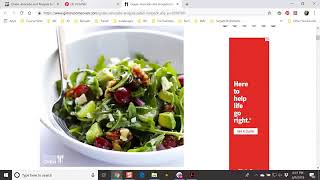
Hey, hey, Lux Ladies, what is up? It is Sunday evening here in Philadelphia and I'm just finishing up my weekly meal planning, trying to figure out what I'm going to make this week and not trying, I am figuring out what I'm going to make this week so I don't have to worry about that during the week. So I wrote an email, sent an email out to my community couple weeks ago about how to use Trello to do meal planning. So I've been doing this for the past couple weeks and I really, really enjoy it. So I thought I would show you guys exactly how I use Trello and what I do. So if you're not familiar with Trello, you can find it at trello.com. It's essentially a very robust project management tool, um, but I read a blog article on their site about how to use it for meal planning and it's super easy. And I love it. I can do it on my desktop, I can do it on my phone, and I just love, I'm a very visual person, so I love the pictures and how you can move things around. So this background I picked, they have like an assortment of different photos you can pick, but this is essentially my meal planning board. It's actually public, so if you wanted to look at it, if you were bored, you can. You can go to this URL to find it. So I have two cards here, Recipes, and then I have What I'm Making This Week. So this here is kind of like a collection of different recipes that I have discovered on Pinterest and things that I want to make. So I will show you exactly what I do. My first step is to find a recipe. I create a card and put it here under Recipes, and then I will drag it over and put it in this week's meal planning section. So let's pretend like we're going to do something new. So I'm on my Pinterest board and I'm kind of scrolling through. I sometimes, I look for different things, right? So if I know I have chicken breasts in the freezer, I may just look for a recipe that has chicken breast, or if I know I have salmon, I may look for a recipe that has salmon. But usually I'm looking for something that looks yummy. And that is easy and quick to make. So how about this? This looks interesting. Grape avocado and arugula salad. So I go ahead and click this open in Pinterest and go directly to the site that has it, gimmesomeoven.com, which is a blogger. And what I'll do is that I will copy this URL here so I can go back and find it when I'm ready to make it. I'm going to create a new card under my recipes here by clicking this at the bottom. Um, the title is Grape Avocado and Arugula Salad. Right, so I've created a new card for this particular recipe. Description, I don't really need to add it because it's very descriptive. Here, I'm gonna just paste the link so I can go back and find it easily when I'm ready to make it. And because I am a visual person and Trello allows you to add all of the pretty visuals, you can actually add this image. So right-click, copy image address to your card. Click the attachment link and then you can attach a link. It's JPEG, attach, and then voilà, it's your cover. So that way you can say, ooh, that looks really, really good, I'm going to make that. I like to organize all of my recipes, so I'm creating a label. This is a salad. I've already created these different labels, salad, chicken, seafood, breakfast. So add a label. So I can go back and find all of my salads very easily. Click save. Good to go. Close it out. And so now we have a brand new card here with the grape avocado and arugula salad. Now what I wanna do is like, okay, I'm gonna add this to my meal plan for this week. I can simply click and drag it over. That easy. So for this week, you can see that I'm already planning to make sheet pan shrimp boil, blueberry chicken chopped salad, and overnight oats. So what I can do is add this to my Trello calendar. So I can decide when am I gonna make this grape avocado and arugula salad. So let's say I'm going to— hey, Keisha, good to see you, my dear. Hope you are well in Michigan. Let's say I'm gonna make it on Wednesday. So I'll just put the due date on Wednesday, 6:00 PM is about the time I cook dinner. Give me, ooh, a day before reminder so I don't forget. Click save. And voilà. It's added to my calendar. So I click this button here, Calendar, and I can see exactly what I'm gonna make, when I'm gonna make it. So as you can see, this week, tonight I'm gonna make blueberry chicken chopped salad. Shrimp pan, tomorrow I'm making the shrimp boil sheet pan and the overnight oats. And then I'm actually having meal delivery service delivered on Thursday. Thursday, which will— from Freshly. This is my second week trying it. It's really, really good. So I don't have to worry about making anything the rest of the week. So this is essentially my meal planning process of how I use Trello. Now you could take it a step further and create another list here, which could simply be your grocery list. For the week, and then you can add a card. See, do this. Uh, week of June 9th. And you can actually create a checklist with the foods that you need to purchase from the grocery store. Um, so that's a little bit advanced. I actually use an app for all of my grocery shopping. And my grocery list. So I don't use this function in Trello, but it really, really is easy. And what I just did is, so I had my list of all the foods that I needed to make all these recipes for the week, and I just ordered them from Instacart. Grocery delivery. And I had a $10 credit, which I didn't know about. So voilà. So if you have not used Instacart or grocery delivery, I highly suggest you do it. It's a wonderful thing and it makes life easy. I just got a notification on my phone that my delivery estimate time tonight is 7:55. So groceries will be here about 8 o'clock and I can prep my salad for the week. And make my overnight oats and life will be wonderful. So that's how I use Trello for meal prep. If you have any questions about how I use this tool or if you have any questions about meal prepping or meal planning, two separate things, feel free to just type me a question and I will come back and answer it. If you're watching the replay, go ahead and type replay so I know that you checked in. All right, have a luxe weekend or a luxe week. The weekend is just about over, and I will see you guys in the next video.