ANYONE Can Make Insane Visual Effects Now!
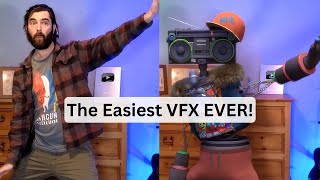
LARRUZ demos Wonder Studio, a tool that swaps people in videos with CG characters. The tracking is solid, but shadows and hand-tracking need work, and a 40-second clip takes 3 hours to render. It's free to try if you get on the wait list.
Questions this video answers
720p, MP4
150 minutes (estimated runtime shown)
About three hours
About 90 minutes
Yes — the creator says it was free via the wait list (no current cost)
Chapters
So I finally got access to Wonder Studio, which is an awesome visual effects tool and it's really, really easy to use. And I'm going to show you how simple it is right now. Let's check it out. You don't know what Wonder Studio is? It's this really cool tool where you can take video footage of a real person in a real life environment and then replace that person with a computer generated character. Just for fun, I went and created a little video of me just doing a bunch of like random motions you could see. I walk back and forth, do some karate move. I look close on the camera. I want to see how it handles all of this kind of stuff. Please ignore my hair, I need a haircut. So I'm going to show you how simple Wonder Studio really is. So if I come up here to create new project, I can click continue and then it brings us into the editor here. And over on the left side, I can upload my video. So I'm going to go ahead and just drag and drop this file right in there. You'll see it uploads. And then if I had more videos, I can actually use multiple videos and it will try to recognize the same person in each video and try to replace them in each little clip. What I do now is I go ahead and take my clip, bring it down onto my timeline here. You can see now I've got my silly little video on my timeline here. If I had another clip, I can add it right after this one. But I've only got this one clip that I'm messing with. Wonder Studio does take quite a while to render one video. There is quite a bit of processing that happens now. We go ahead and we click next up here and it says scan frame for actors. So I'm going to go ahead and scan the frame and it's going to try to find me in the video here. I'm going to move it to a different frame here so it can find me a little more zoomed out. Let's scan for actors here. So it found me here. And then we have these actors over on the sidebar that we can use. Let's go ahead and pull this out. And you can see that there's a handful of actors that aren't available yet. But then it gives us a handful. We can actually upload one ourselves if we want to. But I don't have a 3D character made right now, so I'm going to use one of their built in ones for now. Let's go ahead and use Radio bot here we'll assign radio bot. Make sure it knows that that's also actor one. Now if I click next, the only other step is to render. I'm going to go ahead and render it at 720p because it does take some time and I imagine 1080p will take a lot longer. So let's just do 7:20. We'll render it in MP4 format and we'll go ahead and just click start processing. You'll see. Here's my project and it says estimated runtime 150 minutes. So that's about how long it's going to take to process. And once it's processed, we'll come back and see how it looks. Okay, so it's the next day. I let the rendering just kind of happen overnight because it was going to take about three, three hours. Let's see what we got out of this. Let's go ahead and open this up. And here is my video. Let's go ahead and watch the whole thing. It looks really, really good. One thing I do notice almost immediately though is the shadows in the background. I do have some pretty bright lights shining on my face right now. And if you look at the shadows in the background, you can see sort of the outline of my real head versus the outline of a boombox with a hat on it. Other than that little nuance though, it's looking pretty dang good. I mean, I would have expected it to even blip out a little bit when I got closer to the camera, but no blips at all. It's actually looking pretty solid. When I kick up, it looks like both of my feet kind of kick up in the air instead of just one of the feet. But eh, that's just a minor complaint. I'm actually really happy with the way this came out. That came out really, really cool looking. If I click export video here, it just downloads it and you can see it doesn't even watermark it or anything. It's just this straight up video. There's a little bit of flickering on this little like fuzzy, whatever you would call this around his neck. I guess that might just be part of the model. Maybe it's supposed to do that. I'm not sure. Tracks pretty well as the camera moves with it and everything. But I'm surprised this demo of it right now it's free to use. I didn't have to pay to use it. So if you get on the wait list and play around with it, there's no current cost to use this version of it. I'm sure there'll be some costs associated with it in the future because rendering this out probably took some pretty major compute power. But I would get on the wait list for Wonder Dynamics. They seem to be giving out access to it now to people on the wait list and it's real fun to play with. It'll be cool once they get those render times down. I couldn't imagine how long it would take if you had like a full on hour and a half movie that you generated with this or even like a 30 minute YouTube video. This 40 second clip took three hours. Here's another one that I recorded earlier that was just done on my cell phone. It's a little 30 second clip here. You can tell that this one blips out a little bit more than the one. It seems to work better when you're further away from the camera. This doesn't look too bad, but watch my hand here in a second. Oh, it's a real hand instead of the robot hand. And the thumbs up kind of went behind my shoulder instead of in front of my shoulder. So a couple little blips there. But if it wasn't for seeing my real hand come into frame, this is actually not too bad. You can see it sort of blurring in the background here. Doesn't quite know how to fill in the background. But really this one, when I record it with my iPhone, that is the major problem right there. You can see my finger is a real hand. Even though earlier my hand popped onto the screen and it looked like a robot hand there. But when it came on the second time, it looks like a real hand. And then when I give a thumbs up here in a minute, it's actually behind me. So it didn't actually figure out that this hand was actually my hand. But the one where I'm further away from the camera works really, really good. This one, I can argue that I was sitting next to the robot and I put a thumbs up into the camera as I was sitting next to the robot, I guess. And if you're curious, this 30 second clip here that we just watched actually took about 90 minutes to render. This 30 second clip, it's a lower quality video shot on just an iPhone camera as opposed to being shot with my so Sony A6400 camera, which the newer video that I did was. That hand just gets me though. I'm gonna have some fun playing with this. You might see some little robots and animated characters popping up into future videos. Also in one of my last videos, somebody made a comment about how I seem to be making videos just for the sake of making videos. Well, first of all, yeah, that's kind of what I do on YouTube. But second of all, this is the list of ideas for videos that I have right now. So if you want to stay in the loop of all the cool AI stuff, I'm still gonna make a lot more videos and I still have a lot of ideas for videos that I haven't made yet. So if you like nerding out about all of the cool AI technology and visual effects, augmented reality and virtual reality and all of this kind of cool nerdy future tool y kind of stuff, make sure you like this video and subscribe to this channel because it'll make sure you see more of this type of stuff in your feed. Also, if you do wanna find just a ton of cool AI based tools, head over to FutureTools IO. This is where I curate all of the cool tools that I come across. I add new tools every single day. I also have a free newsletter where every single Friday I'll just send you the five coolest that I came across as well as the tlDr of the AI news in the space, some YouTube videos and one cool way to make money with AI. I send it every single Friday. It is the TLDR of everything that happened in AI this week. I really think you'll dig it. It's totally free. You can find it at futuretools IO. Thank you so much for tuning into my videos. I really appreciate you, especially those of you who enjoy nerding out about all the cool AI stuff that I'm coming across. I have a lot more experiments that I'm excited to share and I promise to continue to keep you in the loop with all the latest AI news. Really, really appreciate you. Thanks again for tuning in. I'll see you guys in the bye bye.










