C4W4L07 What are deep CNs learning?
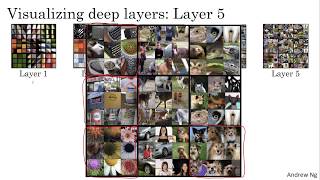
Early layers in deep convolutional networks detect edges and colors, middle layers find textures and shapes, and deep layers recognize object parts and whole objects. The Zeiler & Fergus paper visualizes what AlexNet learns at each depth, foundations for building neural style-transfer algorithms.
Chapters
What are deep confidence really learning? In this video, I want to share with you some visualizations that will help you hone your intuition about what the deeper layers of a confnet really are doing. And this will help us think through how you can implement neurostyle transfer as well. Let's start with an example. Let's say you've trained a confnet. This is an alexnet like network, and you want to visualize one what the hidden units in different layers are computing. Here's what you can do. Let's start with a hidden unit in layer one. And suppose you scan through your training set and find out what are the images or what are the image patches that maximize that unit's activation. So in other words, pass your training set through that, through your neural network and figure out what is the image that that maximizes that particular unit's activation. Now, notice that a hidden unit in layer one will see only a relatively small portion of the neural network. And so if you visualize, if you plot what activated that unit's activation, it makes sense to plot just a small image patch, because that's all of the image that that particular unit sees. So if you pick one hidden unit and find the nine input images that maximizes that unit's activation, you might find nine image patches like this. So it looks like that in the little region of an image that this particular hidden unit sees, is looking for a edge or a line that looks like that. So those are the nine image patches that maximally activate one hidden unit's activation. Now you can then pick a different hidden unit in layer one and do the same thing. So that's a different hidden unit. And it looks like this second one, represented by these nine image patches here, looks like this hidden unit is looking for a line, you know, sort of in that portion of its input region. We'll also call this receptive view. And if you do this for other hidden units, you find other hidden units tend to activate in image patches that look like that. This one seems to have a preference for, for a vertical light edge, but with a preference that the left side of it be green. This one really prefers orange colors. Um, and this is an interesting image patch. This is red and green together, um, would make a brownish or a brownish orangish color, but the neuron is still happy to activate with that and so on. So this is nine different, uh, representative neurons, and for each of them, the nine image patches that they maximally activate on. So this gives you a sense that units trained hidden units in Layer one are often looking for relatively simple features, such as an edge or a particular shade of color. And all of the examples I'm using in this video come from this paper by Matthew Zieler and Rob Fergus titled Visualizing and Understanding Convolutional Networks. And I'm just going to use one of the simpler ways to visualize what a hidden unit in a neural network is computing. If you read their paper, they have some other more sophisticated ways of visualizing what a convnet is learning as well. But now you've repeated this procedure several times for nine hidden units in layer one. What if you do this for some of the hidden units in the deeper layers of the neural network? And what is the neural network then? Learning in the deeper layers? So in the deeper layers, a hidden unit will see a larger region of the image where at the extreme end, you know, each pixel could hypothetically affect the output of these later layers of the neural network. So later units are actually seeing larger image patches. I'm still gonna plot the image patches as the same size on these slides, but if you repeat this procedure, this is what you had previously for layer one, and this is a visualization of what maximally activates nine different hidden units in layer two. So I want to be clear about what this visualization is. These are the nine patches that cause one hidden unit to be highly activated. And then each grouping, this is a different set of nine image patches that cause one hidden unit to be activated. So this visualization shows nine hidden units in layer two, and for each of them shows nine image patches that causes that hidden unit to have a very large output to be very large activation. And you can repeat this for deeper layers as well. Now, on this slide, I know it's kind of hard to see these tiny little image patches, so let me zoom in for some of them. For layer one, this is what you saw. So, for example, this was that first unit we saw which was highly activated if in the region of the input image, you can see there's an edge that, that may be at that angle. Now let's zoom in for layer two as well to that visualization. So this is interesting. Layer 2 looks like it's detecting more complex shapes and patterns. So, for example, this hidden unit looks like it's looking for a vertical texture with lots of vertical lines. Um, this hidden unit looks like it's highly activated when there's a roundish shape to the left part of the image. Um, here's one that is looking for very thin vertical lines. And so On. And so the features the second layer is detecting are getting more complicated. How about layer three? Let's zoom into that. In fact, let me zoom in even bigger. As you can see this better. These are the things that maximally activate layer three. But let's zoom in even bigger. And so this is pretty interesting. Again, it looks like there's a hidden unit that seems to respond highly to a rounder shape in the lower left hand portion of the image, maybe. So that ends up detecting a lot of cars. Um, looks like one that is even, you know, starting to detect people. And this one looks like it's detecting certain textures, like honeycomb shapes or square shapes, this regular texture. And some of these is difficult to look at and manually figure out what it is detecting, but it's clearly starting to detect more complex patterns. How about the next layer? Well, here's layer four. And you see that the features or the patterns it's detecting are even more complex. Looks like this has learned almost a dog detector. But all these dogs look quite similar, right? Is this. I don't know what dog species or dog breed this is, but, you know, all those dogs, all those are dogs, but they look relatively similar as dogs go. Looks like this hidden unit and layer four is detecting water. This looks like it's actually detecting, you know, the legs of a bird and so on. And then layer five is detecting even more sophisticated things. And you notice there's also a neuron that seems to be a dog detector. But the set of dogs is detecting here seems to be more varied. And then this seems to be detecting keyboards and things with a keyboard, like texture, maybe lots of dots against a background. I think this neuron here may be detecting text. It's always hard to be sure. Um, and, and, and then this one here is detecting flowers. So we've gone a long way from detecting relatively simple things, such as edges in layer one to textures in layer two, up to detecting very complex objects in the deeper layers. So I hope this gives you some better intuition about what the shallow and the deeper layers of a neural network are are computing next. Let's use this intuition to start building a neural style transfer algorithm.










