ChatGPT Now Works with Apps, Claude Prompt Improver & More AI Use Cases
OpenAI's ChatGPT can now connect to apps, Anthropic released a prompt improver for Claude, and other new AI tools are emerging. The speaker walks through how these updates work and shares practical ways to use them.
Chapters
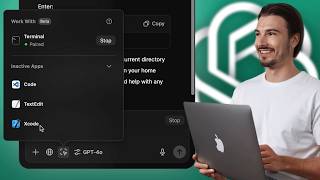
This week we have OpenAI shipping updates to the desktop app, an open source version of Claude's artifacts, and more releases within the generative AI world that you can actually put to work today. Now, if I look or sound a little under the weather, that's because I am. I just got back from speaking at a conference in Denmark and I also held a really exciting workshop on how to generate your personal context and build assistance, but unfortunately didn't bring the appropriate clothing for the cold weather there. So I caught a little cold. So I've been sipping my tea as I've been preparing this video, but no minor sickness is going to stop me from showing you all the new releases in the AI space that you can put to work today. In this week's episode of AI News, you can use let's get into it. So first things first, we have a very interesting update coming out of OpenAI for the ChatGPT app. Namely, it can now work together with other applications for the very first time. Up until now you could give it screenshots, but it couldn't really see what an app was doing on your computer. This is something that's pretty exciting because it has been demoed when they first showed off Advanced Voice Assistant back in May. The way it works is the following. You just need to update your application, which you can do up here. Check for updates updates and I already did this. So I have the newest version of the ChatGPT app right here and it's this new button here. And you might not see it right away because it only works with specific applications. It's the code editing ones. Okay, this is not available for all apps yet, but surely over time they will expand the compatibility of this. But as of now you could work with various code editors like the Terminal or VS code here and it pulls in all the code inside of them into its context window and you can have one conversation with all of it. This is pretty amazing. And again, if you don't see this button, you might need to open up one of these applications. So let me open up Terminal right here and when I'm in Terminal I just open up a new ChatGPT window by clicking the icon of the desktop app. And then here I can add Terminal. If you're doing it for the first time, you're going to need to give it permission on a Mac. And now I can tell ChatGPT things like navigate to my download folder and it will look inside of my terminal and tell me exactly what code to type in there. And I don't need to know various bash commands by heart to navigate this. That's the language that the terminal operates in. So just copy paste what it tells me here, hit Enter and boom, we're situated inside of the downloads folder. With this quick little command, I could see all the files in there. This is great. Now here's the interesting part. You can add other apps to it. Okay, so if I activate this also for text edit, for example, then I could start a new TextEdit document and I add TextEdit here. And now all of this code and all of this code is in a context window of my ChatGPT conversation. Now, this really makes sense if you're building an application inside of VS code, but you want to use the terminal to do something different, like accessing a GitHub repo. And again, this is just the beginning. Surely over time we'll get more applications in here and eventually I'm looking forward to a route where it just sees the screen 24. 7. If I give it access to it, that's when the advanced voice assistant is really going to shine because you're going to be doing your work and it's going to see all the applications and once you need something, you just press a button and tell ChatGPT what you want to do. No need to give it the context because it has it already. Oh, and there's also one more update to the app, and that is the fact that it's now available, available to all Windows users. So if you're on Windows, you can go over to this link and you can download it for Windows. Finally, they rolled this out so everybody can use the desktop app now. And I expect more updates to show up here very soon because not really news you can use. But I did want to highlight the fact that Greg Brockman is actually back at OpenAI and we had a discussion with the team on how peculiar this timing is. The year is about to wrap up. Thanksgiving and Christmas is coming up and he's rejoining the company now. What do they have planned? What are they going to ship that they need Greg there to communicate. Remember, he was always the use case guy. He always tweeted a lot and showed people how to use them. Various things they shipped. So I think the fact that it came on now will coincide with some releases over the coming weeks or months. I'm thinking probably 01 full is the main thing that people are talking about here. We'll report on it as soon as it's here. Okay, so by now you probably know that I really like ChatGPT and especially the GPTs that it provides, they're limited, but if you customize them, they're quite powerful. And today I have both good and bad news for you. And if you've been following the channel, you also know we use Notion a lot of. But GPTs and Notion aren't exactly friends. There's no easy way to have a Notion page that you keep updating and all of that info going into your chatbot automatically. That was the bad news. Now here's the good news. There's a platform that does this connection extremely well, and that is Chatbase, the sponsor of today's video. Chatbase is a platform that lets you create external facing chatbots like customer service agents, lead acquisition bot, or what excited me personally about this is that you can create internal chatbots that are connected to a Notion page that you might be updating anyway. So, for example, for these videos, we curate all of this week's research inside of a database. We call it the AI use Case database. And we keep updating it every single day of the week. Now, by connecting that page to a bot on Chatbase, we can just talk to it and draft social media posts, summarize all of this week's news, or search over the entire database in no time. And this is so easy to set up. You can do this yourself and link any sort of knowledge that you might be collecting somewhere to your own version of ChatGPT. To get started with Chatbase yourself, click the link at the top of the description to try Chatbase today. And now let's move on to the next piece of AI news that you can use. Okay, next up, a brand new tool from Anthropic. This one will be very brief because we talked about this before. Matter of fact, we even built something that does exactly this, improving your prompts. We made it freely available in the GPT store. It's called Sam, the Prompt Creator, and people are using this thing. Look at it. It has over 32,000 chats and I don't even promote it on the channel. I created one video about it a few months back. This works like a charm. But now Anthrop also caught on to the fact that actually improving prompts is something that can be super useful, especially if you're going to be using the prompt a lot or you're going to place it inside of an automation. All you need to do is go into the Anthropic console here and go to this button which is improve an existing prompt. So you can insert your prompt here, then you can Use this button to templatize it. Turning variables into something that's formatted like a variable. Okay. Instead of square brackets as we do it, they use double curly brackets. And now I can just say improve prompt and it will use some of my anthropic credits to improve this. This does work really well as they implemented a six step process here where apparently multiple agents throw this prompt back and forth and come up with the very best prompt that you can have. In practice, I would just say check out what works better for you. If it's this one from Anthropic or the one we built or any other prompt improver, I would just say the following. Sam, the prompt creator is completely free and it has gained its popularity for a reason. It really works. And you have multiple options here. So if you custom build a prompt, it's going to guide you with leading questions to get the optimal result. Whereas with Anthropic you really need to know what you're looking for. At the end of the day, you'll just have to try this out. Just keep in mind you will need some anthropic credits for this. SAM S3. Your choice. Really good to know this thing exists. All right, next up we have quent 2.5 coder artifacts and this is the first open source implementation of something like the Sonnet 3.5 artifacts feature. If you're not familiar, this is the feature inside of Claude that when it creates some code it also visualizes it. And not just that, it's also usable. So it looks something like this in practice. I prompted for a Tic Tac toe game and there you go. It creates the game that I can now actually play. All right, and the game is over. See? Creates a code here in the background. This is the preview. Quin 2.5 coder works the same way. Now we did a little bit of research and testing on this and it seems that in most cases Claude 3.5 sonnet actually beats it, especially when the application is a little more expansive. But there are specific cases like this one that we found on Reddit where. Where Qwent 2.5 coder actually does things that Sonnet 3.5 can't do. What I'm going to do here is take this one specific prompt that we found on Reddit where we prompted to create a single HTML file with three JavaScript scenes of a rotating 3D globe. I'm going to copy paste it into here and send this and I'm going to do the same thing inside of a new Sonnet 3.5 conversation and yeah, right there you could see Quinn write the code. And there we go. Here's the rotating globe with the camera movement, the lighting and everything looks good. It's not interactive, but we also didn't ask it to be. And inside of Claude it does a limited version. It misses the texture even if I go in and re prompt it to do the texture. This runs into limitations of the tool where it can't go further than this. So this is a specific prompt that shows off the ability of this tool and some of the other standard ones. Like all the different games and basic dashboards websites, it did not perform as well as Claude can hold more context and it just feels like it has more power. Benchmark suggests the same thing, but again this thing is openly available and you could build it into your applications, whereas Sonnet 3.5 with the artifacts feature not at all. You can use it through their web app. So there you go. Certainly an interesting development. Eventually we'll see this built into any other application where it makes sense. But this is the in between phase where it's not just for coders and not in mainstream apps. Yet you get it inside of Claude or hugging face demos. Okay, the next piece of news you can use is something that just popped up on Twitter and I thought this was super interesting because I saw examples of this and now the software that does it is open sourced. I'm talking about the ability to connect multiple Mac minis with Thunderbolt 5 to actually create sort of a supercomputer. Now if you haven't seen the release, the brand new Mac minis are actually impressive with the M4 Pro processors. They're unbelievable value for the money that they cost. And just the Mac mini overall happens to be really efficient when it comes to running LLMs. But a single Mac Mini is not going to run some of the bigger models like the 70B models. And here they even say it can run the llama 405B model. But if you daisy chain four of them, it works. The now the piece of software that does this is also freely available on GitHub. So anybody who wants to do this and buy multiple Mac Minis, just go into the readme here, follow these instructions or copy paste them into ChatGPT and let it guide you through it and you're going to be able to hook up multiple Mac minis and build a supercomputer. Now the big question is here, is this more cost efficient than actually investing into a Windows machine with multiple Nvidia graphics cards? And that's also the hot discussion here in the comments section. And Alex, one of the creators of this app actually said they'll be following up with real world benchmarks comparing exactly this very soon. So I can't wait to see this myself. But from the discussion here it seems like with about $8,000 you could run llama 405B, which would be a first. The local setups that run that model successfully are all way over $10,000. So there you go, another interesting development in the AI space and something you could put to work today. And this is something you should definitely consider if you really want the privacy of running LLMs locally. Okay then we also have a new multi agent framework coming out of Microsoft which has been released and at this point there's many of them out there. But the conclusion that our community that after costly testing it and other people discussing it in the comment section below is that it's essentially like a cloth computer use that can use other models besides sonnet 3.5. Now unfortunately that doesn't mean much because cloth computer use just isn't that potent. We played a lot with it. I really, really wanted it to work. We tested various scenarios, but it's just very inconsistent no matter how you prompt it. If you're not familiar, it's essentially a AI that can remote control control a computer and perform various actions like open Excel sheets and the browser and do whatever you tell it to do. But it's just inconsistent. It's the very first version of it, and even something simple like filling out a form for a job application, it cannot really perform consistently across dozens of tasks. Therefore for now I would stamp it as sort of useless. While I hate to say that it's just what we found and the rest of the Internet seems to agree, and this is an alternative to that which unfortunately will probably, probably also fall in this kind of useless category. But I love to keep an eye on this stuff because this is the next evolution of products like ChatGPT and we'll be covering this stuff in depth as soon as more capable versions come out. If you care to see what it can do. There's several examples here on the Microsoft website, like for example, they prompted it to describe the trends in S&P 500 and then it goes ahead and uses an API to Fetch the latest S&P 500 data and it runs an LLM and writes some code just to analyze the trends and then it gives you a text output concluding that these are the some of the latest prices and it talks about the volatility. Nothing groundbreaking, but interesting to see. And another one would be finding and exporting missing citations in a paper. So this one might be a little more practical. It spawns multiple agents like the web surfer to gather some context. And then there's always an orchestrator that kind of looks at what the agents have been doing and it reviews their tasks. And then eventually the orchestrator always gives you back a report on what has been accomplished. And again, I find these interesting, but I have a very hard time finding some proper use cases for these outside of writing code there. All these agentic systems have proven to be really useful in assisting users. Nevertheless, I wanted to update you as now we have a version from OpenAI that is the simplest one of the bunch. Then we have Anthropic with computer use, Microsoft with multiple frameworks like Autogen and now Magentic1, and then I believe Meta is the one player that hasn't made their move in this space yet. But then there's nothing for their consumer applications that really makes sense here so far. So they'll just hold out until they have something useful, I guess. And that's really all I got for this week. I'm going to go drink some tea and get some rest and I'll see you next week with some fresh releases.










