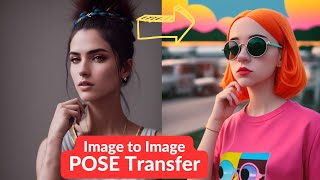
LARRUZ shows how to use Leonardo AI's image-to-pose tool to generate characters in any pose from a reference photo. The feature works by extracting just the pose from your reference image, leaving style and composition free. It works best with photographic poses and is currently only available on Stable Diffusion 1.5-based models.
Questions this video answers
February 23, 2023.
10 models per month.
200 images per day.
Stable Diffusion 1.5-based models.
Chapters
In this video, I'm going to present a step by step process to create character with the exact pose that you want. So we are going to be using concept called image to pose. In this case, we provide a reference image with a certain pose and the character is supposed to have exactly the same pose. This is different than the normal image to image. A normal image to image. Your reference image is used to define the style and composition of your output image. But in this case, the reference image is only for defining the pose, not the style or the composition of our output image. So keeping that in mind, do you think we can create characters with this pose? To find out, watch till the end. So in this video we are going to be testing this new tool called Leonardo AI for image to pose models. But let me quickly give you an overview. If you're not familiar with this tool, it's a new web UI based tool which is a potential competitor to Mid Journey. There are a few neat features that I haven't seen in any other of them. So one of them is this featured model. So there are a number of models that are available that you can use and these are specialized model. For example, so this one RPG is based on characters. Then like a paper art style, there's another model for that, then illustration, and so on and so forth. Next you see there is a community feed where people are showcasing their work. A great feature that I really like is the ability to train your own models. So you can actually upload your own data sets and then create your own models for your own work. They give you the ability to train 10 models per month for their free tiers at the moment. And with their free tier you can generate 200 images per day. I will be making a lot more content on this amazing tool. So if you're interested, please consider subscribing to the channel. All right, so for today's video, the focus is image to pose. So for that you need to go here to the AI image generation. Let me walk you through the interface. So here it's a place where you can input your own prompt. Then if you want to use a specific type of model, you can select it from here, right? And you have the ability to provide negative prompts as well. So there's a toggle for that. And then they have this magic prompt which actually adds some extra things to your prompt to make it more appropriate for what type of images you are generating. Right? And then like you have the ability to select the number of image, the dimension of the image, then the guidance scale. Number of steps, and so on and so forth. But the thing we are interesting today is this image to image. So let me first generate a simple image using this prompt. A stylized girl standing, wearing round sunglasses. So it was inspired from one of the community posts. So let's wait for the model to generate the image. So here's the image of a girl standing in fashion pose. Now we want to change her pose. Okay, so that's where you come image to image. And I have a few images which you can select. So let me select this one. So in normal image to image, what happens is your output image, style and composition is going to be based on your input image. So the image that you select, that will drive the style and composition of your output image. However, in this case, you will see this toggle button post to image if you turn this on. So it will completely ignore the style and composition of the input image. Rather, it will try to replicate the pose of the subject in the image. So with this, let's rerun our prompt and let's try to replicate this pose. So click on generate. Wow. So it took a few minutes, but it's able to actually really replicate the pose of the person in the first image. So you see the hand is near the face. Now it's actually pretty impressive, I would say. Okay, let's try something a little bit more complicated. So let's say I have this image of the person doing Tai Chi. So let's see if we can regenerate the image using this pose. Click generate. Let's wait for the output. Oh, wow. This is pretty impressive. Now you see, the pose is pretty consistent with what we had in our input image. Right. In this case, the wrist is inwards, but I think it's pretty nice. Let's try to know some more complicated stances. So I'm going to try this. That's an exercise pose. Let's see if we can regenerate our image based on this pose. Okay. Oh, this is pretty neat. It's actually like if you look at the leg, the second leg in the hands, it's very similar to the pose of your original input image. Let's do a couple of. Couple more. So for example, this one, it seems to be a pretty complicated one given like the way the person is sitting. Let's click this. Let's see what the outcomes are. Okay, so this is interesting. It definitely is able to mimic that pose in some cases. For example, here there's seems to be like a twisted limb. So but you. But considering we didn't use negative prompts at all. We can actually take care of that. So that shouldn't be a big problem. But I think, like, overall it seems to be working pretty nicely. Let me try a couple more. So, for example here, this might be a little hard one to replicate, but let's test it out. Oh, this is not bad at all. The hands could be outward, but I think it's able to mimic it. So that's nice. All right. And the last test that we're going to be doing is I want to test it with this. This. So instead of giving it a pose in the form of a human figure, let's see if we draw this sketch and it's able to adopt this pose or not. Right. So it would be an interesting test. So let's generate this because you can see with all the other results now you have the ability to simply define the pose and put the character in that pose. Sometimes it's really hard to describe that pose in your prompt. Right. In Pro, if you are generating an image based on simply the text, it kind of becomes harder to capture everything in terms of the poses that you want to define. But now you have the ability to add this visual representation, representation of the pose. So that is going to open a lot of different possibilities, I think. All right. I think it didn't really work on this skeleton. Like, if you look at this image, yes. The hands are hanging on the side, so it seems to be replicating it. But like, for example, in this image, there's one hand up and not sure what's going on over there. But like, it seems to be working on human poses when there are humans in the image. But it doesn't seem to work really good if you have just a sketch of the skeleton. Right. Let's try this one more. Okay. The results are pretty nice, I think. So it's a very similar pose to what is in this picture. Now I'm going to try this crazy one at the end. I don't think it's going to work, but let's see. There's no harm in trying to. And we are not going to know until we try it. Right. So let's try this one. Okay. That didn't really work. Like, in this picture, the model is trying to do something, but I guess, like, not exactly what we are trying to do. And it's a really hard pose, so I don't really blame them for this at all. I can try one more. Just keep in mind that you have this post image option only on the models that are based on stable diffusion 1.5. So anything else? You are not going to see this option. Like for some of the models, for example, if you select something else, I think this Realistic Portraits is based on 2.1 or like stable diffusion 2.1. So you're not going to see this option. I'm assuming that that's going to come pretty quickly. See here it's able to do a pretty good job, I would say. All right, that's all for this video. I hope you liked the content and found this useful. If you did, consider liking the video. This gives a boost to the video and a signal to the algorithm. Thanks for watching. See you in the next one.