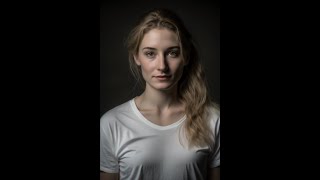
LARRUZ walks through creating an AI animated avatar using MidJourney for character design, ChatGPT for script writing, 11Labs for voiceover, and D-ID to assemble the talking video. You'll generate images with /imagine prompts, synthesize natural speech, and upload everything into D-ID's platform to build the final avatar.
Questions this video answers
February 4, 2023
/imagine (provide the prompt after the slash-imagine command)
Nikon D550
The presenter says DID gives about 20 credits and each video uses 5 credits.
Chapters
Hi everyone. Welcome to the Prompt Engineering channel. My name is Rachel and I'm here to tell you all about how you can create your own AI avatar like me. As you can see, I was created using a combination of cutting edge AI tools and techniques. I may not be a real human, but I can still communicate and engage with you just like one. This script was written using ChatGPT, an AI language model created by OpenAI. With this powerful tool, you can generate natural language text just like the script you're reading right now. And my voice, well that's all thanks to 11labels. This company specializes in creating high quality AI voiceovers and their technology allowed me to have a voice that's natural and engaging. Finally, the video you're watching was created using did an AI video platform that allows you to create dynamic and engaging videos with ease. So are you ready to create your own AI avatar like me? All you need is a combination of these AI tools and a little creativity and the possibilities are endless. I can't wait to see what you come up with.
So let's recreate the whole process. First we need an image. So for this we will going to use the Mid Journey. If you don't have an account already, just click on Join the beta. It will take you to their Discord server. I have already joined the Discord server so I'm not going to do this step. But you will have to do it if you don't have an account. So once you are in the Discord server, so simply find one of the newbies channels. So let's say I click on this now in order to. So these are different images that people are generating right now. In order to generate an image you need a prompt. Mid Journey has a special syntax for plan prompt. So it's a slash imagine right? And then you simply provide the prompt. So I'm going to be using a prompt that I found on Reddit. I will actually provide a link to the actual post. So here is a prompt, a medium shot of a white woman wearing a T shirt captured with Nikon D550. So basically we describe what we want the image to look like right then in terms of the word camera, a type to use with different parameters and then the lighting conditions are here and then the different aspect ratio. So let's run this. This is going to take a good 32nd, so we'll have to wait. Okay, so Mid Journey has generated four potential images, let's say. Let me actually explain what's going on here. So these v1 u1 u2. These are basically showing the image numbers. That's u1, u2, u3, u4. And then you can pick one of them. Let's say that variation 1, 2, 3, 4. So you can actually choose one of them and it will generate four more like based off of that. But now let's say we want to use one of them and simply upscale it. So upscale is basically making it bigger. Right. So let's say I want to use the first one. Okay. So all I have to do is say u1. Right. And it will start upscaling it. So it will again take some time. Okay, so it seems to be done upscaling the image. Let's simply save the image. All right. Awesome. So now let's move on to the second step. Okay, so next we go to ChatGPT. I asked ChatGPT to create a script for this video. So it came up with a script. All we have to do is simply copy this script and we will use 11 labs to actually create the narration. 11 labs. You don't really have to sign up to actually test it, but usually the audio you can generate is pretty small. So go ahead, sign up if you want longer rdos. Okay, so all I did was simply copy the text over here in the 11 labs. And let's select Rachel. Right. You can actually change different voice settings. I will simply keep them to defaults and let's click Generate. Okay.
Hi everyone. Welcome to the prompt engineering channel. My name is Insert name and I'm here to tell you all about how you can create your own AI app.
Okay. Yeah, so it seems to be not happy about the special character. Let's replace this by Rachel and let's generate it again.
Hi everyone. Welcome to the prompt engineering channel. My name is Rachel and I'm here to tell you all about how you can create your own AI avatar like me. As you can see, I was created using a combination of cut.
Okay, so it has finished generating the audio. Let's simply download it and let's paste it here. All right, so we are done with our audio section as well. Now let's move to DID for creating our video. So again in the DID platform you can either like you can simply click on a free trial or you can make your account actually create videos. Right. Okay, so I will click on create videos. Let me add another avatar. So that's the one that we're going to be using. Right? All right. They have some pre built avatars as well that you can choose, but I simply uploaded the one that we just created. With mid journey. Okay. Now the other option is in terms of the audio, you can type in the script. They have a few voices that you can use and they're pretty nice. So you can actually change the style as well. Like assistant chat or cheerful. There is friendly voice as well. But let's upload our own video that we created. So let's see. Let's upload it. Let's wait for it.
Hi everyone. Welcome to the prompt engineering channel. My name is Rachel and I'm here to tell you all about how you can.
So it seems to have uploaded the video, the audio. Now let's ask it. Ask it to generate the video. Right? It keeps track of how many credits you have. I think it gives you like 20 credits. And each video takes five credits. So let's generate the video. It's going to take some time. So the pause with the video here while it's generating. Okay, so the video generation is complete.
Hi everyone. Welcome to the prompt engineering channel. My name is Rachel and I'm here to tell you all about how you can create your own AI.
Okay. You can actually simply download the video if you want or don't download it later on, upload it to YouTube. But. But you can see that they were able to animate the foot face using the voice. Although it still looks robotic. But I think it's a pretty good. And it's a free tool to use. So that's. That's always nice. I hope you like the video. If you want to watch something similar, please consider subscribing. Thanks for watching.