Exploring InVideo AI 3.0: The Ultimate GenAI Video Tool?
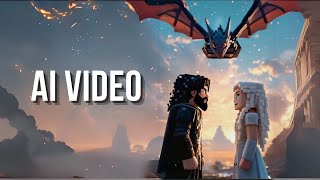
Sam walks through InVideo AI 3.0, showing how to generate videos from text prompts. The tool created a Darth Vader chocolate-factory skit and a Game of Thrones trailer in Minecraft style, and can produce videos up to 20 minutes long with consistent character narration.
Questions this video answers
Version 3.0
Up to 20 minutes
30 seconds
1 minute
Chapters
Sam. This whole video was created using a very simple text prompt using generative AI tool. And that tool is InVideo AI, who are also the sponsor of today's video. It's a platform that lets you create both short form and long form AI generated videos, but can also include narrations that are specific to the videos it creates. And you can also edit those videos using simple text prompts. Unlike some of the other platforms like Runway ML or Pika Labs, you can combine both AI generated content along with stock videos. So it's an extremely powerful platform that offers features that are not available in other platforms. It goes beyond simple text video generation. So here's a quick example. Darth Vader playing Willy Wonka giving people a tour of his chocolate factory. Add Star wars puns, make it photorealistic with 70s panavision look and feel. Now, unlike other text video models, the consistency of text in the generated videos based on the description is pretty amazing. And here's the final video that it created.
In a galaxy far, far away, there's a sweet treat that's causing a stir.
Welcome to my chocolate factory. Prepare to be delighted. Behold the power of the dark side of chocolate. These Death Star gobstoppers will outlast any rebel attack.
Vader's loyal workforce ensures galactic quality control.
Fizzy lifting drinks. Impressive. Most impressive. Join the dark side. We have golden tickets. Taste the power of the Force.
That's no moon. It's a delicious truffle.
I don't like sand, but I do like these cookies.
Wookiee cookie. They're known to pull people's arms out of their sockets if they don't get one. Darth Vader's chocolate factory where confectionary dreams come true.
Remember, the Force will be with you always in every bite.
Now it's actually pretty awesome because it added some puns which are specific to Star Wars. Also the consistency of the characters are pretty amazing. And remember, this is the worst it's ever going to be because it's just the first iteration and it's going to get better with every iteration. They have a showcase section on their website which really gives you a feel of the different capabilities this new model has and you can also get a sense of what is possible. So you can create marketing material or short form videos for YouTube shorts or TikTok and also explainer videos using website contents. Now to get started, make sure to go to the InVideo AI website. Here you will need to create your own account. We are going to be looking at the InVideo version 3.0, which lets you generate AI content. This is the interface that you're going to see. They previously had two older versions. The first version of the platform will only allow you to use stock media from their library. But now with version three, you can create AI generated content, including videos and narrations like we saw before. And you can also combine it with stock media, which is a really powerful tool. Now, before we experiment with it, there are some pre built workflows that you can use. So for example, there are different workflows including creating short videos than creating advertisements. You can actually use the platform to create marketing material. You can also create long form videos. The length of the video is not limited to one minute. Unlike some of the other platforms, it will let you create much longer videos. But keep in mind that will also use a lot more credits and these presets or workflows will have some of these options. So, for example, this workflow will let you create up to 20 minutes, which is pretty long video. You can create whole movies. Then you can define the type of style that we want to use, the type of background music, if you have any specific language in mind. They have support for a lot of different languages, which is pretty amazing. And also the type of music if you want different voice actors. Now, for the art test case, I want to use one of their prompts. So this is the prompt, make one minute trailer of a Game of Thrones. But in Minecraft animation style. The setting is going to be duration is 1 minute. Make it 3D, Minecraft style, high quality, detail oriented, use only AI generated videos. And we wanted to add background music. So I'm not going to use any of the workflows. But we are going to directly type everything here. So I'm going to change the duration to 30 seconds so that it can render much quicker. And let's click on Generate Videos. So first it will analyze your original prompt. After that it will come up with a plan of how many frames or video segments it has to create. And once it goes through that process, then it will give you a couple of options in terms of what is the style that you want, what are the intended audience. And it's smart enough that those options are automatically generated based on the content that you want to create. All right, so right now it's trying to research and Game of Thrones trailer scenes, and it will take some inspiration from those to create our own trailer. Okay, next it's asking us whether we want to use stock media or generative media. So we'll Select Generative media. Then the intended audience is automatically generated by based on the provided prompt. So it was smart enough to figure out that these are the potential options. So I'm going to select Craft players, then Rapid cuts or normal or slow. So that's the media pace. So let's select Rapid Cuts and whether we want shorts or a long form or 16 by 9 aspect ratio. So I'm going to select that and click on continue. So this basically starts generating our video for us. So here's one example video that I previously generated using the same prompt. So. So let's have a look.
In a world of blocks and pixels, a battle for the Iron Throne begins. From the frozen north to the fiery south, the alliances will be forged and broken Dragons will rise and kingdoms will fall. Who will claim the Iron Throne? Game of Thrones now in Minecraft, winter is coming in blocks.
I think this is pretty impressive because in this specific case, the narration really goes well with the generated media. Once you create a video, you can also edit this video using simple text prompts. The way you do it is go to the edit button. And now these are different video clips that the model generated. So you can just select each one of them and then either click on stock media to replace it with the stock media or. Or you can regenerate those clips using generative media or you can even upload your own media if you want. This also lets you change the music or make changes to the script, or you can also add a narrator, which is pretty awesome. So this really lets you customize your produced video. And the customization include translating your videos to other languages, plus adding your own voice so it can clone your voice if you want. This supports more than 50 different languages. You can get started for free. Or if you really want to explore generative AI video capabilities, I highly recommend to look at the generative Plan. That's the one that I'm currently using. And if you're already a member, you can add more credits by clicking Add ons. The generative AI space is the one that is moving really fast and I'm really excited to see what is going to come out of it in 2025. So do check out InVideo AI platform and explore the generative AI capabilities in the video space. I hope you found this video useful. Thanks for watching and as always, see you in the next one.










