Fresh Release: Exploring OpenAI's Game-Changing Sora
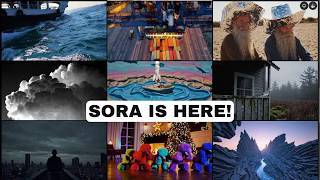
OpenAI's new Sora video generator produces higher-quality outputs than competitors but runs slow and overloaded. The creator tests prompts like a monkey on roller skates and a wolf howling, walks through the dashboard and pricing, and finds some storyboards fail to generate desired motion.
Questions this video answers
Up to 50 videos per month (1,000 credits) at 720p.
Up to 500 videos per month (10,000 credits); unlimited "relaxed" videos; up to 1080p resolution; max duration 20 seconds; five concurrent generations; ability to download videos without watermark.
United Kingdom and the European Union.
Durations: 5s, 10s, 15s, 20s; Resolutions noted: 480p (used for speed), 720p, 1080p.
Tests frequently took ~9–20 minutes from prompt to completed video (examples: ~9 minutes for monkey on roller skates; ~11 minutes for wolf; some featured users reported up to an hour).
Chapters
Well, the day is finally here. We've been hearing about this forever now, but OpenAI finally released Sora, their AI video generator model. I'm super excited to get in and play with it. I have not personally been able to use it yet, although it did take so long to come out that all of the other AI video generators have seemed to improve and got better and almost gotten to the level of Sora. But from what I saw in today's demos, Sora still looks like it's got a little bit of an edge on a lot of the other tools. So let's dive in and put it through its motions. The thing most people are probably going to be asking themselves is how much does Sora cost to use? Well, if you've got a ChatGPT paid account, you can use it with your account. So if you're on the $20 a month plus account, you get up to 50 videos per month, which is 1,000 credits you can generate at 720p. If you're on their new $200 a month Pro plan, you can generate up to 500 videos a month or 10,000 credits. You also get unlimited relaxed videos. So I'm assuming that's a slower to process video generation. You can generate up to 1080 P resolution and 20 seconds. You can have five concurrent generations. So you can have a whole bunch of generations going at once. You can actually download the videos without the watermark. So if you're on that 200amonth plan, you get a bunch of extra features. But if you're on the $20 a month plan, you do get to use it as well. I did upgrade to the $200 a month plan because, well, I make YouTube videos about AI, so I figure I should have access to as much as I can. The other thing to note about Sora is that it is not available in every single country yet. They do have a list of countries that it's available in. There are quite a few countries that it is right now. However, it is important to note that it is not available in the UK or the European Union yet. They're trying to sort out, you know, all the legalities of getting it live over there because they have a little bit more strict of AI related policies in those areas. So let's go ahead and try it out. When I log into the dashboard here, I have a fairly familiar intuitive looking dashboard over on the left menu. We've got our recent videos, we've got featured, we've got stuff saved, we've got our library, all videos Our favorites, our uploads. And it looks like we'll be able to organize by folders, which is pretty handy. Something I wish ChatGPT actually did. Up in the top, right here, we've got filter to filter by prompts, storyboards, remixes, blends and loops. We've got some fill options by aspect ratio and square. I don't totally know what that means yet. We've got our activity and then we have got our little profile and settings drop down here. If I click into settings, we've got options for username, email, themes. You can decide whether or not you you want your videos published to the Explore page and you can choose whether or not you want your content to be used in training. I can click on my plan here. I can see how many credits I've got, how many relaxed videos I've got max concurrent generations, max video duration, max resolution, and the ability to download without watermarks. So I can see all of the features I've got here. Then down at the bottom we have got our prompt entry box. I can upload an image. When I go to upload an image, it asks you to agree to a bunch of policies. So let's go ahead and do that. But I'm not actually going to upload an IM right now. We'll come back to that in a minute. We've got some presets here. Balloon World, Stop Motion, Archival Film Noir, Cardboard and Paper Craft. And I believe in their demo video this morning they actually said you can create your own presets as well. We've got our resolution. It looks like at the Moment we have three options, 16, nine one by one square or nine 16 sort of vertical videos. We've got our resolution. We have the option for 40p, 720p and 1080p. We can see how much slower each progressively better resolution is. We've got our duration, 5 seconds, 10 seconds, 15 seconds and 20 seconds. I believe you need to be on the higher end. Plan to go all the way up to 20 seconds and you can choose how many video variations you want it to generate when you generate new videos. One, two or four. And then over here we've got the storyboard option, which we'll have to play with in a minute. But let's go ahead and test some of the videos that I always like to test. When I first use new video generators, I like to do a monkey on roller skates because so far none of the video generators have done a great job with that one. Let's go ahead and leave it at 5 seconds. 480p. Just for the speed of generation. Just because it's a test and we'll create the video. Now I can see up here it added to the queue. So I've got one video running, but I get five concurrent videos because I am on the Pro account. So let's go ahead and do another one. Let's do a wolf howling at the moon. We'll generate that one. Now I've got two concurrent generations. Let's do a Cat eating tacos. You've watched my previous AI video generation videos. You've seen me do all of these prompts before. Now, for whatever reason, one of my videos for failed. So A cat eating tacos. There was an unexpected error running this prompt. Let's try that again. There shouldn't be any problem with that one. A Cat eating Tacos. Let's go ahead and generate it. This time it appears to be working. Maybe we'll find out. My other videos still appear to be queued. When I look up here, I'm going to go ahead and rename this new folder that I created. I'm just going to call it Tests. So when I'm back in Sora later, I know that these were just the videos I was using it to test with. And my guess is since Sora was announced today, there are a lot of people trying to generate videos right in this moment. It appears to be so overloaded, in fact, that a lot of people people right now are getting this message. Signups are temporarily unavailable. We're currently experiencing heavy traffic and have temporarily disabled signups. We're working to get them back up shortly, so check back soon. So if you do jump over to Sora expecting to play with it, and you haven't signed up for Sora yet with your Pro or Plus account may see this message. Hopefully it's gone by the time you try to sign up for Sora, but some people are running into this issue. One little coder here shared on X that he actually has signed up but was unable to actually generate a video because it says service at capacity. Please try again later. I personally haven't run into this issue yet, but I have gotten a few unexpected errors. All right, so I got my first generation of a monkey on roller skates. Again, it's only at 480p and you know, the quality is really showing. One thing I find interesting about watching the playback of these videos is if I scroll my mouse across the video, it actually plays it. So I can actually scroll it forwards and backwards. You can see my Little finger there on the left. Video and just by moving. I'm not clicking or anything. Just by moving my mouse across the video. It's playing forwards and backwards. Now, other than the fact that these videos are 480p, there is no doubt that this is a monkey on roller skates. This is 100% the best generation of a monkey on roller skates that I've seen so far in all of the video tools that I've tested. It is a monkey wearing roller skates. They're clearly roller skates. The leg kind of disappears at one moment on the left one right there. It looks like the legs sort of switch places with each other, but it's pretty dang good. But Again, this is 480p, so it is a little pixely looking. I think it's pretty bogged down. Took about six minutes just to wait through the queue of generation. And again, I'm on the $200 a month plan. I generated at the lowest resolution, the shortest time possible. And it took six minutes just to get out of the queue. And then once it started generating, it took another minute to two minutes to generate. I wasn't paying close enough attention, but it took a good minute or two to generate. So all in. I started the generation at 10:29. It was done by about 10:37. So it took about nine minutes from the time I entered the prompt to the time I got the video out of it. My wolf howling at the moon so far is taking even longer than that. It's at 94% right now. But I started the generation at 10:30. It is now 10:38. So so far we're about eight minutes in on that one. And my cat eating tacos. I'm at about seven minutes in on this one. So I finally got the wolf howling at the moon. It took about 11 minutes to generate these. But let's go ahead and take a peek. You could look at both of them at the same time. As I scroll across, the one on the right is barely animated at all. You could see a little bit of the trees rustling and the wolf moves and a teeny tiny bit. The one on the left here, it just looks like a static image that somebody put a parallax effect behind. It doesn't even look like a video. The wolf's not moving at all. The trees aren't really moving. It just sort of looks like there's a starry background and then a foreground with a rock and a wolf and a trees and the moon. And it's sort of Like a parallax between the two images. And then again on the one on the right, there's like very subtle movement. So fairly disappointing for waiting 11 minutes to get this, which is only 40p in five seconds. I did get my cat eating tacos. This one took about 11 minutes also. So the. The one on the top is a cat maybe eating a piece of lettuce or something. And then the one on the right here, the cat's chewing. You can see a taco there. Not too bad. I think it's fairly impressive. I don't have much complaints about this one. It would have been nice if, like, the face was in the taco eating it. But it's a pretty solid generation. The wolf howling at the moon was disappointing. The monkey on roller skates. I'm actually pretty impressed. I have had a hard time getting a monkey on roller skates. Let's try an image to video. I'll go ahead and upload an image here. Here's an image that I used for a recent thumbnail of me kind of talking into a mic. Let's just call it Man Speaks into a Microphone. I'm a little worried about trying 1080p right now because if it's eight times slower and the other ones took 10 minutes, that means it's going to take 80 minutes to generate. So I'll go ahead and leave it on 480p just for the demo purposes of this video. Ideally, once Sora has been out for a little bit longer, those wait times come down. But I do think it's getting bombarded today. Let's go and create the video based on that image there. And then while we're waiting for the image to video, let's try some of these presets here. Let's do a balloon world. And I want to test all of these presets with like the same prompt so I can see how the preset adjusts the same prompt. Let's do a pirate juggling watermelons. I'm going to copy this prompt so I can use it over and over again. We're going to use the balloon world preset. We'll run that one. I'm going to try the stop motion preset. We'll try the archival preset and the film noir preset. All right, so the video I tried to generate where it was starting with an image of my face. That one, after about 20min, it said there was an unexpected error running this prompt. Retry prompt. I'll go ahead and click retry prompt here. And it Just brings up a page that is a larger video showing there was unexpected error. So not sure why clicking retry prompt doesn't actually do anything. I don't know if that's a bug or what's going on, but nothing happens when I click retry prompt other than it just opens a page with the errored out video on it. All right, so I got the image to video to work after that first unexpected error. And here's what it did. So the first one, it has some like subtle motion in the eyes. Then it kind of zooms in to show more of the jacket and then it starts to talk. The second one starts with just a static image, doesn't move, and then moves to a completely different image. So kind of funky how that worked. I don't really know how to prompt sorry yet. This is literally my first day using it as well. So there's probably a lot of things I'm doing wrong with prompting. I'm sure there's a lot of people that are going to give some advice on how to actually get better results from the prompts you give it. But from this image, it basically said, cool, I like your image, but I'm going to make you a completely different video. Now let's look at some of the presets we were playing with. Here's a pirate juggling watermelons using that balloon world prompt. I guess it kind of looks balloony. It more looks like a almost like a Pixar style animation, but I could see it being a little bit balloony. The one on the right, he more like makes one watermelon turn into two as opposed to juggling. And it looks like he's just sort of making watermelons float. I'm not really seeing the juggling action. It's a decent looking video. I guess this one is stop motion video. And yeah, that looks like stop motion. It doesn't look like a pirate juggling in either. One on the one on the left, it just looks like watermelon sort of floating around in the air. On the one on the right, it looks like a watermelon pops out of the water and floats there, but it does look like stop motion animation. Then we have archival footage here. This actually is starting to look a little bit more like juggling, but the balls are sort of floating away. You got the little like marks on the, on the side that almost look like film. And it does look like an older archival video. So it has the preset. See that the preset is working the video, the physics of it is just still kind of wonky. Definitely looks very AI generated. And now we have our film noir preset of a pirate juggling watermelons. If I hover over this one, I mean, it's black and white and I guess film noir. Cause you could kind of see all the shadows and stuff. But once again, it can't figure out the juggling aspect of it. They don't really look like watermelons either. They just kind of look like balls or bowling balls or something that he's holding. And then here's the final preset. The cardboard and paper cutout ver. Once again, not much juggling. The one on the left looks a little more like juggling. The one on the right looks like he's just kind of turning one watermelon into two and then dropping it on the ground and turning into one again. But I definitely get the cardboard and paper cutout aesthetic. It just can't figure out how to do juggling yet. This one also took about 20 minutes to generate. So it is still slow right now. But we can see what the various presets do. Let's go ahead and try the storyboard feature. I'm gonna click storyboard. And this is one of the areas where I feel SORA gets really powerful. Is it multiple prompts along a timeline and have it sort of work with those prompts. So I want to try to get like a man standing on a cliff morphing into a wolf. So I could come here to like the two second marker, click plus. And now I can add another prompt for the first one. We want a man standing on a cliff. Let's go with a full moon in the background. And then two seconds in, the man morphs into a wolf. Let's see if we can get a man standing on a cliff with a moon in the background sort of morphing into a wolf like a werewolf. And we'll go ahead and click create. And that one's now added to the queue. And the other cool thing about this storyboard is you can generate a five second video. And if you don't like the last one second of the video, you can crop it down to four seconds and then have the storyboard generator regenerate that last one second. Or you can slide the whole video over and have it regenerate the first one second. So it takes the context of the videos that you have and knows how to extend them. And let's take a peek at the storyboard generation. Now, remember, it starts with a man on a cliff. And then the man is supposed to morph into a wolf. Let's check out the two generations. We can definitely see the man on the cliff there. Let's go ahead and hover over it and let's see what the animation does. He sort of crouches down and doesn't turn into a wolf. The one on the right, it just sort of zooms in on the man and never actually turns into a wolf either. Maybe it just needs a longer generation. Let's see what happens if I just give it a prompt without using the storyboard feature. Like a man on a cliff morphs into a wolf under a full moon. Maybe if we try that as opposed to the storyboard feature, I'll get something a little bit closer to what I was hoping that this one would do. But this was just sort of a dude standing on a cliff. This one looks like it could just be a static image that zooming in on the image. Here's my full prompt of a man on a cliff morphed into a wolf under a full moon. We can see the full moon, we can see the man, but we're not seeing much morphing. So it seems to struggle with a man morphing into a wolf. But again, maybe a more detailed prompt would have worked. And also, I got one failed variant. So it was supposed to generate two videos. It only generated one. Again, I think this is a symptom of the servers just being completely overloaded right now. And now instead of generating more videos to show what it's capable of, I'm going to show some of the videos that are under the featured tab under Explore here. Because every time I'm generating a video, it's taking between 15 and 20 minutes right now, which is making the video I'm recording right now take forever. My advice is, if you want to use Sora, I'd probably wait like a week or so until maybe some of the craziness dies down. Because right now it is super overloaded. It is taking a long time to generate videos, even if you're on the high end $200 a month plan. Also, we'll probably have more feedback and tip on how to better prompt by then as well. Cause right now I'm still kind of confused on how to get something really good out of Sora. You know, simple basic prompts don't work well, so chances are you have to give it a little bit more detail to really get what you're looking for. But looking at some of the examples in the feature tab, people are getting really good videos out of this. We've got like a bird on a fence here. That looks pretty good, looks pretty realistic. You've got some clouds. We've got like a. I don't know, it looks like a clay rocket here. We've got a bunch of colorful dancing poodles. A like river in this like fantasy looking world. Somebody looking out over a city skyscraper. A monkey in the smoke driving through some trees here. A ladybug, a man walking through what looks like Tokyo or something. We've got a ship on the ocean, an elephant walking in the snow here. A cat on a skateboard, A Viking walking in the snow. I mean, the stuff that's showing up in the featured videos is really, really impressive. I mean, people are making really good videos with this. I just need to figure out how to prompt this a little bit better. This Viking in the snow is really impressive. I wonder if I can actually see the prompt on it. So if I click on it, we can see a video of a Viking walking through a mountain. Snowy landscape near the ocean. So you can see the ocean in the background and the snowy landscape. That's pretty good. With a pretty basic prompt. This one with the ship on the water. Here was an anamorphic extreme wide shot of a double masted wooden ship departing from the ancient port of Joppa. And then let's see, if I hover over it, you can see the whole prompt. I'm not going to read the whole thing. It's a long prompt. So this one actually was a really, really detailed long prompt. Oh, this pixel art one is really good. What is this? Okay, so I. I can't read that. I wonder if I can translate it here. So the translation here is a cutscene for Minecraft in which the player escapes from a gradually frozen village. That looks really cool. I really like the sort of like pixel art look of that video. So I think my problem is I wasn't putting enough detail in the prompts. I think just slightly more detail will work a little better. Look at this close up of a monkey like that looks straight out of a nature documentary here. So this was a remix of a different video making him close his eyes. So people are definitely getting some amazing videos. I'll just hover here on the screen over some of videos for a second so you can look at some of the generations people are getting. Here's a few more. And one of the nice things is you can go into the featured section or the recent section, click into any video that somebody else made and see the exact prompt they made or remix the prompt and tweak it a little bit. So that's pretty cool as well. So SORA is definitely impressive. So here's a video I found on my computer that I generated back in March of 2023 of a monkey on roller skates. That's what we were getting back in March of 2023. When you compare that to what SORA is generating In December of 2020, we have come a long way. Honestly. I know you can find a lot of issues in these videos, but just looking at where we were in March 2023 to where we are today in December 2024, AI video has made insane leaps. It does seem like you need to give it a little bit of detail in your prompt. Just giving it a monkey on roller skates, a wolf howling at the moon, things like that doesn't seem to be enough to get the motion that I want out of it. Also, again, super bogged down right now. People are claiming on X that it's taking them upwards of an hour to generate a video. I think I've been fairly lucky generating my videos in 15 to 20 minutes right now, so I would probably hold off like I mentioned. But again, if we look in the Explore tab and see some of the recent videos people are getting, some of them are pretty dang impressive, others not so much. But SORA is here and this is the worst it's ever going to get. I'm excited to play with it some more. Yeah, let's go. This looks fun. Excited to dive in, test even more, and as I figure out more tips and tricks, I'll likely make some follow up videos and we'll dive in even deeper. Hopefully you enjoyed this. Hopefully you learned a little bit more about what SORA is capable of and you get a chance to play with it. Hopefully it's not too bogged down for you to actually get in and generate some videos. I'm going to keep going, but because the videos are so long to generate, I'll probably start sharing some of my generations over on X and Instagram and places like that so you can see what I'm actually getting out of Sora. So if you're not following me on those places, I'll probably be posting stuff there because this video is going to take me multiple days to make if I keep on trying to generate more videos to put it through its motions. While it's as bogged down as it is, a Sora is here, Anybody outside of like the UK and Europe can go play with it right now and and Sam Altman even mentioned. This is like the GPT one or the Dall? E one of a video generation from Sora. I can only imagine what we're going to see a year from now. All right, that's it. I'm done rambling. I'll see you in the next video. Bye. Bye.










