This content was created by LARRUZ. This content was uploaded by LARRUZ. This is a YouTube video titled "Google’s New AI Watched 30,000,000 Videos!" (created 2024-02-08). It is a single-speaker episode of Two Minute Papers (Dr. Zsolnai) in which the host reviews a Google AI research paper that generates short, high-resolution videos from text. The speaker describes the model's capabilities (text-to-video, image-to-video, stylized generation/style transfer, video stylization/editing, cinemagraphs, and inpainting), notes it was trained on ~30 million videos and upscales from 128×128 to ~1024×1024 using multi-diffusion to reduce temporal artifacts, and summarizes human-evaluation results favoring this method over prior approaches (e.g., Imagen Video). The video is enthusiastic about creative applications and also includes a sponsorship mention for Lambda GPU cloud.
Chapters
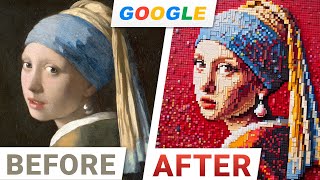
This is unbelievable. I just talked about a Google AI research paper that takes text and creates great videos out of it. I barely finished talking about it and what do I see? I see this. Wow. A better version is already out there. The pace of progress in AI research is so incredibly quick. Unbelievable. This one has looked at 30 million videos and can create 1 megapixel videos a million pixels for up to 5 seconds. So what can we do with those 1 million pixels? Well, we can do six things amazingly well with it. Dear fellow scholars, this is Two Minute Papers with Dr. Zsolnai. 1. Text to video. Whether you want a surfing teddy bear, delicious sushi or muffins, or or if you are wondering what a keyboard made for mouses would look like, this works really well. And I love that it even has a hint of creativity. 2. Image to video. It can do absolute miracles. Like taking the legendary girl with the pearl earring and animate it. I wonder what it would look like if we made her smile. Well, let's find out together. Look at that. So good. And I absolutely loved the variety of things that this can generate. It feels like absolutely any topic works. Even ones again that need a hint of creativity. Creativity in a machine. How cool is that? What a time to be alive now. 3. Hold on to your papers, fellow scholars. For stylized generation, this will be mildly reminiscent of style transfer, but a great deal more powerful. What is style transfer? An incredible technique from the early days of two minute papers where you could add one image for style and one for content and it would fuse the two together. It was fantastic. Especially that it can also be done in an illumination guided manner. So something that we showcased 700 episodes ago or over time, researchers extended the idea for doing style transfer to even simulations. That is incredible. But you know what's better? Getting just one image for style and a text prompt of what we would like to see and out comes a video with that style. That is insanity. For instance, look at that bear dancing. This is me when I get my hands on a fresh paper like this. Loving it. And now four, we can also stylize or edit videos. Oh yeah, look, that's me again. So here the input would be a video of yours plus a prompt that describes the instructions as to how to recreate the video. Just imagine the creative possibilities it could unlock. You can try to run, dance or do anything and ask it to take your motion and make a teddy bear or a robot do that. And this is really just some surface level stuff. You can even rebuild yourself from origami, toy bricks you name it. Five Cinemagraphs. What are those? Well, you choose a region in an image and it will be animated while the rest of the image stays as it is. 6. Inpainting. Inpainting means that we have a little gap in an image and we look to fill it with sensible information. This is super difficult. Here you see PatchMatch, an amazing handcrafted computer graphics algorithm that could do it. And it was powered by pure human ingenuity. But today, with the power of these learning algorithms, we can even do this for video. Now here is the not that cool use case. You have somehow lost part of the video and would like to restore it. That also works. But the cool use case is where you have the full video. You just want some part of it changed and recreated. If you want to add some new ingredients or create a completely different cake and add the chocolate sauce to that, not a problem. Can you find out that this is not the original video but synthesized by an AI? Let me know in the comments below. So how does this wizardry work? Well, it generates all these videos at an initial resolution of 128x128 and then upscales them to 1024 by 1024. It is like an artist who initially uses a pencil to create the outlines first and only then finish the artwork with the fine brushstrokes. But wait, there are so many similar techniques out there. Dozens at this point. Is this really better than them? Well, we can test that by calling in a bunch of humans and have them look at the text to video result of this technique versus the previous techniques, of course in a randomly ordered manner. So we don't know which side is which. And if we do that, what do we get? Oh my goodness, fellow scholars, we get a clean sweep. This new one is preferred by the people for every single case in aggregate. One of the closer competitors is imagenvideo, something that we talked about here earlier that was fantastic incidentally. Also a paper from scientists at Google Bravo. I will note comparisons with numbers. These look a little more competitive and a bit less one sided. Now let's pop the hood and have a look in there. Oh yes. The new technique also uses multi diffusion. This reduces the amount of sudden jumps during creation of these videos. This is like a special kind of glue that makes them stick together better, that creates scenes with no awkward jumps. And what I like here is that the new technique also has fewer moving parts than previous methods. Loving it. I believe this new paper is going to be an amazing asset for all of us to be able to unleash our creativity, and I can't wait to see where you fellow scholars are going to take it once the first public implementations of this paper appear. If you're looking for inexpensive cloud GPUs for AI, Lambda now offers the best prices in the world for GPU cloud compute. No commitments or negotiation required. Just sign up and launch an instance and hold onto your papers. Because with the Lambda GPU cloud you can now get on demand H100 instances and they are one of the first cloud providers to offer publicly available on demand H100 access. Did I mention they also offer persistent storage? So join researchers at organizations like Apple, MIT, and Caltech in using Lambda Cloud instances, workstations or servers. Make sure to go to lambdalabs.compapers to sign up for one of their amazing GPU instances today.