How-To Force ChatGPT To Write In Your Style
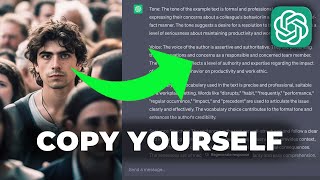
LARRUZ shows two ways to make ChatGPT write like you. Give it an example and ask it to match the tone, voice, and sentence structure, or have it analyze your style first then apply it to new writing. A brand name like Harley Davidson works as a shorthand style cue.
Chapters
Chatgpt is way overhyped. It could never match my level of writing, and that's what many ChatGPT beginners are convinced of. But I'm here to tell you that it can absolutely match the level of your writing for most people. And if you're a proficient writer, it can match the level of your drafting. Because most people that get those mediocre results provide ChatGPT with unclear instructions with a limited amount of context. And that gets you poor results. But no worries. Today I'll show you the ultimate prompt on how to apply your very own style to your ChatGPT outputs. Because over the last few months, I went through 10 iterations of this prompt, and I'm about to show you the one that I return to every time now. But in order for you to actually understand what's going on here, we need to take a step back and first, a quick recap on how to stylize your text inside of ChatGPT. So, as you might be familiar from me teaching prompt engineering, I always start with instructions and context. And the only thing that differs when we stylize the text is the addition of the style to the end. So yet again, here, nothing changes. As per usual, every prompt is made up of instructions context. But here in this case, we want to add style. And yes, style could be considered a subset of context. But in order for you to get the most out of this prompt, we need to take a quick look at the basics of prompt engineering when it comes to applying style. So in practice, this would look something like write me an email as my instructions to my boss as the context, and then I'll say, in the style of Harley Davidson. Okay, now remove the brackets and we have a simple yet very effective prompt that writes your email to your boss in the style of Harley Davidson. Now, at this point, you might be surprised that I use Harley Davidson, because usually people say in the style of William Shakespeare or in a formal style. But one fun fact is that you can actually use these brand names. And you might already know that in my free notion template, I provide a bunch of these styles. But this is my tip to you use brand names and what you're going to achieve by using brand names, and this ties into how to customize it to your very own style, which we'll talk about any second here. But what you achieve by saying Harley Davidson is really a large subset of keywords that is hidden inside of that Harley Davidson. If you're not familiar, it's American motorcycle brand that represents freedom, individual individualism amongst many other American values. And that is important to keep in mind because looking at the prompt that adjusts it to your very own style, you should really realize how wide a single word like Harley Davidson can really be and how many values that can represent. Okay, now let's get to the main part of this video. The prompt that adjusts any writing to your very own style. So how do we do this? Well, we say write a type of text about topic for target audience. Okay, so as per usual, the words in square brackets, you want to change up to fit your very own needs. And then we continue by saying in the style of the provided example, capturing its tone, voice, vocabulary, and sentence structure. And then we round it out by saying example colon. And here you insert your very own example. Okay, so as you can see, this is extended form of the previous prompt. And let's just try filling it out so we can get a practical result here. So we'll say write an email about the bad coffee at the office for my boss in the style of the provided example, capturing its tone, voice, vocabulary, and sentence structure example. Now we're going to insert a piece of my writing and what I'll do here is copy paste part of my welcome email sequence when you sign up to my newsletter. And this is essentially a part of my life story that explains the importance of adapting to your environment. But in this case, I just want to write me this email in my very own style. And now let's have a look at the output here. And look at that. It perfectly mimics the style of my handwritten email. And not just that, it also copied the structure of the email, as you can see. Look at that. At the age of 30, I have never tasted such a disaster in a cup. It's tragic here at the age of 24, I still hadn't spent more than three years living in one place. It was rough. It's perfect. And it did that because we included this part, we said sentence structure. So if you want, you can always remove this, but I always start with this prompt as it replicates the text one to one with, which is usually what I need. So, yeah, these are the basics. But there's a second prompt, so watch out for this one. This one is even better because it actually shows you the style so you can learn from it and reapply it in different ways. Let me show you. It goes like this. Analyze an example text for tone, voice, vocabulary, and sentence structure. Apply the identified elements to all your future outputs. And there's nothing to modify here. If I just Copy paste the example below. It will do what I asked of it. And I like the analysis inside of GPT4 more because it's structures it nicely. But all of these work equally as well in GPT 3.5 and 4, so feel free to copy paste them from the description below as per usual. And as you can see right here, it generated the analysis of my text. So the tone of the text is conversational, informal and reflective. The voice is personal and engaging as the author speaks directly to the reader. The vocabulary used is simple and accessible without any technical jargon or overly complex terms. But I think you can actually see this is a description of my style that I use for my YouTube tutorial too, because for example, the sentence structure is varied with a mix of short and longer sentences as long as sentence fragments, right? That's kind of how I actually talk. And now that we have the analysis, we could run a completely different prompt and it will apply that text because if you remember, we asked to apply the identified elements to all your future outputs. So future output would be the answer to our next prompt. Write me an email about the bad coffee in our office to my boss. And now this completely unrelated request will be generated in the style of me as that's what we analyzed above with the very first prompt and this two prompt sequence. It's so darn powerful because now you can write anything in your very own text. Look at that. It's friendly and engaging with simple language, very casual, conversational, and it talks from my perspective. But for all this to work appropriately, you need to consider one tip that I'll leave you with here, and that is that example that you use has to be a good representation of your style, because that's what all of this is built upon. If it's going to be some generic reply that doesn't contain your actual writing style, how is it supposed to be reflected? There's no way for ChatGPT to reflect it correctly, so make sure it's a high quality one. And a final tip would be use the same type of writing. So if you're trying to write emails, ideally use another email of yours. Now this is not a requirement, but you will get the best results. If you're looking to write an essay, use an essay that you wrote before, not an email, as the style there simply varies and you want to make your input as possible precise as possible, right? So at the end of the day, this prompt is a fantastic addition to your tool belt. And by having access to this now, you can push yourself and AI to do more and hopefully make you the best writer you can be. Now, if you enjoyed this video, these are the very basics of prompt engineering that we covered here. If you want to go deeper, I now have a full course with 32 videos similar to this, but they go way deeper. On the topic of building your own prompts to get custom results, and if you're interested in learning some advanced ChatGPT techniques that I have this YouTube video which a lot of people have called a hidden gem because it has some truly unique and advanced prompts in there which might just help you with getting ahead in your life. I'll see you there.










