LARRUZ shows how to generate and edit images in ChatGPT, available to free and paid users. Create images from text prompts, add accurate on-image text, swap yourself into meme templates, restyle photos as anime, and edit existing designs conversationally by removing logos or changing copy.
Chapters
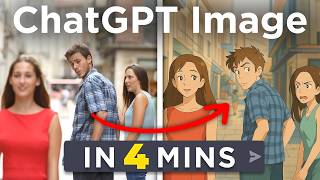
OpenAI now has an image generator that you can access through the free account inside of ChatGPT and it can produce stunning results like this, or this. Or how about this one? That would take an experienced graphic designer hours to create all of this and way more can now be done inside of ChatGPT and I'll show you how to do it with a bunch of tips and tricks. Let's do this. So how do you access this? Well, it's simple. You just go to chatgpt.com, you log in with your free account, and if your model is set to GPT4O, you now have access to the free generator. It's accessible to all paid accounts and even the free tier, although on the free tier the usage is very limited, whereas the Pro account has unlimited usage. Use it by typing a phrase like create an image of and then the subject that you want to create. Now this is the most basic functionality that we've seen before. It's generating an image. But this tool can do so much more because it can also edit images all within the ChatGPT interface that you might already be familiar with. And it does a few things really well that we just haven't seen before, like generating a lot of text. If I say create an image of encyclopedia page for a cat with a hat, voila, I get exactly that with zero mistakes. Maybe if you're super critical, this e could be cleaned up, but this amount of text in an AI generated image is very impressive. Now you could also do a thing like this where you provided one well lit image of yourself and then another random image, in this case this meme template. And I told it to generate this meme with my face and the questions being something that makes fun of a 30 year old deciding between multiple hard life choices. And then it came up with this. As you can see, it used the power of ChatGPT to generate the question, the funny answers, and it transferred me into this quite popular meme on the Internet. Impressive. But there's more, because as I mentioned, this is not just about generation, this is also about editing the images you already get. So if I look at the encyclopedia entry of this cat with a hat and I continue by following up, add more images and some lore and it just ends up doing exactly that. Now I didn't end there. I also said extend this into a double page a three with a lot of details and various sections, voila. Now I have different sections, even more images, but if you look closely, you will find some mistakes here and there. And that's why I followed up a few more times with specific details I want to see there or specific mistakes I spotted. As you can see here, here, it's at Sightings and Site Tank and I wanted to correct that and it actually did. So this might not be 100% perfect once you start doing this much text, but between one word and one to two paragraphs, it really nails it reliably. Now, beyond that we have more editing capabilities. One of the basic ones that has been a thing in generative AI for a while now is restyling images. So if I give it the screenshot and I tell it to turn this into Studio Ghibli style style image, it will turn you into a Japanese anime character in seconds. And then you have a thread in which you can upload any image and say something like now this. And it will do that too. If you're not familiar, this is a morning routine meme that's all over the Internet right now. If you know, you know. But it doesn't end there because we have the power of ChatGPT at our disposal here too, right? Copy and ideate. We can go further and give it an image from NASA of an astronaut on the moon and say now this. But turn it into an inspirational poster and there you go, a Studio Ghibli style inspirational poster with custom text that works, works. And what did this take? A few words and some random images from the Internet to arrive at this. Now I want to leave you with one more example that really shows the potential of this tool and that's giving it some ads that have worked well previously and redoing them with your very own product or service. And I told it generate an ad image in the style of the old Apple ads for a generative AI learning community named AI Advantage Community. And I wanted to see how it redoes these ads for main offering at the AI Advantage. And look at that. Right away it came back with an image where it refault the poster, kept some of the copy, certainly kept the layout and even added the Apple logo down here. Now obviously I don't want the Apple logo there, but because this is inside of ChatGPT, you can just keep talking to it like you would to a graphic designer that you're working with. So I told it remove the Apple logo and add the link and then I pasted the URL and it did exactly that. Now admittedly the original design actually looked better, but it followed my instructions and did what I wanted it to do. And because this is LLM, I can tell it things like make it more aesthetic and just give it a shot at coming up with something better. Up until now, with every image generator, you had to tell it exactly what changes change you want. You didn't have the freedom and carelessness that having ChatGPT built into this image creation tool brings. Look at that. This choice of color is just better. And I didn't even have to tell it how to improve it. I'll let ChatGPT figure that out for me. And that's really it. So if you're curious about more ways that this could be used, you can check out this video. And if you learned something today, don't forget to leave a like, see you soon.