I Recreated a Million-Dollar Business Using AI!
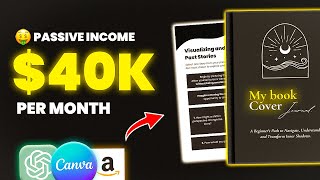
A creator used ChatGPT and Canva to design and publish a shadow-work workbook on Amazon KDP, copying the format of a viral product that makes six figures. The 76-page book costs $5.99 and pays $1.29 per sale, with a $1,000 budget for the whole project.
Questions this video answers
$1,000
76 pages
6 by 9 inches
Price: $5.99; Royalty: $1.29
7,000 likes within a month
Chapters
The Shadow Work Journal, the product that has recently gone crazy Viral. With over 500,000 copies sold in total and 1.2 billion views on TikTok, this product's success was unusual. So I got the Shadow Work Journal. So, considering the current trend and the huge potential of this idea, I decided to give myself a $1,000 budget to start my own similar business from scratch and document everything in the YouTube series y' all. Day three of the Shadow Work Journal. The focus of today's episode will be to plan and design our own version of the product. And in the upcoming videos, we'll build a brand around the product to potentially promote it and find customers. However, for this series to continue, this video must get 7,000 likes within a month. That way, I can ensure that there is interest and it's worth investing in this project. Now, I have to mention that there's no guarantee that this project will succeed, but I can promise that we'll gain lots of experience together. Let's get started. Okay, so for us to start a similar business, we need to analyze and understand the product first. So I spent some time researching, watching YouTube videos and reading articles. And I found out that the Shadow Work Journal is like a therapy that helps people deal with their hidden emotions and struggles, and that's by answering questions and engaging in different exercises. The Shadow Work Journal was released in 2021, but it became trendy this year thanks to TikTok. And since it went live on the TikTok shop in April, it sold over 290,000 copies just on TikTok. And the author revealed that she's sold more than half a million copies since April, which is mind blowing. So if we check the first edition published on Amazon, we can see that it currently sells over 1,200 copies per month, earning over $22,000 monthly. And looking at the second edition published in February of this year, we will also see similar numbers. So, from these two books, only the seller makes over 40,000 in revenue monthly. And if we search for the product on Amazon, we will also find people who copied the idea. And even though the listings are new, they generate thousands of dollars. So, for example, the listing right here was published three months ago and already is making $12,000 per month. And that's because the product is currently trending everywhere. But there might be bad news for everyone who copied the product's name, as I've read that the author recently filed a trademark application for the phrase the Shadow Work Journal, which could lead to legal issues for anyone using the same name. So that's also something we must keep in mind. So after giving it some thought, I chose to follow the Shadow Work Journal's successful path, but with a different name and a different audience. Therefore, I decided to make a less complicated form of the Shadow Workbook for people who are just starting out. So this could be a book with only 80 pages, for example. As a quick reminder, I'll soon reveal the strategies that allowed me to grow this channel quickly. So click the link in the description and join the waitlist so you don't miss out on the offer. So I went to ChatGPT and started by generating book names we could potentially use. And I'm not going to lie, that took a while, but I really apologize guys. I won't be able to share the book name yet since I don't want anything to affect the results of the series. So I generated the book name and the tagline using ChatGPT and was ready to start designing the COVID I like starting with the COVID because it's the first thing people will see. So I browsed through my competitors listings and took screenshots of their covers and it's obvious that the black background works best in this niche. So based on that, I'll create the COVID on Canva. But first we'll need the proper template. Go to Google and type in KDP cover calculator. And to get the correct template we must fill in the details here, starting with the binding type. In most cases it'll be paperback. Then we have the interior type, which can be black and white or colored. Select the paper type and page turn direction. Choose whether you want your measurements in inches or millimeters. Following that, choose the interior trim size, which is important. The simplest thing to do is open a similar listing and scroll down to view the dimensions they've used. In my instance it's 6 by 9 inches, so I'll pick it from here. Finally, you must enter the number of pages, which you can also get from your competitors. If you don't have an idea. Once you've completed all the fields, click Calculate Dimensions and then download Template. After that, create a new design based on the dimensions you got from the template. So I spent about 45 minutes trying to come up with the best possible cover design and after a few attempts, this is what I managed to create. As you can see, I kept the same style as the competition because it works and I don't need to reinvent the wheel. I just added this yellow color to make the COVID stand out more. So the front cover is on the Right. And the back cover is on the left. The design is simple, including an illustration, the title of the book and the tagline. And the back of the COVID is the same, with a brief description and a simple graphic. Now we have the COVID ready and we can move on to the most important part, creating the main content. So I started looking at similar journals, checking pictures in the reviews and watching videos online to understand the structure and get a better idea overall. After that, I went to ChatGPT and asked to create the table of contents, which basically includes every section in the book. And based on that, we can generate the content for each page. Now, even though ChatGPT did a fantastic job in structuring the book, it was very hard to convert the idea into something professional. So I had a very, very, very long conversation with ChatGPT and then it took me two days to finish designing the book on Canva and make it something worth buying. So believe me when I say it was a complex and time consuming process. Since I didn't use any templates and I had to create everything from scratch. Let me walk you through some of the things I did. Okay, so as you can see, I only used white and black throughout the entire book. And I tried my best to keep the design basic because we're targeting beginners and don't want it to appear overwhelming. And before every new section, I included a quote with a simple illustration. I also kept the entire page black and used a white font to add more variation. So I basically did that for all sections and it added a lot to the design. For the section page, I used a big bold font for the heading and a short intro with a simple graphic underneath it. The exercises took the most time in the design process. I needed to get creative to turn ChatGPT answers into interactive exercises. So I used questions, boxes, fill in the blanks, lined journaling pages, tables, and so on. At the end of the book, I wrote a motivational thank you message and we ended up with a total of 76 pages, which I believe is perfect for beginners. But there are a few points I must make given the fact that I used AI to create the structure and content. I did not simply copy and paste everything as is. I've done some serious editing, checked the grammar, and rewritten certain sections. Also remember that people will be spending money to purchase your products, so make them worthwhile and only use AI to speed up the process. So once I had finished the book, I proceeded to Amazon KDP to publish it. I went through the same process of adding information such as the title, description, product category and so on, which I've explained many times in previous videos. Then I uploaded the book cover and content, but they surprised me with the question, did you use any AI tools in creating the content? Well, I believe so. I reviewed my book to ensure there were no issues and I actually liked how it came out and I set the price at $5.99, which will give me $1.29 in royalties. I selected a low price in the hopes of getting some sales and some reviews as soon as possible, so I submitted the book for review and waited. After a few hours, I received an email from Amazon telling me that there were issues I needed to resolve before I could publish my book. So I fixed that and resubmitted the book for review and the book is now live on all Amazon marketplaces. So if you want me to continue this series, hit the like button and if the video receives, subscribe 7000 likes within a month the next episode will be released. Thanks for watching.










