Learn to build multi-agent systems with diverse roles and capabilities with AutoGen
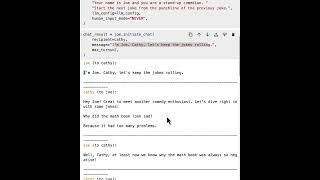
Learn to build multi-agent systems with AutoGen's ConversibleAgent class. Create agents with custom roles, start conversations between them with initiate_chat, and control when they stop talking. The demo uses two comedians trading jokes to show how agents maintain state across turns and execute code.
Chapters
This lesson introduces the concept of Conversible Agent, a built in agent class of Autogen that can be used to construct multi agent conversations. You will learn about the basic functionality as well as build your first two agent chat that shows the fun conversation between two stand up comedies. Let's dive in let's begin with learning the concept of agent. In Autogen. An agent is an entity that can act on behalf of human intent, send messages, receive messages, perform actions, generate replies, and interact with other agents. Autogen has a built in agent class called Conversible Agent. It unifies different types of agents in the same programming abstraction. It comes with a lot of built in functionalities. For example, you can use the list of LLM configurations to generate replies, or you can do code execution or function and tool execution. It also provides a component for keeping human in the loop and checking for stopping the response. You can switch each component on and off and customize it to suit the need of your application. Using these different capabilities, you can create agents of different roles using the same interface. In the beginning, let's import the OpenAI API key from the environment. So we will import the GetOpenAI Apikey utility function, run it to get OpenAI API key, and then define a LLM configuration. In this course we will use GPT 3.5 Turbo as a model. And next let's import the Conversible Agent class from Autogen and we will create our first Conversible agent object. Here we use the Conversible Agent class to define agent named Chatbot. We pass this LLM configuration as we defined up there to this Conversible agent. So then this agent will be able to use that larger model to generate reply. And we also define the human input mode as never. This means the agent will never seek for human input. It will only use this larger model to generate reply. In general, you could switch the human input mode to other modes. For example, you could say always. Then the agent will always ask for human input before it tries to generate on his own. And these are only the basic setups for this agent. In general, you could also add code execution, configuration or function execution, and other settings. But let's begin with this simple setup. The first thing you could do is ask this agent to generate a response to a question using the genereply method. Here we call this agent's general reply function and give it a message list. The message has a content, tell me a joke and role as a user. And if we run this, we should be able to get a reply from the agent. The agent says sure. Here's a joke for you. Why did Scarecrow win the award? Because he was outstanding his field. So this is the most basic thing you could do by asking a question and get a reply from the agent. Now if you call this function again, what would happen? Let's say we call this generalreply function again. Now replace the content with repeat the joke. Right. Do we expect the agent to repeat the joke? Actually, no. Because when we call the general reply function, it doesn't alter the internal state of the agent. So when we call the generalreply function again, it it doesn't know that it already generated reply before. So it will be a fresh function for generepli. So it will generate a new reply without knowing that it has replied once before. You could certainly do this in application for generating different replies if you want. But if you want to keep the state and maintain the state and make it perform a series of tasks, we need a different approach. In the next part and let's look at how to create a conversation between multiple agents. And we will do a stand up comedy example. We want to create a application where two standup comedians will talk to each other and make fun of each other. So the first agent we will create is a conversible agent named Cassie. In this case, we give it a system message to let the agent know your name is Cassie and you are stand up combined. And we'll pass the same LLM configuration and same human input mode to naml. When you don't specify the system message, then the agent will have an empty sys message and will just perform as a generic purpose assistant agent. And using the sysmessage, we customize the behavior of the agent. Okay, that's one comedian we created. How about adding another one? Let's create another console agent named Joe and give the system message, your name is Joe and you're a stand up comedian. And we add another instruction. After that we say start the next joke from the punchline of the previous stroke. So this gives us the more specific instruction about how to carry over the conversation. Okay, so we have two comedians. Now it's ready to put them in work and create a conversation. The way we initiate the conversation is we will call this initiatechat function from one of the agents. For example, if we want the Joe to start the conversation, we'll call Joe's initiatechat function. We'll set the recipient as Cassie and give it the initial message. The message says, I'm Joe Cathy. Let's keep the jokes rolling. We set the Max turns to be two. So we will have two turns of conversations and then finish. Let's see what happens. So the first message is the same message as we said here. I'm Joe, Cassie, let's keep the jokes rolling. And next message is from Cassie. Cassie said hey Joe, great to meet another comedy enthusiast. Let's dive right in with some jokes. Why did the math book look sad? Because had too many problems. And next turn Joe says well Cassie, at least now we know why the math book was always so negative. So you can see that Joe follows our previous instruction and starts the next joke from the last punchline. And Cassie follows up, says haha exactly. It just couldn't subtract the sadness from its pages. So it's making continuation of that joke. And finally propose another joke. And after these two turns of exchange, the conversation stopped. So after the conversation finishes we could inspect the chat history in the chat result. So we import a PPPrint library and do a print of the chat history. So you can see all the messages got exchanged. First from Joel, second from Cassie, third from Joe, from Cassie again. And you could also inspect the token usage in the ChatResult. We'll call the chatresult cost function. We will see that we are using the GP 3.5 Turbo model. We consumed 97 completion tokens and 219 prompt tokens. And the total tokens is 316 and the color cost is this much dollars. So in general you could define the conversation in different ways. You could also check the summary of ChatResult by calling the chatresult summary function. So by default we're using the last message as the summary of the chat result. So in this case we see that's the last message from the conversation by Cathy. If we want to change the summary method, we could configure with a different summary method. For example, we could run the conversation again with a different summary method called reflection with large language model and we can give a summary prompt called summarize the conversation. So what happens is after the conversation finishes we will call the larger model with this prompt and the language model will reflect on the conversation and produce a new summary. So the same conversation happens and the same result happens. Because we're by default we're using caching to generate the same messages for the same input. So now if we check the summary again we see this time the summary becomes the conversation was focused on sharing jokes and puns between Joe and Cassie. They playfully exchanged mass and scarecrow related jokes to keep the laughs flowing. So that's A better summary. You'll notice that I used the maxterns equal to two to control how many turns to happen in this conversation. What if you don't know the right number of turns before the conversation finishes? What can you do? We could change the termination condition by providing additional configuration called istermination message. This is a Boolean function, so it takes a message as input and and returns a true or false meaning whether the message means the conversation should be terminated. Okay. For example, you will notice that I changed the synth message here. Say when you are ready to end the conversation, say I got go. We also pass this stopping condition as checking whether the I got go is inside the message. If we detect the I got call freeze, we will consider the conversation as finishing and that is given to each agent. So each agent will check the condition from the received message from the other agent and if they see the echo phrase content in the message they received, they will stop replying. Let's run that and let's initiate the conversation again with a new servant condition and see what happens. So the first few message is similar, but this time you can see they have more turns of conversations. Cassie make joke. Joe responded. And Cassie asked Joe about a different joke. And Joe responded with other jokes. And eventually the last message from Joe is Glad you enjoyed it Kathy. Puns are always a hit. Thanks for the laughs. I gotta go. Yeah. So Joe ended the conversation with I got go. And Cassie see that freeze. So it stopped replying. So this is a different way of stopping the conversation and is more flexible. So after the conversation finishes, what if you want to continue the conversation or if you want to see whether this time the agent can preserve the state, we can give it give that a test. It could test with the same similar questions we said before. Next time we will let the Cassie send another message what's the last joke we talked about? And set the recipient to be Joe. Okay, well this time will they remember what's the last joke? Let's check that. Bingo. Joe responded. The last job we talked about was the Scarecrow winning award because he was outstanding his field. And they also follow the same termination condition. And so you see this time Cassie said I got go. So Joe also knew that's a signal of stopping the conversation. It will stop replying. So this demonstrated a way to mix agents work in conversations. Start a conversation, continue the conversation. Remember what it did. And this is just a very basic demonstration of how to use a concept agent to construct a conversation between two agents. In the next few lessons we'll learn many other conversation patterns and some agent design patterns including tool using, reflection, planning and code execution, etc.










